The Bottleneck in Central Switzerland
In the heart of Central Switzerland, a mid-sized engineering firm with 145 employees was facing a silent crisis that threatened its competitive edge. The company, known for its precision in machinery design and manufacturing, operated on an IT infrastructure that had not been significantly updated in over a decade. The core of their communication ran on an on-premises Exchange 2013 server, a technology that was rapidly becoming obsolete.
The symptoms were not just technical; they were operational. Engineers and sales staff reported that sending a simple internal email often took over 15 minutes to arrive. For external communications, the delay was equally problematic, averaging 12 minutes. In an industry where response times to client inquiries and internal coordination on complex projects are critical, these latencies were unacceptable. The IT department, a lean team of only four specialists, was overwhelmed by the manual nature of the existing Active Directory administration. Every user change, permission update, or server patch required manual intervention, creating a bottleneck that stifled productivity and introduced security gaps due to inconsistent permission management.
Management was clear in their demands: they needed a provable reduction in communication latency and a simplified IT landscape. The goal was not just to fix the email system, but to transform the IT department from a reactive maintenance unit into a strategic enabler for the engineering teams.
The Challenges
Before diving into the solution, it was crucial to understand the specific hurdles that made this migration complex rather than straightforward:
- Legacy Dependency: The on-premises Exchange 2013 environment was deeply intertwined with legacy engineering software that relied on specific SMTP ports and authentication methods. Any change risked breaking these integrations.
- Manual Identity Management: The Active Directory structure was a “snowflake”—highly customized and manually managed. There was no standardized process for provisioning or de-provisioning users, leading to orphaned accounts and security risks.
- Zero-Downtime Requirement: As a service-oriented engineering firm, the client could not afford any downtime during business hours. The migration had to be seamless to the end-user, regardless of the complexity behind the scenes.
The Tech Stack
To address these challenges, we selected a modern, cloud-native stack designed for scalability and security:
- Microsoft 365 Exchange Online: The core mail service, providing global redundancy and low-latency delivery.
- Microsoft Entra ID (formerly Azure AD): The central identity provider, replacing on-premises Active Directory for authentication and authorization.
- Power Automate: Used to automate user provisioning and de-provisioning workflows, reducing manual IT effort.
- Conditional Access Policies: Security policies that dynamically assess risk and enforce MFA based on user location, device health, and application sensitivity.
- 24/7 APM Monitoring: A real-time monitoring environment to track latency spikes and system health during and after migration.
Implementation Strategy
We approached the project with a methodical, phased strategy to minimize risk. The entire process took 18 weeks, broken down into a detailed analysis phase and a three-stage migration.
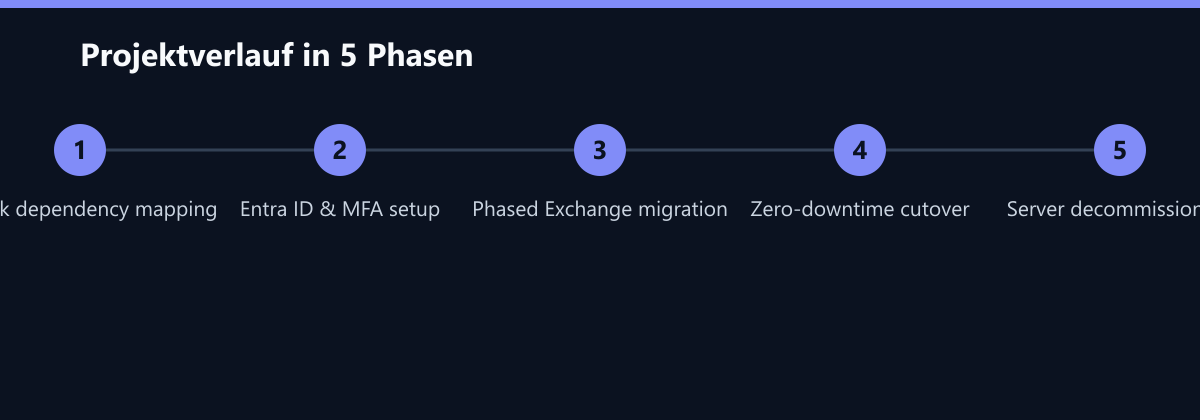
Phase 1: Foundation and Identity (Weeks 1–4)
We began with a 6-week analysis phase to map all dependencies of the on-premises environment. This included auditing all mail flow rules, legacy integrations, and user permissions. The first implementation step was establishing the new identity backbone. We set up Microsoft Entra ID and implemented a modern Identity Management system. All 145 user accounts were migrated and secured with Multi-Factor Authentication (MFA). This “Identity First” approach was critical; without a clean, cloud-based identity structure, the subsequent Exchange migration would have been unstable and insecure.
Phase 2: Hybrid Exchange Migration (Weeks 5–10)
With the identity foundation in place, we established a hybrid setup between the on-premises environment and Exchange Online. The migration of mailboxes was executed in three sub-phases to ensure business continuity:
- Management Team: The IT leadership and executive team were migrated first. This allowed us to validate the new infrastructure with a small, tech-savvy group.
- Sales Department: Next, the sales team was moved. Their need for fast external communication made them a key test case for latency improvements.
- Engineering Staff: Finally, the largest group, the engineers, was migrated. This phase required careful coordination to ensure that internal communication channels remained open during the transition.
Throughout this phase, we utilized careful DNS adjustments and mail flow routing to ensure a zero-downtime migration. Users continued to send and receive emails without interruption, unaware of the underlying infrastructure shift.
Phase 3: Decommissioning & Optimization (Weeks 11–12)
Once all mailboxes were fully functional in Exchange Online, we shut down the on-premises Exchange servers. This was followed by the configuration of Conditional Access Policies to enforce strict security controls. We also automated user provisioning via Power Automate, creating a seamless workflow where new hires were automatically created in Entra ID and granted appropriate licenses and access rights.
Operations continued throughout the implementation. Our 24/7 monitoring environment tracked the migration in real time, allowing our team to detect and resolve latency spikes immediately, often before users even noticed them.
How We Measured It
To ensure the results were not just anecdotal but data-driven, we established a rigorous measurement framework. Latency was measured using synthetic transactions that simulated email sends from the internal network to internal and external recipients. We tracked the time from “send” to “arrival in inbox” for a sample of 100 emails per day during the baseline period and the post-migration period.
IT effort was measured by tracking the time spent on identity management tasks (user creation, password resets, permission changes) in the IT ticketing system. We compared the average hours per week spent on these tasks before and after the implementation of automated workflows. Security incidents were tracked via the security log, counting the number of failed login attempts, suspicious activities, and actual breaches per quarter.
The Impact on Performance
The migration resulted in an immediate and measurable improvement in email performance. The data confirmed that the shift to Exchange Online and modern identity management delivered exactly what management had requested.
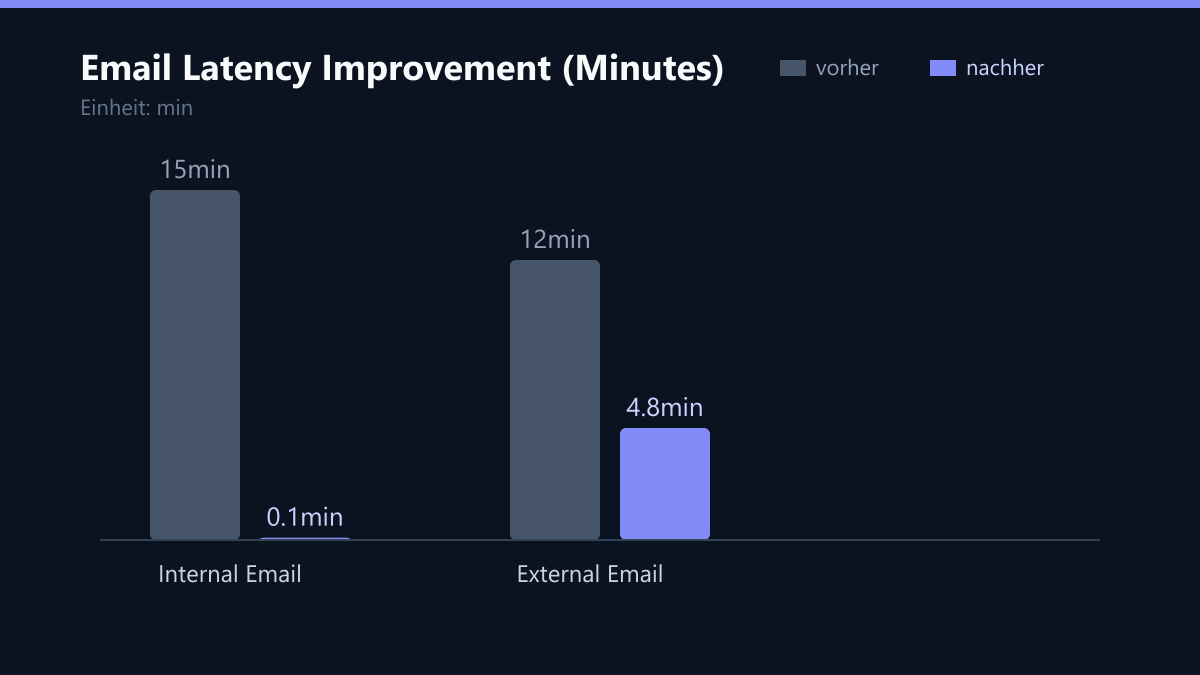
The average latency for internal emails dropped from 15 minutes to under 6 seconds. This is a reduction of over 99%, transforming internal communication from a bottleneck into a near-instantaneous interaction. External messages were delivered 60% faster, dropping from 12 minutes to 4.8 minutes. This directly improved response times in sales, allowing the team to engage with clients more effectively.
Beyond performance, the operational efficiency of the IT department saw a dramatic improvement. The manual effort required for identity management was reduced from 8 hours per week to 1.5 hours per week, a decrease of 81%. This freed up the IT team to focus on strategic projects rather than routine maintenance.
Most importantly, the security posture of the organization was significantly strengthened. The number of security incidents dropped from 3 per quarter to 0 per quarter in the six months following the migration. The implementation of MFA and Conditional Access policies eliminated the most common vectors for attacks, such as credential stuffing and unauthorized access from untrusted networks.
Lessons Learned
The success of this project hinged on three core principles that we have since applied to similar engagements:
- Identity First: Migrating identity management before the Exchange migration was crucial. We learned that attempting to migrate mailboxes without a clean, cloud-based identity structure leads to synchronization issues and security gaps. Entra ID must be the single source of truth from day one.
- Phased Migration Minimizes Risk: The step-by-step approach allowed us to validate each phase with automated tests before proceeding. This “crawl, walk, run” strategy ensured that any issues were contained and resolved before affecting the broader user base.
- Monitoring as an Early Warning System: Proactive monitoring was not just a safety net; it was a critical enabler. By tracking latency and system health in real time, we could identify and resolve issues proactively, ensuring a smooth user experience.
What We Would Do Differently Today
While the project was a success, there are areas where we would refine our approach for future engagements:
- Earlier Legacy Integration Testing: We would allocate more time in the analysis phase to test legacy engineering software integrations. While the migration was successful, some minor adjustments to SMTP ports were needed during the cutover. Identifying these earlier would have streamlined the process further.
- User Training for MFA: Although MFA was a security win, some users initially struggled with the new authentication flow. We would implement a more robust user training program before the cutover to ensure a smoother adoption curve.
- Automated Compliance Reporting: While we simplified GDPR and NIS2 compliance, we would build automated compliance reporting dashboards from the start. This would provide continuous visibility into security posture and compliance status, rather than relying on periodic audits.
For engineering firms with outdated on-premises systems, the combination of Exchange Online and modern identity management is the fastest path to a productive, secure, and scalable IT landscape. The results speak for themselves: faster communication, lower IT overhead, and a stronger security foundation.