The Illusion of Security: Why ‘Backed Up’ Does Not Mean ‘Safe’
Many mid-market IT leaders operate under a dangerous misconception: if the backup job shows a green checkmark, the data is safe. This assumption is the single largest gap in modern business continuity planning. In reality, a backup is only as valuable as its last successful restore. Without rigorous verification, you are exposed to silent data corruption, incomplete snapshots, or encryption key failures that remain hidden until a disaster strikes.
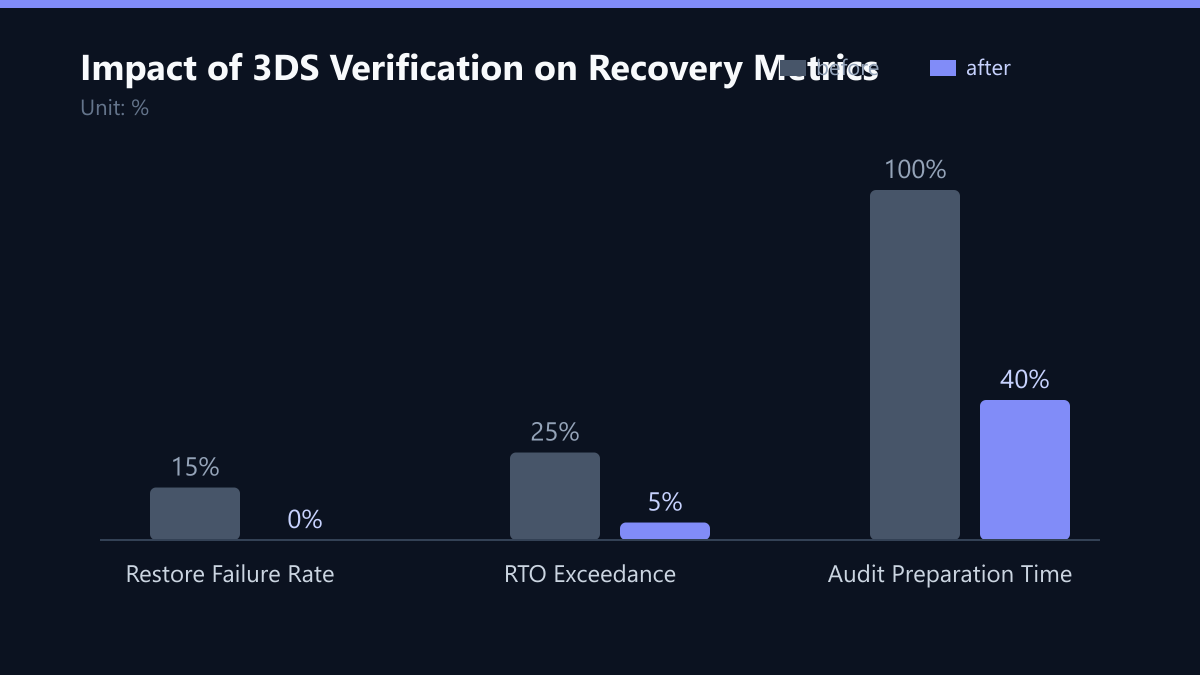
Consider the cost of a failed recovery. In a cyber incident or critical hardware failure, every minute of wasted effort diagnosing why a backup won’t mount translates directly into lost revenue and reputational damage. The 3DS model (Data, Detection, and Disaster Recovery) addresses this by shifting the paradigm from passive storage to active validation. It treats backup verification not as a one-time setup task, but as a continuous, measurable process. This guide outlines how to implement this framework to ensure your data is not just stored, but provably recoverable.
Deconstructing the 3DS Framework
The 3DS framework moves IT from a reactive support role to a strategic risk management function. It aligns directly with ISO 27001 and NIS2 requirements, which demand demonstrable resilience rather than just stated intent. The model consists of three interconnected pillars:
- Data: This pillar focuses on the integrity of the capture process. It ensures that the right data is captured at the right frequency. It is not enough to back up everything; you must verify that critical assets are included in the scope and that the retention policies match your compliance needs.
- Detection: This is the proactive layer. It involves continuously scanning for corruption, gaps, or anomalies in the backup chain. Detection tools monitor the health of the backup repository, alerting you to silent failures before they become critical outages.
- Disaster Recovery: This is the proof layer. It requires demonstrating that the data can be restored to a usable state within your defined Recovery Time Objective (RTO). Without this step, the first two pillars are theoretical.
By integrating these three elements, organizations create a closed loop of assurance. You capture data, you verify its health, and you prove its recoverability.
The Non-Negotiable Role of Regular Restore Tests
Regular restore tests are the heartbeat of the 3DS model. They provide concrete, auditable proof that your backup strategy works. Relying on automated backup jobs alone is like owning a fire extinguisher but never checking if it has pressure. Scheduled restoration offers several critical benefits that passive monitoring cannot provide:
- Validation of Integrity: Automated checks often miss subtle file corruption. A restore test forces the system to read the data back, detecting bit rot or logical errors early.
- Process Testing: Technology is only half the battle. Restore tests verify that your IT team knows how to execute a recovery under pressure. They identify procedural gaps, such as missing credentials or unclear documentation.
- Compliance Evidence: Regulators and insurers do not accept “we have backups” as evidence. They require logs of successful restore tests. These tests create the audit trail necessary for compliance with NIS2 and industry-specific regulations.
- Performance Benchmarking: You cannot manage what you do not measure. Restore tests allow you to measure actual restore times against your RTO, identifying bottlenecks in network bandwidth or storage I/O.
Without these tests, you are flying blind. You do not know if your backups are complete, accessible, or compatible with your current infrastructure version.
Building a Structured Verification Schedule
A structured verification schedule balances risk mitigation with operational load. You do not need to restore every file daily, but you must test critical systems regularly. The key is to stratify your assets based on business criticality.
Recommended Frequency Strategy:
- Critical Applications (Tier 1): Test restore weekly or bi-weekly. This includes ERP systems, CRM, and primary databases. These systems have the lowest tolerance for downtime.
- File Servers and Secondary Databases (Tier 2): Test monthly. These assets are important but have higher tolerance for brief unavailability.
- Full System Recovery (Tier 3): Test quarterly. This involves a full infrastructure rebuild simulation to ensure that the entire stack, from OS to application, can be restored.
To make this sustainable, use automated tools to perform synthetic restores or application-level checks. Synthetic restores verify data integrity by re-creating backup files in a virtual environment without consuming excessive production bandwidth or storage space. Application-level checks go a step further, launching the application in a sandbox to ensure the data is not just present, but functional.
Implementation Roadmap: From Policy to Practice
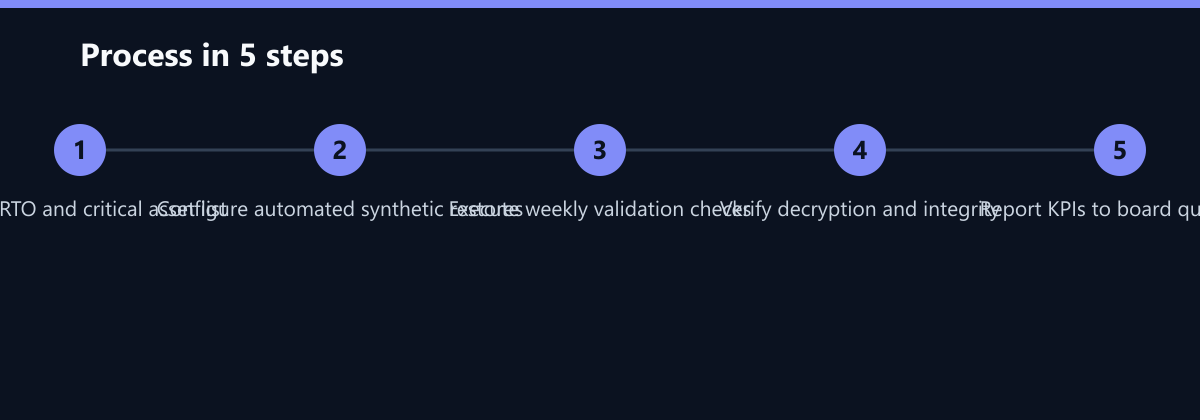
Implementing the 3DS model requires a phased approach. Do not attempt to overhaul your entire backup strategy overnight. Start with a pilot group of critical assets and expand from there.
- Define RTO and Critical Assets: Work with business stakeholders to define the Recovery Time Objective for each application. Identify which assets are Tier 1, 2, or 3. This step ensures that your testing efforts are aligned with business priorities.
- Configure Automated Synthetic Restores: Deploy backup software that supports synthetic verification. Configure these checks to run during off-peak hours. Set up alerts for any failure in the verification process.
- Execute Weekly Validation Checks: Begin with your Tier 1 assets. Run synthetic restores and application-level checks. Document any failures, even if they are minor. The goal is to establish a baseline of reliability.
- Verify Decryption and Integrity: For encrypted data, ensure that your tests include the decryption process. Verify that the correct keys are available and that the decrypted data is readable. This prevents scenarios where data is restored but remains inaccessible due to key management errors.
- Report KPIs to the Board Quarterly: Compile the results of your tests into a clear report. Highlight success rates, average restore times, and any incidents. This transparency builds trust with leadership and justifies IT investments.
Measuring Success: KPIs for Backup Health
To prove the effectiveness of your 3DS implementation, you must track specific Key Performance Indicators (KPIs). These metrics should be reported to the board quarterly. Transparency builds trust and provides a clear view of the organization’s resilience posture.
| KPI | Target | Why It Matters |
|---|---|---|
| Restore Success Rate | 100% | Ensures all critical data is recoverable. Any failure here is a critical risk. |
| Average Restore Time | < RTO | Guarantees business continuity during outages. If you miss the RTO, you miss business. |
| Corruption Detection Rate | 0 | Identifies silent failures before they become critical. A non-zero rate indicates a systemic issue. |
| Test Frequency Compliance | 100% | Demonstrates adherence to policy and compliance standards. Missed tests are audit failures. |
By tracking these KPIs, you move from subjective confidence to objective proof. For example, if your Average Restore Time for a critical database is 4 hours, but your RTO is 2 hours, you have a clear gap to address. You can then investigate whether the bottleneck is network bandwidth, storage I/O, or application startup time.
Typical Mistakes in Backup Verification
Even well-intentioned IT teams often make critical errors when implementing backup verification. Avoiding these common pitfalls can save significant time and resources.
- Testing Only the Backup Job, Not the Restore: Many teams monitor the backup job status but never attempt to restore the data. This is the most common mistake. A successful backup job does not guarantee a successful restore.
- Ignoring Decryption Tests: In encrypted environments, teams often restore the data but fail to verify that it can be decrypted. This leads to scenarios where data is restored but remains unreadable, causing critical delays during an actual incident.
- Lack of Documentation: If the restore process is not documented, it relies on tribal knowledge. If the key engineer is on vacation during a disaster, the recovery process can stall. Ensure that all restore procedures are documented and accessible.
- Not Aligning Tests with RTO: Some teams perform restore tests without measuring the time. If you do not measure the time, you do not know if you are meeting your RTO. Always time your restore tests and compare them against your defined objectives.
Checklist for 3DS Implementation
Use this checklist to ensure your 3DS implementation is complete and effective:
- RTO Defined: Have you defined the Recovery Time Objective for all critical assets?
- Asset Classification: Are your assets classified into Tier 1, 2, and 3 based on business criticality?
- Automated Verification: Have you configured automated synthetic restores for Tier 1 assets?
- Decryption Tested: Do your restore tests include verification of the decryption process?
- Documentation Updated: Are all restore procedures documented and accessible to the IT team?
- KPI Reporting: Are you reporting backup health KPIs to the board quarterly?
Conclusion
The 3DS model transforms backup from a passive storage task into an active risk management process. By implementing regular restore tests, you gain the confidence that your data is not just backed up, but provably recoverable. This is essential for meeting compliance requirements, ensuring business continuity, and protecting your organization from the financial and reputational impact of data loss. Start with a pilot group of critical assets, measure your results, and scale your verification efforts. The investment in time and automation is small compared to the cost of a failed recovery.
By following this guide, you can establish a robust backup verification process that meets the demands of modern IT environments. Remember, a backup is only as good as its last successful restore. Make sure yours is always ready.