The Strategic Shift in DACH Process Automation
German, Austrian, and Swiss mid-market companies face rising labor costs and complex regulatory demands. Traditional rule-based automation is no longer sufficient for handling unstructured data. Artificial Intelligence now enables systems to interpret emails, invoices, and contracts autonomously.
This shift moves automation from simple task execution to cognitive process management. Businesses can reduce manual workload by up to 40% in back-office functions. The key is selecting a platform that aligns with existing IT landscapes and compliance standards. For many DACH SMEs, the barrier to entry has lowered significantly, but the complexity of choosing the right tool has increased. It is no longer just about “automating clicks”; it is about managing cognitive workflows that require human oversight for edge cases.
Market Leaders and Emerging Challengers
The market is dominated by established vendors, but agile startups are gaining ground. Each solution serves different architectural needs.
- Microsoft Power Automate & Copilot: Ideal for organizations deeply embedded in the Microsoft 365 ecosystem. It offers low-code development and seamless integration with Azure AI services. For many DACH companies, this is the path of least resistance due to existing licenses.
- UiPath: A market leader in Robotic Process Automation (RPA). It excels in enterprise-grade stability and supports complex, cross-system workflows. It is often the choice for larger mid-market firms with extensive legacy systems.
- n8n: An open-source, node-based automation tool. It is highly customizable and cost-effective for tech-savvy teams, offering self-hosting options for data sovereignty. This is a strong contender for companies with strong internal IT capabilities.
- Automation Anywhere: Focuses on cloud-native RPA with strong AI capabilities. It is well-suited for distributed teams and scalable deployments, though its market share in the DACH region is smaller compared to the others.
Key Evaluation Criteria for Decision Makers
Choosing the right platform requires looking beyond feature lists. Three critical factors determine long-term success.
- Integration Depth: Can the tool connect to legacy ERP systems, SAP, and custom databases without extensive middleware? For DACH companies, SAP integration is often a make-or-break feature. If the platform cannot natively read from SAP tables or trigger SAP transactions, the implementation cost will skyrocket.
- Data Sovereignty and Compliance: For DACH businesses, GDPR and NIS2 compliance are non-negotiable. Check if data stays within EU data centers or if the vendor offers on-premise deployment. This is not just a legal checkbox; it is a business continuity issue. A data breach or a legal hold on data stored in non-EU jurisdictions can halt operations.
- Total Cost of Ownership (TCO): License fees are only part of the cost. Consider implementation, maintenance, and the need for specialized staff. Open-source tools like n8n may have lower license costs but higher maintenance overhead. You must factor in the time your IT team spends managing the platform versus the time saved in business operations.
Comparative Analysis: Cost, Security, and Scalability
The following table summarizes the core differences between the leading platforms. This overview helps identify which model fits your organizational structure.
| Platform | Deployment Model | Best For | Security Focus | Scalability |
|---|---|---|---|---|
| Microsoft Power Automate | Cloud / Hybrid | M365 Centric Orgs | Enterprise Grade | High |
| UiPath | Cloud / On-Premise | Large Scale RPA | Certified (ISO 27001) | Very High |
| n8n | Self-Hosted / Cloud | Custom Workflows | Data Sovereignty | Moderate |
| Automation Anywhere | Cloud | Distributed Teams | Cloud Security | High |
Microsoft wins on ease of use for non-technical staff. UiPath leads in complex, high-volume automation. n8n offers maximum control for data-sensitive industries. The choice often comes down to your current IT stack. If you are 100% Microsoft, Power Automate is likely the most cost-effective. If you have a diverse landscape with many legacy apps, UiPath’s robust connector library may be superior. If you have a strong DevOps team and strict data residency requirements, n8n is the most flexible.
Implementation Strategy for the Mid-Market
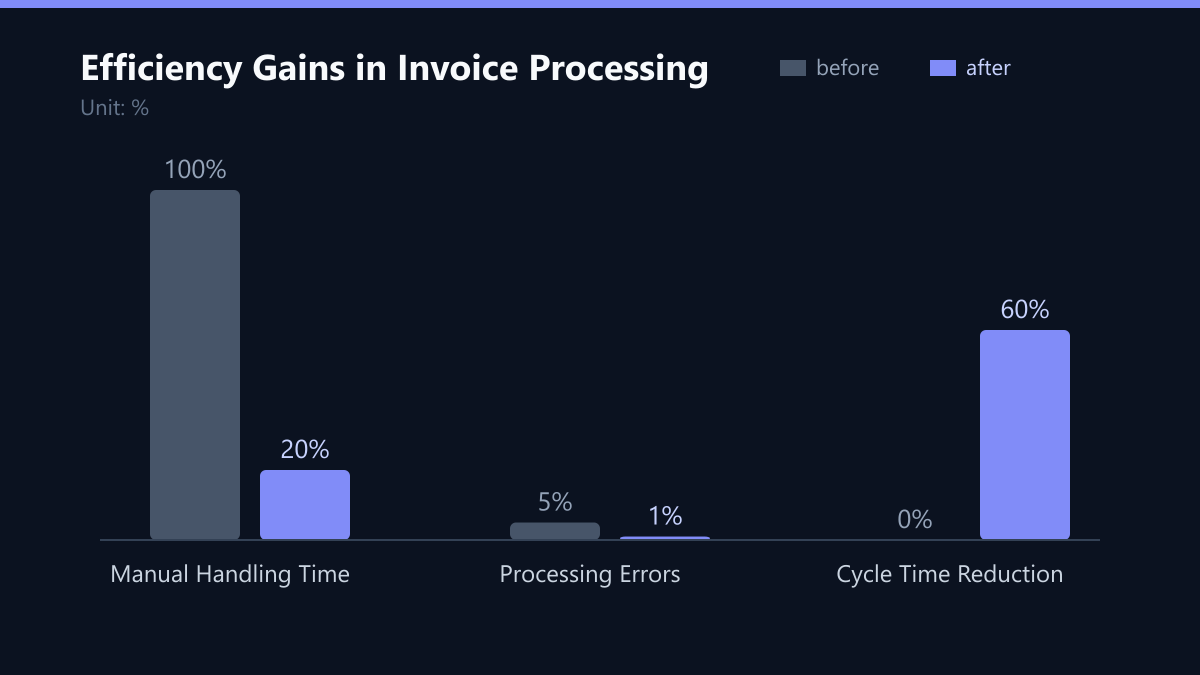
A successful rollout starts with a focused pilot project. Do not attempt to automate entire departments at once. Identify one high-impact process, such as invoice processing or lead qualification. A typical pilot might involve 500 invoices per month. The goal is not to automate everything, but to prove the value of the technology in a controlled environment.
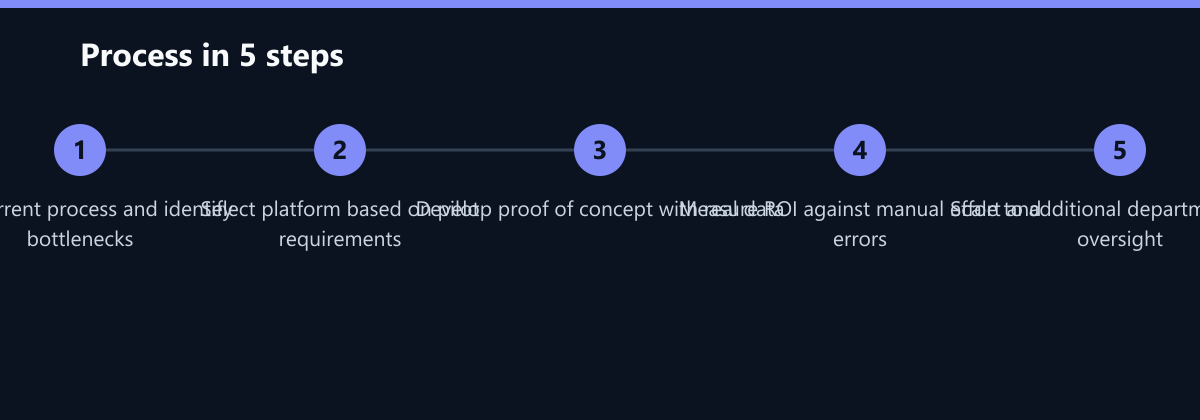
- Phase 1: Map the current process and identify bottlenecks. Use process mining tools if available, or manual observation. Identify where errors occur most frequently.
- Phase 2: Select a platform based on the pilot’s technical requirements. Ensure the platform can handle the specific data formats and systems involved in the pilot.
- Phase 3: Develop a proof of concept with real data. Test the AI models against historical data to measure accuracy. Aim for a baseline accuracy of at least 90% before moving to production.
- Phase 4: Measure ROI against manual effort and error rates. Compare the time spent by human operators before and after automation. Track error rates and cycle times.
Assign a dedicated change manager to ensure user adoption. Training is crucial, especially when introducing AI agents that require human oversight for edge cases. Users must understand that the AI is a helper, not a replacement. They need to know how to intervene when the AI is unsure.
Typical Mistakes to Avoid
Even with the right platform, poor execution can derail an automation project. Here are three common pitfalls in the DACH market:
- Over-Automating Complex Processes: Trying to automate a highly variable process, such as complex contract negotiation, with a simple rule-based bot. AI is good for unstructured data, but it still needs clear boundaries. Start with structured or semi-structured data.
- Ignoring Change Management: Deploying the tool without training the end-users. If users do not trust the AI or do not know how to override it, they will revert to manual work, negating the ROI. A change manager is not optional; it is essential.
- Underestimating Maintenance: Assuming that once the bot is running, it will run forever. AI models degrade over time as data patterns change. You need a monitoring strategy to detect drift and retrain models periodically. Budget for ongoing maintenance, not just initial setup.
How You Measure Success
To determine if your automation investment is paying off, you need concrete KPIs. Do not rely on anecdotal evidence. Track the following metrics:
- Cycle Time: The time from start to finish of the process. For invoice processing, this might be the time from email receipt to payment approval. Aim for a reduction of at least 50%.
- Error Rate: The percentage of transactions that require manual correction. AI should reduce this significantly. Track the number of errors per 1,000 transactions.
- Cost per Transaction: The total cost (labor + software) to process one unit. This is the most direct measure of ROI. Compare the cost per invoice before and after automation.
- User Satisfaction: Survey the employees who use the tool. Are they spending more time on value-added tasks? Are they frustrated by the tool? High user satisfaction often correlates with high adoption and long-term success.
Risk Management and Future-Proofing
AI automation introduces new risks, including algorithmic bias and data leakage. Implement robust monitoring and audit trails from day one. Ensure that your chosen vendor provides transparent logging of AI decisions. For every automated decision, you should be able to trace back the input data and the model version used.
Look for platforms that support model versioning and easy rollback capabilities. As AI models evolve, your automation stack must be flexible enough to integrate new capabilities without full re-engineering. Partnering with a specialized IT consultancy can help navigate these technical and strategic complexities. They can help you design a governance framework that ensures your AI systems remain compliant and effective over time.
Checklist for Your Next Automation Project
Before you sign a contract, ensure you have answered these questions:
- Have we identified a single, high-impact process for the pilot?
- Do we have a clear definition of success (KPIs) for the pilot?
- Have we verified the platform’s compliance with GDPR and NIS2?
- Do we have the internal skills to manage and maintain the platform?
- Have we allocated budget for ongoing maintenance and model retraining?
- Have we identified a change manager to lead user adoption?
Passend dazu
- IT Consulting & IT Strategy
- IT Automation & Process Automation
- Cloud Services & Cloud Migration
- IT Compliance & Data Protection
- RPA for Order Fulfillment: How a DACH Retailer Cut Processing Errors by 60% Using Power Automate
- Retail: Reducing Phishing-Related Downtime by 40% with Sentinel and Intune in the DACH Region