The Silent Drain on Your Cloud Budget
Cloud spending often escalates faster than revenue, a phenomenon driven by the inherent elasticity of modern infrastructure. Without strict visibility, organizations pay for peak performance during off-peak hours, effectively subsidizing idle capacity. This financial leakage erodes margins and distorts budget forecasting, creating a gap between projected and actual IT costs.
Infrastructure monitoring is the antidote to this opacity. It transforms raw usage data into actionable intelligence, revealing which services are dormant, over-provisioned, or misconfigured. Instead of relying on estimates or vendor defaults, you gain the ability to make data-driven decisions. The primary targets for cost reduction are three specific categories of waste:
- Idle Resources: Virtual machines (VMs) and databases running with near-zero CPU or I/O usage.
- Over-Provisioning: Instances equipped with significantly more compute power than the application actually requires.
- Orphaned Storage: Snapshots, volumes, and backup files no longer attached to active systems.
Addressing these areas typically yields immediate, tangible savings without compromising performance or security posture.
Quantifying Waste Through Key Metrics
To reduce costs effectively, you must first quantify the waste. Monitoring tools track key performance indicators (KPIs) that correlate directly with billing units. The goal is to identify metrics that signal inefficiency before it impacts the bottom line.
CPU and Memory Utilization is the most direct indicator of over-provisioning. If an instance consistently stays below 20% utilization for several weeks, it is likely oversized. Downgrading to a smaller instance type can reduce costs by 30–50%. Conversely, consistent spikes at 90% or higher indicate a risk to performance, requiring an upgrade rather than a downgrade.
Network Traffic and I/O patterns often reveal architectural flaws. High egress traffic, for instance, can drive up network charges significantly. Optimizing data transfer paths or integrating content delivery networks (CDNs) can lower these costs by reducing redundant data movement.
Storage Growth is a silent cost accumulator. Unmanaged log files and backups can balloon storage costs over time. Implementing lifecycle policies to archive or delete old data prevents this unchecked growth.
| Metric | Warning Sign | Recommended Action | Potential Savings |
|---|---|---|---|
| CPU Utilization | < 15% for 14 days | Right-size instance | 30–50% |
| Idle Hours | > 50% of month | Auto-scaling | 20–40% |
| Storage Age | > 90 days unused | Archive/Delete | 10–15% |
Regular reviews of these metrics ensure that your infrastructure aligns with actual business needs rather than historical maximums.
Strategic Right-Sizing of Compute Resources
Right-sizing is the most impactful strategy for reducing cloud waste. It involves matching instance specifications to actual workload requirements, a process that relies heavily on historical data from your monitoring systems.
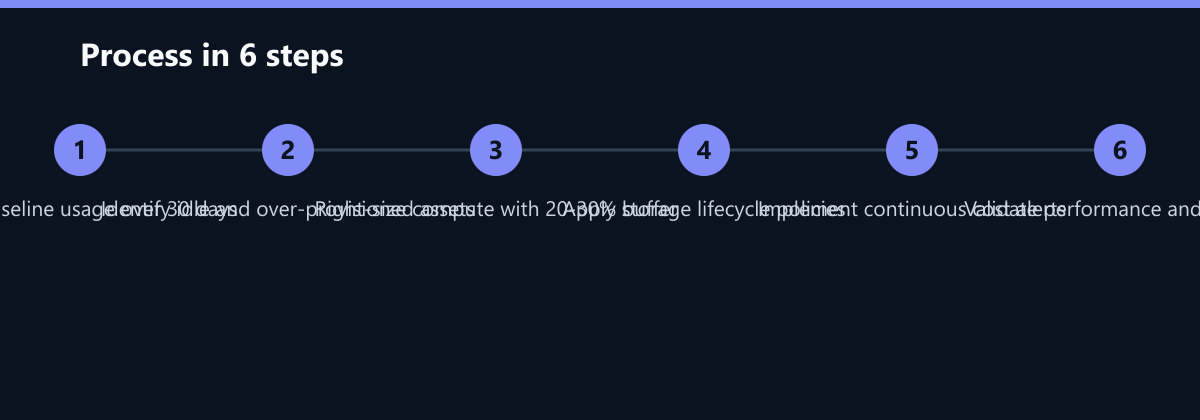
Step 1: Analyze Peak and Baseline Load. Determine the average and peak CPU/memory usage over the last 30 days. The baseline load dictates the minimum instance size required for stable operation.
Step 2: Select the Appropriate Instance Type. Choose an instance that handles peak loads with a 20–30% buffer. This buffer absorbs unexpected spikes without requiring immediate scaling. Avoid selecting instances based on previous over-provisioning habits or “just in case” mentalities.
Step 3: Implement Auto-Scaling. Use auto-scaling groups to adjust capacity dynamically. This ensures you only pay for resources when they are actively used, scaling down to a minimum during quiet periods.
Step 4: Validate Performance. Monitor error rates and latency after changes. If performance remains stable, the savings are realized. If issues arise, revert to the previous configuration immediately.
Beyond core production workloads, specific environments offer unique opportunities:
- Non-production environments: Shut down dev/test servers outside business hours. Many teams leave these running 24/7, resulting in 30–40% unnecessary spend.
- Batch jobs: Schedule execution during off-peak hours to leverage reserved instances or spot pricing, which can be significantly cheaper than on-demand rates.
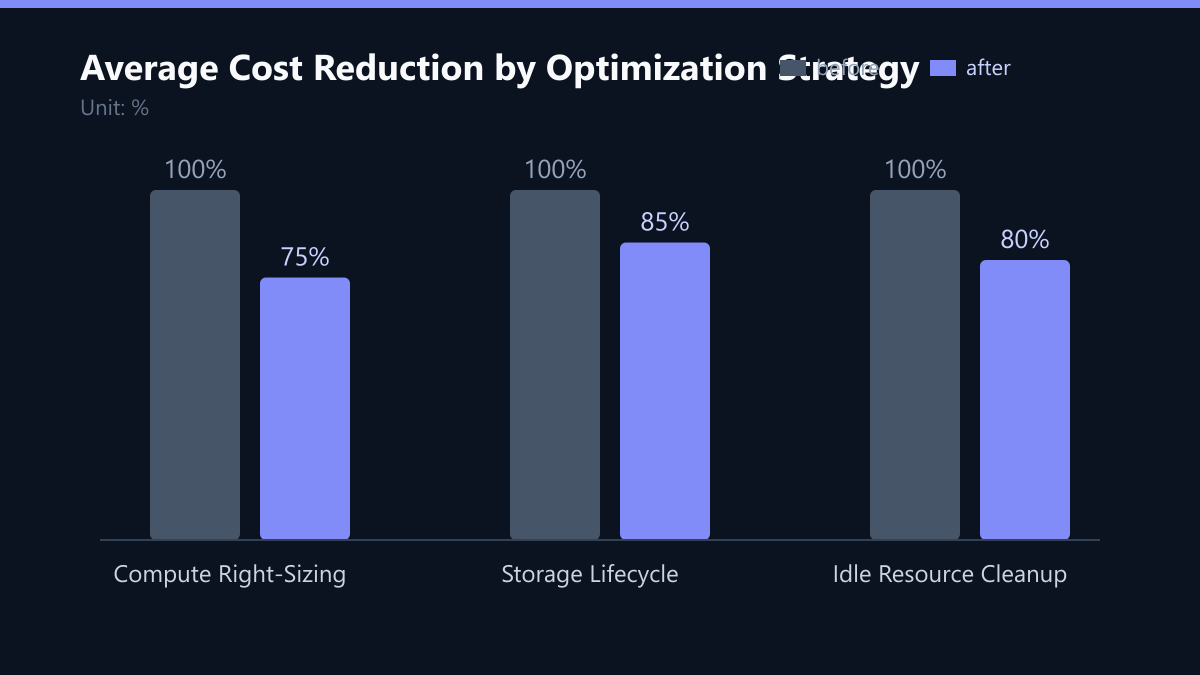
This approach typically reduces compute costs by 20–30% without requiring application code changes.
Optimizing Storage and Data Lifecycle
Storage costs accumulate silently over time. Data that is rarely accessed should not reside in high-performance storage tiers. Implementing a data lifecycle policy is essential for long-term cost control.
Tiered Storage Strategy:
- Hot Storage: For data accessed daily. This tier has the highest cost but offers the highest performance.
- Warm Storage: For data accessed weekly or monthly. This offers a moderate cost-performance balance.
- Cold Storage: For archival data. This has the lowest cost but slower retrieval times, suitable for compliance or long-term backup.
Automated Lifecycle Policies: Configure rules to move data automatically between tiers based on age or access frequency. For example, a rule can move logs older than 30 days to cold storage, reducing their cost by up to 70%.
Snapshot Management: Delete unused snapshots and limit the retention period. Old snapshots consume storage and can be restored if needed, but they are not active backups. A common best practice is to retain only the last 7–14 days of snapshots for non-critical systems.
Compression and Deduplication: Enable compression for backup and log data. This reduces the volume of data stored and transferred, directly lowering storage and egress costs.
By aligning storage tiers with access patterns, organizations often reduce storage costs by 15–25%. This is a low-risk optimization that requires minimal operational effort once configured.
Implementing Continuous Cost Monitoring
Cost optimization is not a one-time task. Cloud environments change constantly, and new inefficiencies emerge as workloads evolve. Continuous monitoring ensures that waste does not creep back in.
Set Up Alerts: Configure alerts for abnormal spending spikes. For example, set a threshold to alert if daily spend exceeds 120% of the 30-day average. This helps identify unexpected issues, such as runaway processes or misconfigured auto-scaling, early.
Tagging Strategy: Apply consistent tags to all resources (e.g., project, owner, environment). This allows you to allocate costs accurately and identify high-cost areas. Without tagging, cost attribution becomes a guessing game, making it difficult to hold teams accountable for their spend.
Regular Reviews: Conduct monthly cost reviews with IT and finance teams. Analyze trends, validate savings, and identify new optimization opportunities.
- Weekly: Check for idle resources and orphaned volumes.
- Monthly: Review right-sizing opportunities and storage tiers.
- Quarterly: Assess reserved instance and savings plan coverage.
This proactive approach maintains cost efficiency as your business grows. It also supports budget forecasting and financial planning by providing accurate historical data.
Typical Mistakes to Avoid
Even with the right tools, organizations often fall into common traps that undermine cost optimization efforts.
- Ignoring Non-Production Environments: Teams often focus solely on production workloads, overlooking dev, test, and staging environments. These environments can account for 20–30% of total cloud spend and are frequently left running unnecessarily.
- Over-Reliance on Reserved Instances: Buying reserved instances for workloads that are still changing or being decommissioned can lock in costs for resources you no longer need. Always right-size before committing to long-term reservations.
- Lack of Tagging Discipline: Without consistent tagging, you cannot accurately attribute costs to specific projects or teams. This leads to “shared cost” black holes where no one is accountable for the spend.
- One-Off Optimization: Treating cost optimization as a single project rather than a continuous process. Without ongoing monitoring, waste creeps back in as new services are deployed and workloads change.
How You Measure Success
To ensure your optimization efforts are effective, you need to track specific KPIs and establish a baseline for comparison.
Cost per Unit of Work: Track the cost per transaction, per user, or per request. This metric normalizes cloud spend against business activity, allowing you to see if efficiency is improving even as usage grows.
Percentage of Idle Spend: Calculate the percentage of total spend that goes to resources with less than 10% utilization. A target of less than 5% is a good benchmark for mature cloud environments.
Right-Sizing Adoption Rate: Measure the percentage of compute resources that have been reviewed and right-sized in the last quarter. A high adoption rate indicates a healthy optimization culture.
Forecast Accuracy: Compare your budget forecasts to actual spend. As you improve your monitoring and tagging, your forecast accuracy should improve, allowing for better financial planning.
Checklist for Implementation
- Audit: Conduct a full audit of all cloud resources, identifying ownership and usage patterns.
- Tag: Implement a consistent tagging strategy for all resources, including project, owner, and environment.
- Right-Size: Review compute resources and adjust instance types based on 30-day usage data.
- Lifecycle: Configure storage lifecycle policies to move data to cheaper tiers based on age.
- Automate: Set up auto-scaling for dynamic workloads and alerts for abnormal spending.
- Monitor: Establish a regular review cadence to track KPIs and identify new optimization opportunities.
Achieving Sustainable Savings
Reducing cloud waste by 20% is an achievable goal with the right data and processes. It requires a shift from reactive to proactive management. Infrastructure monitoring provides the foundation for this shift, enabling you to make informed decisions that balance cost, performance, and reliability.
Key Takeaways:
- Data-Driven Decisions: Use monitoring data to identify and eliminate waste.
- Right-Sizing: Match compute resources to actual workload needs.
- Storage Optimization: Implement tiered storage and lifecycle policies.
- Continuous Monitoring: Regularly review costs and adjust configurations.
By following these steps, you can reduce cloud spending without compromising performance or security. This frees up budget for innovation and growth. It also demonstrates financial responsibility to stakeholders. Start with a baseline audit of your current infrastructure. Identify the top three areas of waste. Implement changes in a phased manner. Measure the impact and iterate. This systematic approach ensures sustainable savings and a more efficient cloud environment.