The Strategic Shift to Data Sovereignty
Most enterprises currently rely on cloud-based Large Language Models for document analysis. While convenient, this approach sends proprietary data to third-party servers, creating significant legal and security risks for regulated industries. The core issue is not just privacy, but control. When data leaves your controlled environment, you lose sovereignty over how it is processed, stored, and potentially accessed.
Beyond legal concerns, there are tangible operational drawbacks. Network round-trips introduce latency that slows down real-time queries, frustrating users who expect instant answers. Furthermore, API usage fees rise linearly with data volume. As your organization scales, these variable costs become a significant line item in your IT budget. An on-premise deployment keeps all processing within your firewall, ensuring that sensitive contracts, customer records, and trade secrets never leave your infrastructure.
Architecting a Secure Private AI System
Building a robust private AI system requires three core components: vector storage, the LLM engine, and a secure interface. Each component must be isolated and monitored to prevent data leaks and ensure performance.
- Vector Database: This stores the embeddings of your documents. Popular choices include PostgreSQL with pgvector or specialized solutions like Milvus. The vector database is the memory of your system, holding the semantic representation of your knowledge base.
- LLM Engine: This hosts the model weights locally. Open-source models like Llama 3 or Mistral are excellent starting points due to their strong performance and licensing terms.
- Application Layer: This manages user authentication and query routing. It acts as the gatekeeper, ensuring only authorized users can interact with the system and that queries are directed to the correct model instances.
Security is not an afterthought; it is a foundational requirement. You must implement network segmentation by placing the AI cluster in a dedicated VLAN, isolating it from the general corporate network. All vector stores and model weights must be encrypted at rest to protect against physical theft or unauthorized disk access. Finally, implement Role-Based Access Control (RBAC) for query endpoints to ensure that employees only access data relevant to their roles.
Hardware Realities and Performance Benchmarks
Running LLMs locally requires specific hardware to ensure acceptable response times. Underpowered servers lead to poor user experience and abandoned tools. If your system takes 10 seconds to answer a simple question, users will revert to their old methods or use unauthorized cloud tools.
For a production-ready system, consider these minimum specifications:
- GPU: Minimum 24GB VRAM per model instance. NVIDIA A5000 or L4 cards are solid choices for mid-sized enterprises.
- CPU: High-core-count processors are essential for preprocessing tasks like tokenization and embedding generation. AMD EPYC series is a strong candidate.
- Storage: NVMe SSDs are mandatory for fast vector retrieval. HDDs will become a bottleneck as your knowledge base grows.
Performance expectations should be defined before deployment. For documents under 50 pages, query latency should be under 2 seconds. Throughput typically supports 5-10 concurrent users per 24GB GPU instance. Accuracy should be comparable to cloud models for specific domain tasks, provided the RAG pipeline is well-tuned.
Step-by-Step Implementation Guide
Deploying a private knowledge base is a structured project. Following these phases minimizes risk and ensures adoption.
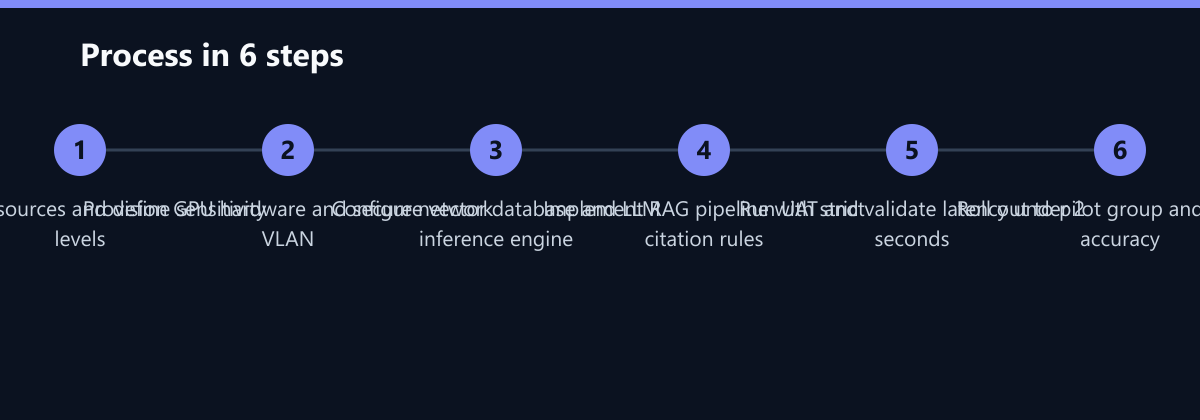
Phase 1: Data Preparation Start by cleaning and structuring existing documents. Support formats like PDF, DOCX, and HTML. Remove personally identifiable information (PII) where possible to reduce legal risk. Create a clean, representative dataset for initial testing. This step is often underestimated; garbage in means garbage out.
Phase 2: Model Selection Choose an open-source model suitable for your language and domain. If your industry has specific terminology, fine-tune the model on your specific corpus. This step can significantly improve accuracy and reduce hallucinations.
Phase 3: Deployment Provision servers in your data center or private cloud. Install the inference framework, such as vLLM or Ollama. Configure the vector database and connect it to the LLM. Ensure that all components are monitored for health and performance.
Phase 4: Testing and Rollout Run internal user acceptance testing (UAT) with a small group of power users. Monitor accuracy and latency closely. Roll out to selected departments first, gathering feedback before a full company-wide deployment. This phased approach allows you to fix issues before they impact the entire organization.
Measuring Success: KPIs and Metrics
How do you know if your investment is working? You need concrete KPIs. Track Query Latency to ensure the system remains fast as data grows. A target of under 2 seconds for 95% of queries is a good benchmark. Monitor User Adoption Rate by tracking active users and queries per week. If adoption is low, investigate usability issues. Track Cost per Query to validate your TCO assumptions. Compare this against your previous cloud API spend. Finally, measure Accuracy Score by having a small team manually review a sample of 50 queries per month. If the error rate exceeds 5%, re-tune your RAG parameters.
Compliance and Legal Integration
On-premise AI helps meet strict regulatory requirements, but you must still document your processes. Under GDPR, ensure data minimization and the right to erasure for AI inputs. If a user requests deletion, their data must be removed from the vector store. NIS2 requires you to classify the AI system as a critical asset and apply appropriate security controls. ISO 27001 integration means incorporating AI operations into your existing Information Security Management System (ISMS). Maintain an audit trail by logging all queries and responses. Store these logs securely and retain them according to your legal hold policies. This documentation is crucial during audits.
Cost Analysis: The Break-Even Point
The total cost of ownership (TCO) depends heavily on usage volume. High-volume operations favor on-premise solutions. While the initial setup cost for on-premise is high due to hardware and software, the per-query cost is low and fixed. Cloud APIs have low initial setup but high, variable per-query costs.
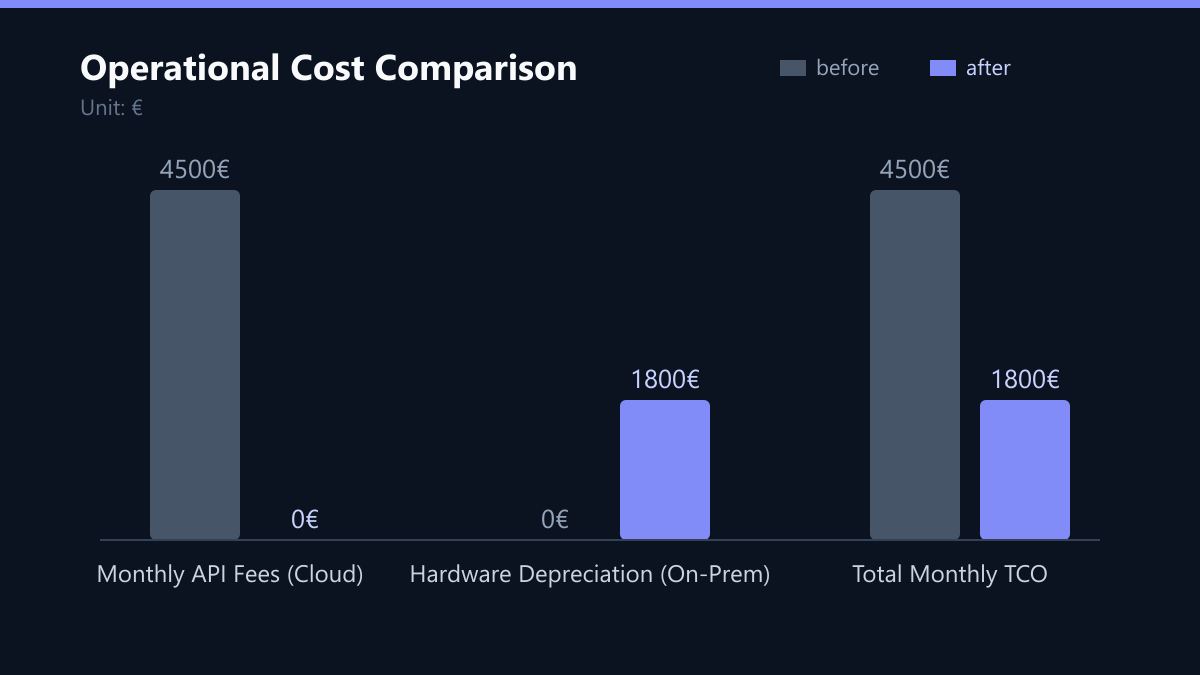
Consider a typical mid-sized enterprise processing 100,000 queries per month. On a cloud API, this might cost €4,500 per month in fees. On-premise, your hardware depreciation and maintenance might cost €1,800 per month. This represents a 60% reduction in operational costs. Most companies reach cost parity at 50,000-100,000 queries per month. Beyond this volume, on-premise becomes significantly cheaper. Additionally, you avoid data transfer egress fees, which can be substantial for large document libraries.
Typical Mistakes to Avoid
Even with a solid plan, organizations often stumble. Here are four common pitfalls:
- Ignoring Data Quality: Teams often dump uncleaned documents into the system. This leads to poor retrieval accuracy. Always invest time in data preprocessing.
- Underestimating Latency: Choosing a model that is too large for your hardware results in slow responses. Benchmark your hardware with your chosen model before full deployment.
- Lack of Monitoring: Without monitoring, you won’t know if the system is degrading. Set up alerts for high latency, failed queries, and hardware health issues.
- No Feedback Loop: If users find errors, there is no way to report them. Implement a feedback mechanism where users can flag incorrect answers. This data is gold for improving your RAG pipeline.
Checklist for Deployment
Before going live, verify these items:
- Hardware: GPUs provisioned with sufficient VRAM (24GB+).
- Network: AI cluster isolated in a dedicated VLAN.
- Security: Encryption at rest enabled for vectors and weights.
- Access: RBAC configured for all query endpoints.
- Data: PII removed or masked in the training corpus.
- Monitoring: Dashboards set up for latency and error rates.
- Compliance: Audit logging enabled and retention policy defined.
- Documentation: User guides and admin manuals published.
By following this structured approach, you can build a secure, cost-effective, and high-performance private AI knowledge base. The key is to treat it as a core IT service, not an experimental toy. With proper planning and execution, you will unlock the power of AI while keeping your data secure and your costs under control.