The Cost of Fragmentation: Why Separate Instances Fail
Running separate e-commerce instances for Germany, Austria, and Switzerland creates a technical debt that compounds over time. Each instance requires its own updates, security patches, and developer attention. For IT decision-makers, this fragmentation leads to inconsistent customer experiences and higher operational overhead. A unified Magento 2 multi-store setup solves this by maintaining a single codebase while serving distinct market requirements. This approach reduces maintenance costs significantly and ensures that a product launch in one region can be mirrored in others with minimal effort.
The strategic value here is centralized control. You manage inventory, product catalogs, and marketing campaigns from one admin panel. However, this flexibility demands precise configuration of scopes to prevent data leakage between regions. Misconfigured scopes can lead to incorrect pricing or tax errors, which are particularly costly in regulated markets like the DACH region. The core advantage lies in scalability. As you expand into new EU countries, you add a new website scope rather than deploying a new platform. This keeps your technical debt low and your time-to-market fast, allowing your business to respond to market changes without waiting for infrastructure provisioning.
Architecting the Scope Hierarchy
Understanding Magento 2’s scope hierarchy is essential for successful multi-store management. The hierarchy flows from Global to Website to Store View. Settings configured at a lower scope override those at higher scopes. This logical structure is the backbone of your regional configuration.
- Global Scope: Applies to the entire installation. Use this for core system settings like currency symbols, tax calculation methods, and global payment gateways. Avoid placing regional logic here.
- Website Scope: Applies to a specific regional entity (e.g., ‘Germany Website’, ‘Switzerland Website’). This is where you define pricing rules, tax zones, and shipping methods. It is the most critical scope for cross-border compliance.
- Store View Scope: Applies to a specific language or brand variant within a website. Use this for translation-specific adjustments, minor design tweaks, or localized metadata.
A common pitfall is configuring tax rates at the Global scope. This forces all regions to use the same tax logic, which is incorrect for cross-border sales. Always configure tax rates at the Website scope to ensure regional accuracy. Additionally, manage Catalog Rules carefully. If you create a catalog rule for a discount in Germany, ensure it is scoped only to the German Website. Otherwise, it may inadvertently apply to Swiss or Austrian customers, leading to pricing errors and potential legal issues.
Regional Pricing and Currency Management
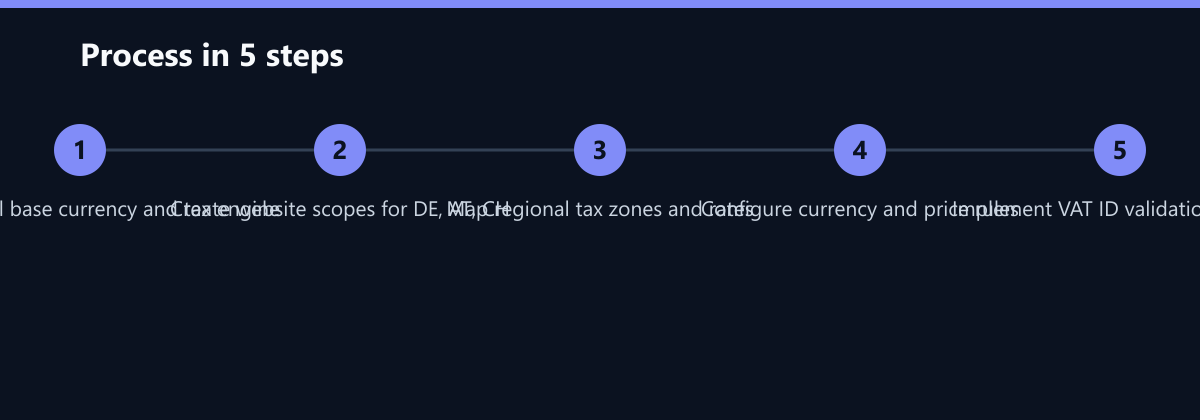
Pricing strategies vary significantly between DACH markets. Germany often requires strict adherence to statutory price displays, while Switzerland may use different currency rounding rules. Magento 2 handles this through the ‘Websites’ and ‘Stores’ scope hierarchy. To implement regional pricing effectively, follow these steps:
- Define Base Currency: Set your base currency (e.g., EUR) in the global configuration. This serves as the internal accounting currency.
- Assign Currencies per Website: Map specific currencies to each regional website (e.g., EUR for DE/AT, CHF for CH). Ensure the exchange rates are updated regularly, either manually or via an API integration.
- Use Price Rules: Create catalog price rules scoped to specific websites. This allows you to apply discounts or price overrides without modifying the base product price. For example, you can set a 10% discount for all products in the Swiss store during a specific holiday period.
- Configure Tax Zones: Ensure that tax rates are linked to the correct customer groups and shipping destinations. This is crucial for accurate invoice generation.
Critical Note: Avoid hardcoding prices in product attributes if possible. Use dynamic pricing rules to maintain flexibility. This ensures that if you change a product’s base price, all regional variations update automatically according to the defined logic. This dynamic approach is vital for maintaining consistency across markets.
Navigating VAT and Tax Compliance in the EU
Tax compliance is the most critical aspect of cross-border e-commerce in the EU. The EU VAT rules for B2C sales require merchants to charge the VAT rate of the customer’s location, not the merchant’s. Failure to comply can result in fines and blocked payments. Magento 2 supports this through its tax calculation engine, but it requires meticulous configuration.
You must configure the following elements:
- Tax Zones and Rates: Define specific tax rates for each country (e.g., 19% for DE, 20% for AT, 7.7% for CH). Ensure these rates are up-to-date with current legislation.
- Tax Classes: Assign products to the correct tax classes (Standard, Reduced, Zero-Rated). For example, digital goods might have a different tax treatment than physical goods in certain jurisdictions.
- Customer Group Mapping: Ensure that B2B and B2C customers are correctly mapped to their respective tax treatment rules. This is often overlooked but is essential for accurate tax calculation.
For DACH markets, special attention is required for Reverse Charge mechanisms in B2B transactions. Magento can automatically apply zero-rated tax if a valid VAT ID is provided. This requires integration with a VAT validation service, such as the EU VIES database or a third-party provider. Without this, you risk overcharging B2B clients or missing out on tax exemptions. This integration is not just a technical feature; it is a legal requirement for many businesses operating in the EU.
Compliance Tip: Regularly audit your tax logs. Magento provides detailed reports on applied taxes, which are essential for your accounting team to reconcile financial statements. These reports should be part of your monthly compliance review process.
Performance and Maintenance Considerations
A multi-store setup increases the complexity of your database. Each additional website and store view adds rows to the eav (Entity-Attribute-Value) tables. This can impact performance if not managed correctly. To maintain optimal performance, consider the following strategies:
- Index Management: Enable automatic reindexing for product, catalog, and tax indexes. Manual reindexing after large data changes can cause stale data issues. Automating this process ensures that search results and price displays are always current.
- Caching Strategy: Use Full Page Cache (FPC) to serve static content to customers. This reduces the load on the server and improves page load times. For multi-store setups, ensure that the cache is segmented by store view to prevent content leakage.
- Database Optimization: Regularly optimize your database tables. Magento 2 can generate a large amount of data in the eav tables, which slows down queries over time. Implement a regular maintenance schedule to archive old data and optimize table structures.
For IT managers, monitoring is key. Use tools like New Relic or Datadog to track response times and error rates. Set up alerts for high memory usage or slow queries. This proactive approach helps you identify bottlenecks before they impact your customers. By monitoring performance metrics, you can ensure that your multi-store setup remains fast and reliable, even as your business grows.
Typical Mistakes to Avoid
- Global Tax Configuration: Configuring tax rates at the Global scope instead of the Website scope. This leads to incorrect tax calculations for cross-border sales and can result in compliance issues.
- Ignoring Cache Segmentation: Not segmenting the Full Page Cache by store view. This can cause customers in one region to see content or prices intended for another region, leading to confusion and potential legal issues.
- Manual VAT ID Validation: Relying on manual entry and validation of VAT IDs for B2B customers. This is error-prone and does not comply with EU regulations for Reverse Charge mechanisms. Always use an automated validation service.
How You Measure Success
To ensure your multi-store setup is effective, track the following KPIs:
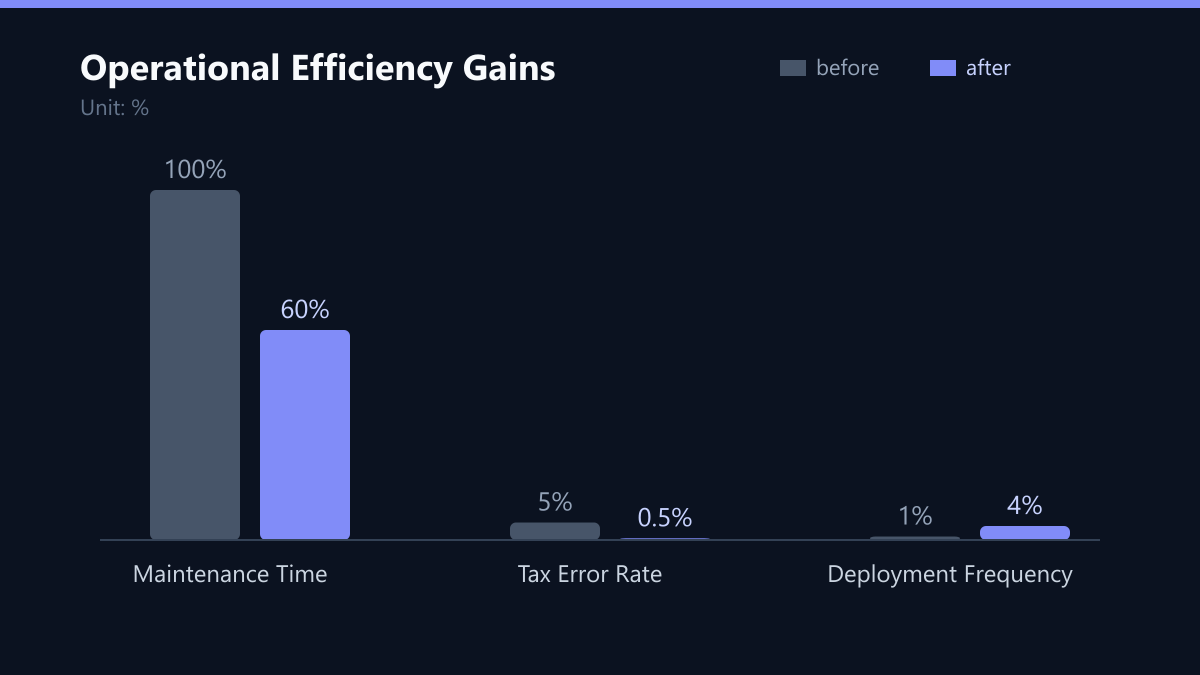
- Tax Error Rate: The percentage of invoices with incorrect tax calculations. Aim for less than 0.5%. Use automated audits to measure this.
- Maintenance Time: The time spent on updates and bug fixes across all stores. A unified setup should reduce this by 40% or more compared to separate instances.
- Page Load Time: The average time for a page to load across all store views. Aim for less than 2 seconds. Use monitoring tools to track this metric.
By tracking these KPIs, you can ensure that your multi-store setup is not only compliant but also efficient and user-friendly. Regular reviews of these metrics will help you identify areas for improvement and ensure that your e-commerce infrastructure continues to support your business growth.
Checklist for Implementation
- Define Scope Strategy: Map out which settings will be Global, Website, or Store View. Document this strategy for your development team.
- Configure Currencies: Set up base currency and assign currencies to each website. Ensure exchange rates are updated regularly.
- Set Up Tax Zones: Define tax rates for each country and assign products to the correct tax classes.
- Integrate VAT Validation: Implement a VAT ID validation service for B2B transactions. Test this thoroughly with sample data.
- Optimize Performance: Enable automatic reindexing and configure Full Page Cache. Set up monitoring tools to track performance metrics.
By following this checklist, you can ensure that your Magento 2 multi-store setup is robust, compliant, and ready for future expansion. This approach not only ensures legal compliance but also provides a scalable foundation for your e-commerce operations.