The Limitation of Passive Compliance
Annual compliance videos rarely change behavior. Employees forget details within weeks of watching them, creating a dangerous gap between theoretical knowledge and practical resilience. You need active testing to measure real-world vulnerability, not just checkbox completion.
Passive training creates false confidence. It assumes that reading about phishing is the same as recognizing it. In practice, employees often miss subtle cues in high-pressure situations. Without active reinforcement, security posture degrades rapidly.
- Retention drops significantly after 30 days without reinforcement.
- Behavioral change requires repeated, low-stakes exposure.
- Compliance checkboxes do not equal security posture.
How Simulation Mechanisms Work
Simulations send realistic but harmless emails to your workforce. These emails mimic common attack vectors like invoice fraud or urgent IT requests. The goal is not to punish, but to measure. Realism is key; if the email looks fake, employees will ignore it, skewing your data. You must replicate current threat landscapes accurately to get valid insights.
- Credential harvesting templates test password protection.
- Malware attachment simulations test file handling.
- Social engineering scenarios test decision-making under pressure.
Designing a Balanced Test Strategy
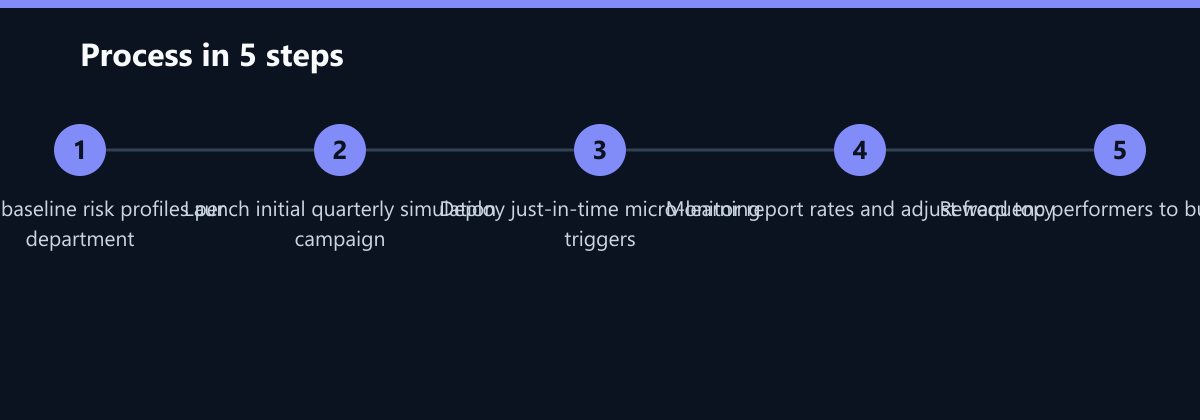
You must balance testing frequency with employee trust. Over-testing leads to alert fatigue and cynicism, while under-testing leaves blind spots. Start with a baseline: run one simulation per quarter initially. Adjust frequency based on departmental risk profiles.
- High-risk roles (Finance, HR) may need monthly tests.
- General staff can be tested quarterly.
- Executive teams require targeted, high-fidelity simulations.
Ensure your IT team monitors the simulation infrastructure to prevent false positives in your actual security alerts. This technical hygiene is crucial for maintaining the integrity of your security operations center.
Measuring Success Beyond Click Rates
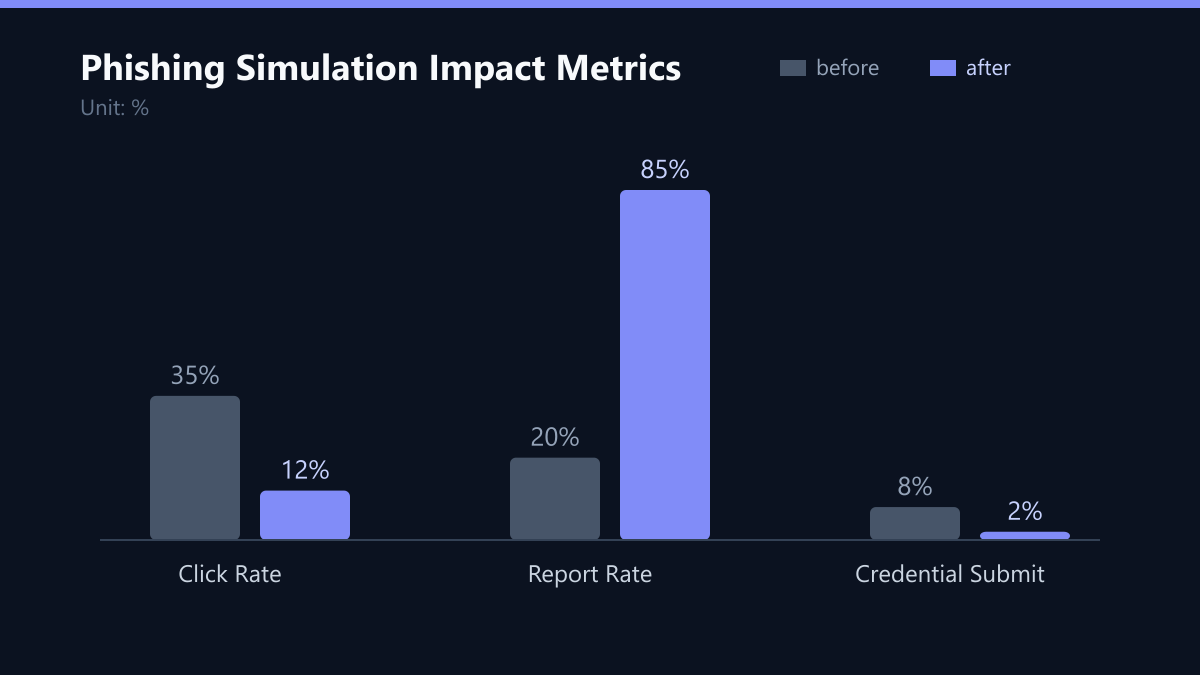
Click rate is the most common metric, but it is not the only one. You must track the full chain of user behavior to understand true risk exposure. An employee who clicks but reports the email immediately has a lower risk profile than one who clicks and ignores it. Therefore, report rate matters more than click rate in assessing overall safety.
| Metric | Definition | Target |
|---|---|---|
| Click Rate | % who clicked the link | < 15% |
| Report Rate | % who reported the email | > 80% |
| Credential Submit | % who entered data | < 5% |
Use these metrics to identify specific departments that need targeted support. A high click rate in the Finance department, for example, signals a need for specific invoice fraud training rather than generic awareness campaigns.
Translating Data into Action
Data without action is noise. You must translate simulation results into immediate, micro-learning interventions. Avoid long courses that overwhelm users. Just-in-time training is the most effective method. Trigger a 2-minute educational module immediately after a simulation failure. This approach turns a security failure into a learning moment within minutes.
- Personalized feedback explains exactly what the user missed.
- Short video snippets reinforce key recognition skills.
- Gamification encourages reporting over clicking.
Building a Culture of Reporting
Your ultimate goal is a workforce that reports suspicious activity. You must remove the fear of punishment for honest mistakes. Positive reinforcement drives long-term behavioral change. Reward teams with the highest report rates. Public recognition in company newsletters, clear communication that reporting is valued over perfection, and simplified reporting tools all reduce friction. When employees feel safe reporting, your first line of defense becomes significantly stronger.
Typical Mistakes to Avoid
Many organizations fall into traps that undermine their simulation programs. Understanding these common errors can save time and resources.
- Using Obvious Templates: If the phishing email contains spelling errors or generic greetings, employees will dismiss it as a test. This skews data and fails to test real-world resilience. Always use high-fidelity templates that mimic current threat actors.
- Punishing Failures Publicly: Shaming employees for clicking a link creates fear, not awareness. Employees will stop reporting because they fear judgment. Focus on learning, not blame.
- Ignoring the Report Rate: Focusing solely on reducing clicks can lead to employees clicking and not reporting. If the report rate is low, your security response is compromised. Prioritize reporting behavior in your KPIs.
- One-Size-Fits-All Approach: Treating all employees the same ignores risk profiles. Finance staff face different threats than marketing staff. Tailor your simulations to specific departmental risks for better results.
How You Measure Success
To ensure your program is effective, track these specific KPIs over time. Use a dashboard to visualize trends.
- Click Rate Trend: Aim for a consistent downward trend over six months. A target of <15% is standard for mature programs.
- Report Rate Trend: This should increase steadily. A target of >80% indicates a strong culture of reporting.
- Time to Report: Measure the average time between receiving a suspicious email and reporting it. Faster reporting reduces dwell time for potential threats.
- Departmental Variance: Identify departments with significantly higher click rates. These are your priority targets for intervention.
Implementation Checklist
Use this checklist to launch or refine your phishing simulation program.
- Define Scope: Identify which departments and roles are included in the initial phase.
- Set Baselines: Run a preliminary test to establish current click and report rates.
- Select Templates: Choose high-fidelity phishing templates relevant to your industry.
- Configure Triggers: Set up just-in-time learning triggers for simulation failures.
- Communicate Policy: Inform employees about the simulation program in your IT policy.
- Monitor and Adjust: Review metrics monthly and adjust frequency and content based on results.
By following this structured approach, you can transform your employee base from a potential vulnerability into your strongest security asset. Remember, the goal is not perfection, but continuous improvement and a culture of vigilance.