The Hidden Cost of Broadcasting
Sending identical messages to your entire contact list is not just inefficient; it is a direct waste of budget and a risk to brand reputation. In the mid-market, where resources are limited, precision is the only viable path to ROI. Unsegmented campaigns consistently lead to high unsubscribe rates and low engagement metrics because they treat all contacts as equal. A new lead and a long-time customer have different needs, different budgets, and different stages in the sales cycle. Without segmentation, you send irrelevant content to both, diluting your message and confusing your prospects.
The core issue is the lack of context. When you ignore the specific state of a relationship, you create noise. Prospects receive messages that do not match their current interest level, leading to increased fatigue. Generic calls-to-action fail to resonate with specific buyer personas, resulting in lower conversion rates. Furthermore, inaccurate engagement data from these broad blasts pollutes your analytics, making future targeting even harder. The goal is to move from a ‘broadcast’ mindset to a ‘conversation’ mindset, where every interaction is context-aware.
Data Hygiene: The Non-Negotiable Foundation
You cannot segment data that does not exist or is incorrect. Before building any journey, you must ensure your data model is clean and structured. Salesforce Marketing Cloud relies on Data Extensions (DEs) as the primary storage for segmentation logic. Many companies fail at this step by relying solely on the default All Subscribers list. This list is static and lacks the granular fields needed for dynamic behavior. You need to map your CRM data and behavioral data into dedicated Data Extensions to create a single source of truth.
Essential data fields for effective segmentation include demographics (industry, company size, job title, region), firmographics (revenue range, employee count, tech stack), behavioral data (email opens, link clicks, website visits, webinar attendance), and transactional history (purchase history, cart abandonment events, support tickets). Without these fields, your segments are blind. Take time to audit your DEs and ensure that these fields are populated accurately. If your CRM does not capture firmographics, consider integrating a third-party data enrichment tool to fill the gaps.
Strategic Models for Multi-Dimensional Targeting
Once your data is clean, you must choose the right segmentation strategy. There is no one-size-fits-all model. The best approach combines multiple layers of data to create multi-dimensional segments. This ensures that your messages are relevant not just to the person, but to their company and their behavior.
1. Lifecycle Stage Segmentation This is the most common and effective model for B2B. It groups contacts based on their position in the sales funnel. New Leads (no prior engagement) need awareness and education. MQLs (Marketing Qualified Leads) have high engagement but are not yet sales-ready; they need nurturing and case studies. SQLs (Sales Qualified Leads) are active in the sales pipeline and need timely, high-intent content. Customers (closed-won deals) need retention and upselling. Mapping these stages ensures that no one is over-communicated with or left in the dark.
2. Behavioral Segmentation This model reacts to real-time actions. It is highly effective for triggering automated journeys. You can assign an Engagement Score by giving points for actions (e.g., +10 for opening an email, +50 for clicking a link). You can also set Inactivity Triggers to identify users who have not opened an email in 90 days. Additionally, tracking Content Interest allows you to see which topics (e.g., Cloud Migration vs. Cybersecurity) a user engages with most, allowing for personalized content recommendations.
3. Firmographic Segmentation This model groups contacts by company attributes. It is crucial for B2B where decision-making units are complex. Separate healthcare from finance to use relevant case studies. Tailor messaging for SMBs vs. Enterprise clients, as their buying processes differ significantly. Adjust for geography to account for local regulations, language, and time zones.
Implementing Dynamic Segments in Marketing Cloud
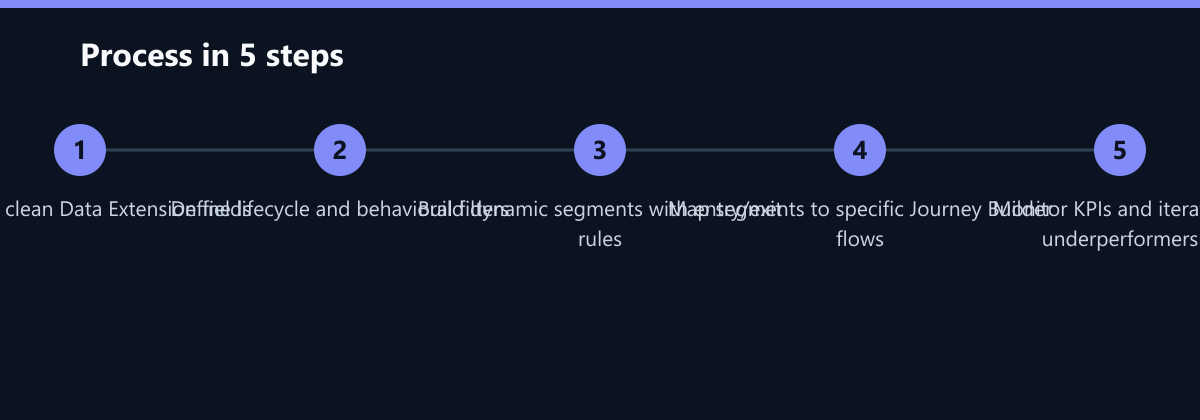
Static segments become outdated quickly. In Salesforce Marketing Cloud, you should use Dynamic Segments wherever possible. These segments update automatically based on real-time data changes. To create a dynamic segment, you define a filter query in the Data Extension. For example, a segment for ‘Active Prospects in the Cloud Sector’ would filter for: Industry = ‘Technology’, Last Email Open Date > 30 days ago, and Status = ‘Lead’.
This ensures that when a lead converts to a customer, they are automatically removed from the prospect journey and moved to the customer journey. No manual maintenance is required, which saves significant operational time. Best practices for dynamic segments include always excluding existing customers (add a negative filter for ‘Status = Customer’ to avoid sending lead-nurture content to buyers), using clear entry/exit criteria, and monitoring segment size. If a segment is too large, it is not specific enough. If it is too small, you may lack data to draw conclusions.
Connecting Segments to Journey Builder
The value of segmentation is only realized when it drives action. In Journey Builder, each segment should map to a specific journey. This ensures that the right message goes to the right person at the right time. For example, the ‘New Lead’ segment maps to a Welcome Series (3 emails over 14 days focusing on brand value and intro to services). The ‘High-Intent Prospect’ segment maps to a Demo Request Nudge (triggered after 3+ clicks on pricing pages, sending a case study and demo link). The ‘Inactive Customer’ segment maps to a Win-Back Campaign (triggered after 60 days of inactivity, offering special support or discount).
Critical configuration steps include selecting the specific Data Extension and segment filter as the Entry Source. Use ‘Contact Added’ or ‘Contact Modified’ as the Entry Event to trigger the journey. Use wait steps to pace the communication and avoid overwhelming the prospect. Finally, define exit conditions clearly (e.g., conversion, unsubscribe, or inactivity) to keep your lists clean.
Measuring Success and Optimizing Performance
Segmentation is not a set-and-forget task. You must continuously measure the performance of your segments and journeys. Key metrics to track include open rates, click-through rates (CTR), and conversion rates. A/B testing is essential for optimization. Test different subject lines, send times, and content angles within the same segment. For example, test if a ‘Cloud Migration’ case study performs better than a ‘Security Audit’ guide for the ‘Tech Industry’ segment.
The optimization loop involves analyzing journey performance reports weekly, identifying segments with low engagement or high drop-off, hypothesizing why the segment is underperforming (e.g., wrong content, wrong timing), implementing changes, and scaling successful tactics to other segments. By treating segmentation as a continuous improvement process, you ensure that your marketing efforts remain aligned with your business goals and customer expectations.
Typical Mistakes to Avoid
- Ignoring Negative Filters: Forgetting to exclude existing customers from lead-nurture journeys is the most common error. This damages trust and confuses buyers who have already purchased.
- Over-Segmentation: Creating too many micro-segments leads to data fragmentation. If you have 50 segments, you cannot effectively manage them. Stick to 10-20 core segments that cover the main lifecycle and behavioral triggers.
- Static Assumptions: Assuming that a segment built last month is still accurate today. Without dynamic updates, your data becomes stale, and you end up messaging people who no longer fit the profile.
How You Measure Success
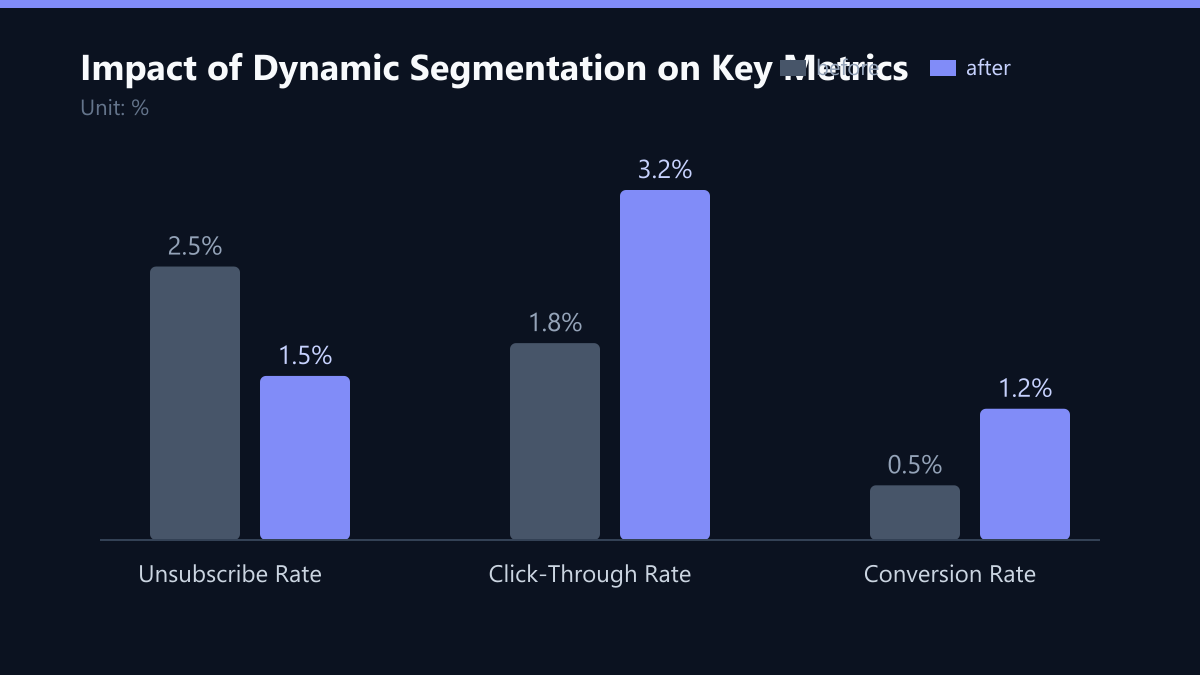
To determine if your segmentation strategy is working, focus on three concrete KPIs. First, track the Unsubscribe Rate. A drop from a baseline of 2.5% to 1.5% indicates that your content is becoming more relevant. Second, monitor the Click-Through Rate (CTR). An increase from 1.8% to 3.2% shows that your targeted messaging is resonating. Third, measure the Conversion Rate. A shift from 0.5% to 1.2% proves that your segments are driving actual business outcomes. Use Journey Builder reports to isolate these metrics by segment, allowing you to identify which specific groups are driving the most value.
Checklist for Implementation
- Audit your Data Extensions for missing demographic and behavioral fields.
- Define your core lifecycle stages (Lead, MQL, SQL, Customer).
- Build dynamic segments with clear entry and exit criteria.
- Map each segment to a specific Journey Builder flow.
- Set up A/B tests for your top two segments.
- Review performance metrics weekly and refine filters.