The Strategic Dilemma: Security Posture vs. User Adoption
Choosing between Microsoft Teams and Slack is no longer just a preference for chat interfaces; it is a strategic decision impacting your IT security architecture and total cost of ownership (TCO). For mid-market enterprises, the debate often stalls because both platforms are capable. However, the path to compliance and the effort required to secure the environment differ significantly. Microsoft Teams offers a tighter integration with existing security frameworks, particularly for organizations already invested in the Microsoft 365 ecosystem. Slack, conversely, provides a superior user experience for non-technical teams but demands more manual configuration to achieve a comparable security baseline.
This guide breaks down the technical and financial realities to help you make an informed decision. We will look beyond the marketing features to examine how each platform handles data protection, regulatory compliance, and the often-overlooked hidden costs of implementation.
Security Architecture: Native Integration vs. Configuration
Data protection is the primary concern for IT departments. Microsoft Teams operates within the Microsoft 365 ecosystem, which undergoes rigorous third-party audits including ISO 27001, SOC 1, 2, and 3, as well as GDPR compliance. A critical advantage is that data is encrypted in transit and at rest by default, with no additional cost for encryption. The security model is built on Microsoft’s zero-trust architecture, meaning that security is not an add-on but a foundational element of the service.
Slack also offers strong security, but the implementation details vary by plan. While Slack encrypts data in transit and at rest, its data residency options are more limited compared to Microsoft’s global infrastructure. For companies in the DACH region, Microsoft’s ability to host data in specific EU regions without extra premium tiers is a significant advantage. Slack’s higher-tier plans are required to enable advanced data retention and compliance features, which adds to the cost and complexity.
Key security differentiators include:
- Identity Management: Teams integrates natively with Azure Active Directory (Entra ID), enabling seamless single sign-on (SSO) and multi-factor authentication (MFA) enforcement. Slack requires separate identity provider configurations.
- Conditional Access: Microsoft allows IT to block access based on device compliance, location, or risk level directly within the Teams platform. Slack relies on external identity providers for similar conditional access policies.
- Audit Logs: Teams provides centralized audit logs that are easier to integrate with existing SIEM solutions. Slack’s audit logs are robust but often require additional parsing or third-party connectors for deep SIEM integration.
Compliance Burden: GDPR, NIS2, and ISO 27001
Regulatory compliance is not optional for mid-market enterprises. Both platforms support GDPR, but the effort required to achieve and maintain compliance differs. Microsoft Teams is designed to be compliant out of the box for many European regulations. It includes built-in features for data processing agreements (DPA) and data subject access requests (DSAR), reducing the manual workload for IT and legal teams.
Slack requires more manual configuration to meet the same standards. For example, enabling Data Residency to ensure data stays within the EU is a feature available only in the Business+ and Enterprise plans. For companies subject to NIS2 or ISO 27001, the lack of native, granular audit trails in lower-tier Slack plans can increase the burden on IT staff to document and verify compliance manually.
Consider the following compliance checklist for IT decision-makers:
- GDPR: Microsoft offers a comprehensive DPA and data processing transparency. Slack’s DPA is standard but requires careful review of sub-processors to ensure full compliance.
- NIS2: Microsoft’s threat protection services (Defender) provide the necessary monitoring and incident response capabilities. Slack relies on third-party security tools for equivalent coverage, adding to the stack.
- ISO 27001: Microsoft’s cloud services are certified. Slack’s certification applies to its platform, but specific configurations may need additional validation to meet strict internal audit standards.
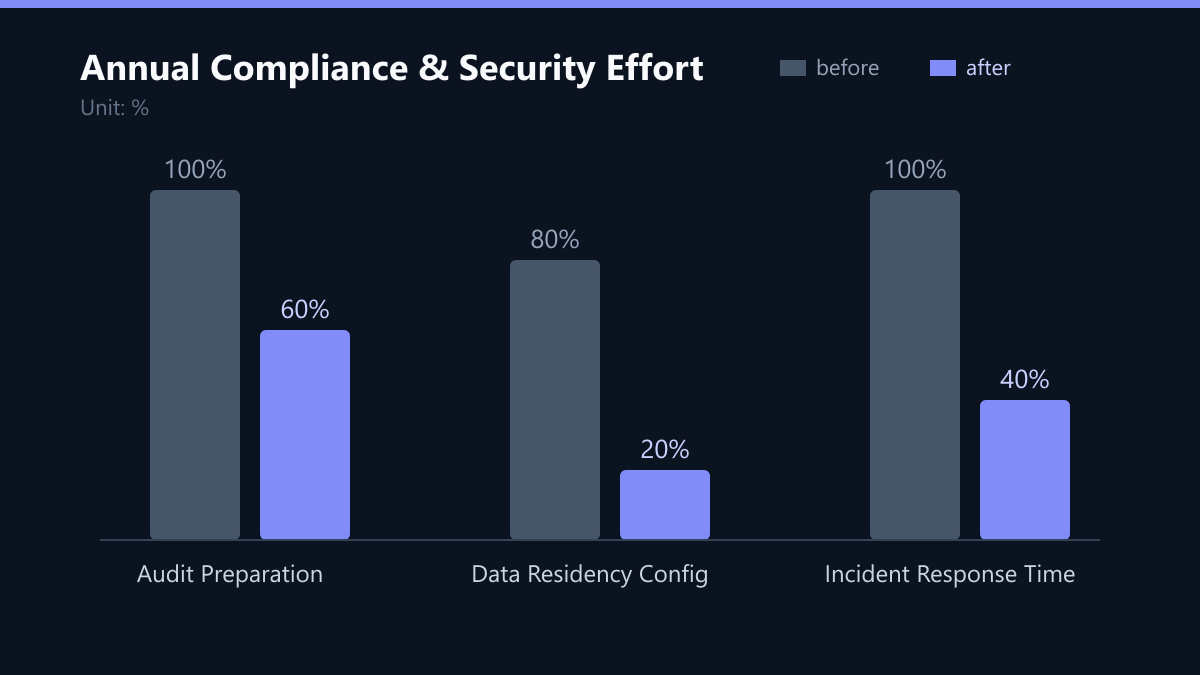
The difference in effort is stark. A mid-sized company using Teams may spend 20% of its IT security budget on compliance verification, whereas a similar company using Slack might spend 40% or more due to the need for manual documentation and third-party tool integration.
Total Cost of Ownership: Licensing and Hidden Costs
Licensing costs are the most visible part of the TCO, but they are rarely the whole story. Microsoft Teams is included in most Microsoft 365 Business and Enterprise licenses. If your company already uses Microsoft 365, the marginal cost for Teams is zero. This makes it a cost-effective choice for organizations already invested in the Microsoft ecosystem.
Slack operates on a freemium model. The free tier is limited to 10,000 message history and basic integrations. For enterprise features like unlimited history, advanced security, and compliance, you must upgrade to Business+ or Enterprise. The per-user cost for Slack Business+ is typically higher than the marginal cost of adding Teams to an existing Microsoft 365 subscription.
Hidden costs to consider:
- Integration Costs: Connecting Slack to other enterprise tools (CRM, ERP, HR) often requires middleware or paid apps. Teams has native integrations with Microsoft Power Platform and Dynamics 365.
- Training Costs: Teams has a steeper learning curve for users unfamiliar with Microsoft products. Slack is intuitive but may require training for advanced administrative tasks.
- Support Costs: Microsoft offers 24/7 support with higher-tier licenses. Slack’s support is limited to business hours on lower tiers, potentially requiring additional IT staff time for issue resolution.
User Experience and Productivity Impact
Security and cost are critical, but user adoption determines ROI. Slack is widely praised for its intuitive interface and real-time communication features. It is particularly effective for development teams and creative departments that require fast, informal communication. The app ecosystem is vast, with thousands of integrations available.
Microsoft Teams, while historically perceived as clunky, has improved significantly. It excels in combining chat, video conferencing, and file collaboration in a single workspace. For companies that rely heavily on Microsoft Office, Teams reduces context switching. However, the user interface can feel overwhelming due to the sheer number of features. IT departments must manage channel structures and permissions carefully to prevent information overload.
Productivity considerations:
- Onboarding: Slack users often require less onboarding time. Teams users may need structured training to navigate the interface.
- Mobile Experience: Both platforms have robust mobile apps. Slack’s mobile experience is slightly more streamlined for quick interactions.
- Search Functionality: Teams’ search is deeply integrated with Microsoft Graph, allowing users to find files and conversations across their entire Microsoft 365 tenant. Slack’s search is powerful but limited to Slack data unless integrated with external tools.
Typical Mistakes in Platform Selection
Many organizations make critical errors when choosing between these platforms. First, they ignore their existing license base. If you already pay for Microsoft 365, choosing Slack is often a redundant expense that does not bring proportional security benefits. Second, they underestimate the integration effort. Assuming Slack will “just work” with your CRM or ERP without middleware is a common pitfall that leads to budget overruns. Third, they neglect the compliance gap. Selecting Slack without upgrading to a plan that supports EU data residency can lead to regulatory violations and significant remediation costs later.
How You Measure Success
To ensure your choice is the right one, define clear KPIs before and after implementation.
- Compliance Audit Time: Measure the hours spent preparing for ISO 27001 or GDPR audits. A successful implementation should reduce this time by at least 30% compared to the previous baseline.
- Security Incident Response Time: Track the average time to detect and respond to security alerts. Native integration with SIEM tools should reduce this metric significantly.
- User Adoption Rate: Monitor the percentage of active users engaging with the platform weekly. Low adoption indicates a poor user experience or insufficient training, which can negate security benefits.
- Total Cost of Ownership (TCO): Calculate the annual cost per user, including licenses, support, and integration middleware. This provides a clear financial comparison over a 3-year period.
Checklist for IT Decision-Makers
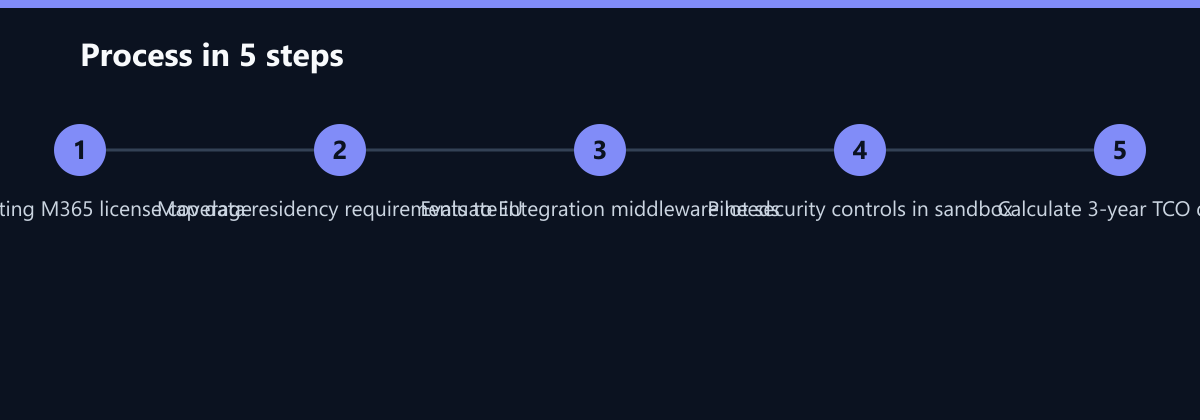
- Audit Existing Licenses: Confirm if Microsoft 365 licenses already cover Teams.
- Map Data Residency: Identify if EU data residency is a strict requirement and which plan tier it requires.
- Evaluate Integration Needs: List all third-party tools that need to integrate and estimate middleware costs.
- Pilot Security Controls: Test conditional access and audit log integration in a sandbox environment.
- Calculate 3-Year TCO: Include licensing, support, training, and integration costs for a comprehensive comparison.
Final Recommendation
The right choice depends on your existing infrastructure and security requirements. If your company already uses Microsoft 365, Microsoft Teams is the logical choice. It minimizes additional costs, leverages existing security controls, and simplifies compliance management. The integration with Azure AD and Microsoft Defender provides a unified security posture that is difficult to replicate with Slack.
Choose Slack if your organization prioritizes user experience over deep integration with Microsoft tools. It is ideal for companies with a tech-forward culture, heavy use of third-party SaaS applications, or limited existing Microsoft infrastructure. However, be prepared to invest in additional security tools and compliance management to match the security baseline of Microsoft Teams.
Final decision factors:
- Existing Microsoft 365 License: Choose Teams.
- Strict Compliance Requirements (NIS2, ISO 27001): Choose Teams for easier audit trails.
- Developer-Centric Culture: Choose Slack for better developer experience.
- Budget Constraints: Choose Teams if already licensed; choose Slack if free tier suffices.