The Starting Point: Legacy Constraints
The client, a precision machine manufacturer based in Munich with 120 employees, faced a critical inflection point. Their IT infrastructure had reached the end of its useful life. Running on aging on-premises hardware, the organization struggled with high maintenance overhead that consumed a disproportionate share of the IT budget. More critically, the reliability of this legacy stack was degrading. Unplanned downtime of legacy servers was no longer an isolated IT issue; it directly caused production delays, impacting delivery times to key automotive and industrial clients.
The IT team, consisting of a small group of generalists, was stretched thin. They spent excessive hours on manual backups, emergency patching, and hardware troubleshooting. This reactive posture left zero capacity for strategic initiatives, such as digitalizing the production floor or integrating IoT sensors. The business leadership demanded a solution that would not only stabilize operations but also reduce the total cost of ownership (TCO) of the IT landscape.
The Challenges
Three specific hurdles made this migration complex:
- Production Continuity: The manufacturing floor operates in strict shifts. Any downtime during migration could result in significant financial penalties due to delayed shipments.
- Compliance Mandates: As a supplier to the automotive sector, the client is bound by strict ISO 27001 requirements. Moving sensitive CAD and ERP data to the cloud required a rigorous security validation process.
- Cost Predictability: Previous cloud experiments had led to “cost creep.” The leadership team needed a model that guaranteed cost savings, not just a shift in expenses.
The Tech Stack
- Azure Virtual Machines: Used for hosting ERP and CAD servers with high-performance storage options.
- Azure Site Recovery: Enabled for seamless disaster recovery and migration orchestration.
- Azure Sentinel: Deployed for continuous security monitoring and threat detection.
- Azure Monitor: Integrated for performance tracking and automated alerting.
- Auto-Scaling Groups: Configured to dynamically adjust compute resources based on real-time load.
Implementation: A Phased Approach
We executed a phased migration to Azure over a six-month period. The strategy prioritized business continuity, ensuring that no single point of failure existed during the transition.
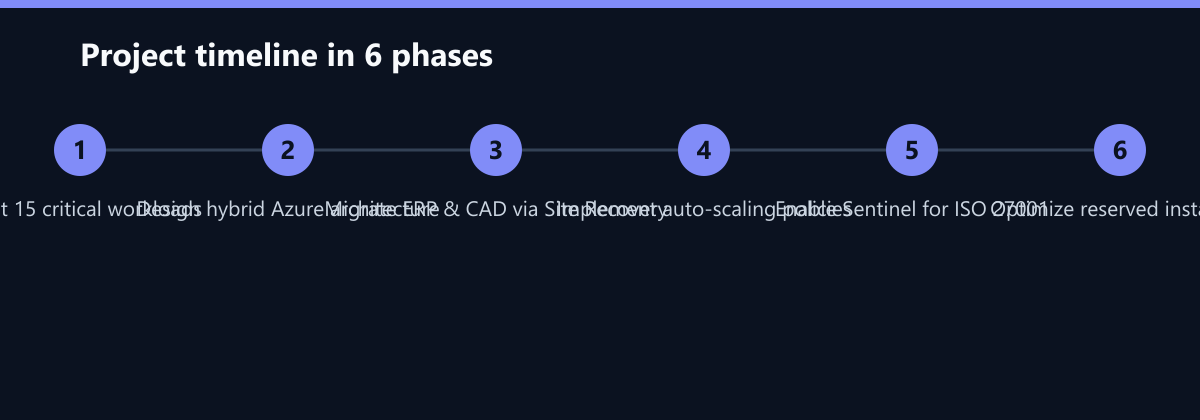
Phase 1: Assessment and Design (Months 1-2) We began with a comprehensive audit of the existing infrastructure. We identified 15 critical workloads, categorizing them into three groups: those suitable for lift-and-shift, those requiring re-architecture for cloud-native benefits, and those best kept on-premises due to latency constraints. The ERP and CAD servers were flagged for immediate migration due to their high resource consumption and vulnerability.
Phase 2: Pilot Migration (Months 3-4) We started with non-critical test environments to validate the network architecture and security policies. Using Azure Site Recovery, we replicated the workloads to the cloud. This allowed us to test failover scenarios and measure latency. The pilot confirmed that the Azure region selected for the Munich client provided sub-10ms latency, ensuring a seamless user experience for engineers accessing CAD files.
Phase 3: Core Migration (Months 5-6) The core ERP and CAD servers were migrated during a scheduled maintenance window. We utilized Azure Site Recovery to synchronize data in real-time, allowing for a near-instant cutover. Once the workloads were live in Azure, we immediately enabled auto-scaling policies. This ensured that during peak design phases, additional compute resources were provisioned automatically, and scaled down during nights and weekends.
Phase 4: Security and Optimization (Ongoing) We enabled Azure Sentinel to provide 24/7 monitoring. This integration allowed us to maintain ISO 27001 compliance by providing a clear audit trail and automated response to potential threats. Concurrently, we implemented reserved instances for the baseline workload, securing a significant discount on the compute costs.
How We Measured It
To ensure the reported results were accurate and reproducible, we established a baseline before the migration began.
- Cost Baseline: We aggregated the total cost of ownership (TCO) for the on-premises hardware, including license fees, power, cooling, and the fully loaded cost of IT staff time spent on maintenance. This figure served as the 100% reference point.
- Performance Baseline: We used Azure Monitor to track Mean Time to Recovery (MTTR) and Mean Time Between Failures (MTBF) for the legacy servers over a 3-month period. The average MTTR was recorded at 4 hours, often requiring overnight work to resolve.
- Workload Baseline: We tracked the number of hours IT staff spent on routine tasks (patching, backups, hardware swaps) per week. This data was collected via time-tracking software integrated with the ticketing system.
Post-migration, these metrics were re-evaluated over the same 3-month period. The cost data was pulled directly from Azure Cost Management, providing a granular view of spending by service and resource group.
The Outcomes
The migration delivered immediate and tangible benefits across financial and operational dimensions.
Total IT infrastructure costs dropped by 28% within the first year. This reduction was driven by the elimination of hardware maintenance costs, optimized energy consumption, and the strategic use of reserved instances.
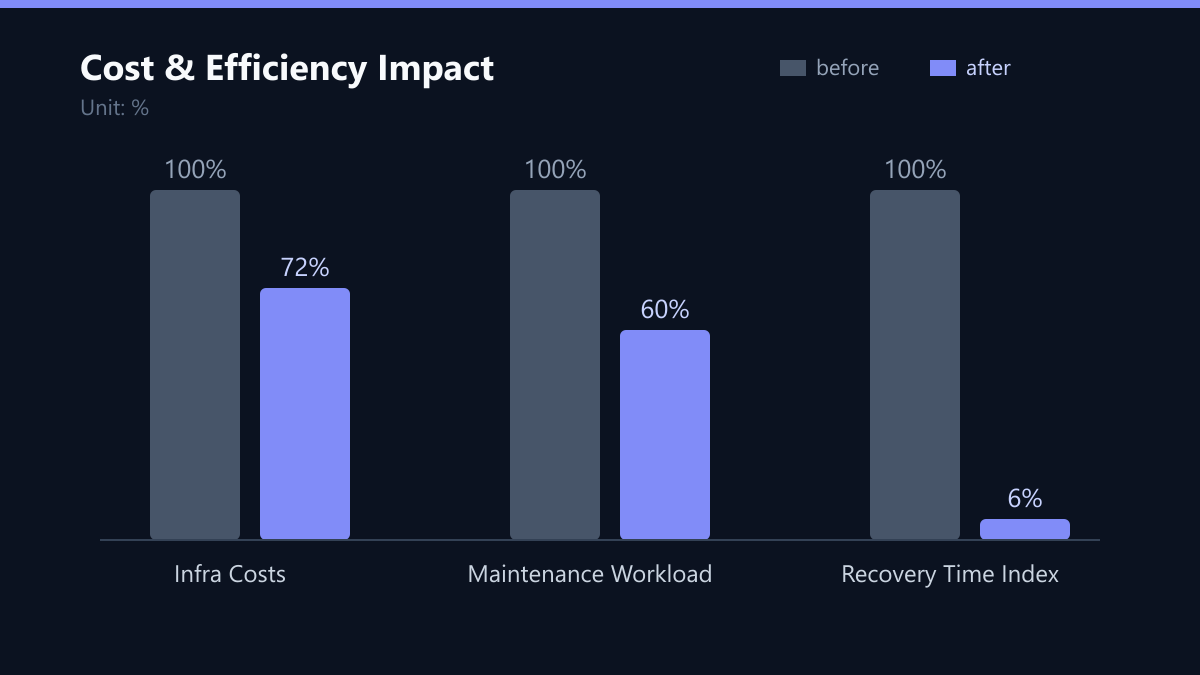
Mean Time to Recovery (MTTR) improved from 4 hours to 15 minutes. The automated failover capabilities of Azure Site Recovery, combined with the redundancy of the cloud infrastructure, allowed the IT team to restore services almost instantly after a failure. This dramatically reduced the risk of production stoppages.
IT team workload for routine maintenance decreased by 40%. With automated patching, self-healing capabilities, and managed services handling the underlying infrastructure, the IT staff was freed from repetitive tasks. This capacity was redirected toward strategic digitalization projects, including the integration of IoT sensors on the production line.
Lessons Learned
The success of this project relied on several key factors that we now consider best practices for similar engagements.
Early Workload Assessment is Critical. Skipping the detailed assessment phase often leads to over-provisioning. By carefully analyzing the 15 workloads, we avoided migrating unnecessary resources, which would have eroded the cost savings.
Automated Monitoring Prevents Cost Creep. Cloud environments are dynamic. Without automated alerts for idle resources or inefficient configurations, costs can quickly spiral. Our implementation of Azure Monitor with cost anomaly detection ensured that any deviation from the expected spend was flagged immediately.
Stakeholder Involvement Ensures Adoption. Involving production managers in the migration plan was crucial. Their input helped us schedule the migration during low-activity periods and ensured that the new cloud environment met the specific needs of the manufacturing floor. This collaborative approach minimized disruption and built trust in the new infrastructure.
What We Would Do Differently Today
While the project was a success, we identified areas for improvement.
- Earlier Integration of FinOps: We introduced cost optimization tools later in the process. Starting with a FinOps culture from day one would have allowed for even more aggressive cost controls during the pilot phase.
- More Extensive Training: The IT team required additional training on Azure-specific management tools. Providing more comprehensive training upfront would have accelerated their transition to a proactive, cloud-native mindset.
- Hybrid Cloud Strategy: We initially focused heavily on full migration. A more nuanced hybrid approach, keeping some high-latency-sensitive workloads on-premises, could have been implemented earlier to further optimize performance.
This case study demonstrates that a well-planned Azure migration can deliver significant cost savings and operational improvements for manufacturing companies. By leveraging managed services and automated tools, businesses can transform their IT infrastructure from a cost center into a strategic asset.
Passend dazu
- Azure OpenAI vs. AWS Bedrock: Cost and Compliance for DACH Companies
- IT Consulting & IT Strategy
- Azure vs. AWS for Mid-Market Enterprises: Cost, Security, and Migration
- Cloud Security Basics: 5 Common Mistakes in M365 and Azure Migrations
- Cloud Services & Cloud Migration
- IT Compliance & Data Protection
- E-Commerce Development
- Azure Cost Reduction for Logistics via Right-Sizing
- E-Commerce Retailer Cuts Recovery Costs by 40% with Azure Site Recovery
- Reducing Server Costs by 40% via Adobe Cloud Migration
- GDPR Compliance and 45 Percent Latency Reduction in Hamburg E-Commerce Cloud Migration
- MES Migration to AWS Without Production Line Downtime
- Mittelständiger Maschinenbauer in Österreich: Transparente Kostenkontrolle der Azure-Umgebung durch granulares Monitoring
- Migration von 200 SAP-Servern auf Azure Hybrid: 40 % Senkung der IT-Kosten bei einem deutschen Logistikunternehmen
- Zero-Downtime Migration for a German Healthcare Provider
- Microsoft Defender vs CrowdStrike Falcon: Cost and Performance for 500 Users
- Migrating 1200 Fleet Telematics Devices to Azure IoT Hub in 48 Hours
- Insider Threat Mitigation: Securing Intellectual Property in a Munich Engineering Agency