The Hidden Cost of Simple Copy-Paste
Many mid-sized enterprises approach cloud migration with a simplistic mindset: move the servers, keep the code, and save money. This ‘lift-and-shift’ strategy is a common trap. It often fails to address the underlying architectural limitations of legacy systems. Without modernization, you end up paying premium cloud rates for inefficient on-premise performance. This mismatch leads to unexpected cost spikes and sluggish application response times that frustrate users and erode trust.
The root cause lies in the nature of legacy applications. They are frequently monolithic and tightly coupled, meaning components cannot scale independently. Cloud environments, by contrast, offer dynamic resource allocation. When legacy software demands fixed resources in a dynamic environment, you waste capacity. Furthermore, licensing models for legacy operating systems or databases often do not translate well to public cloud economics, further inflating costs.
To avoid this, you must conduct a thorough workload assessment before moving a single byte. Identify which applications can be re-architected to leverage cloud-native benefits and which require a hybrid approach. This initial analysis is not just a technical exercise; it is a financial one. It determines whether you are migrating to save money or simply to move expenses to a different line item.
Mapping the Web of Dependencies
Legacy systems rarely exist in isolation. They are usually embedded in a complex web of integrations with CRM, ERP, or third-party services. Overlooking these dependencies is one of the most common causes of migration failure. It creates data silos and breaks workflows during the transition. The result is operational downtime that directly impacts revenue and customer satisfaction.
Common integration pitfalls include hardcoded IP addresses or hostnames that do not resolve in the cloud environment. Legacy protocols, such as FTP or older SQL drivers, may also be unsupported or insecure in modern cloud architectures. Additionally, data formats in legacy databases often do not align with cloud-native database structures, leading to sync errors and data corruption.
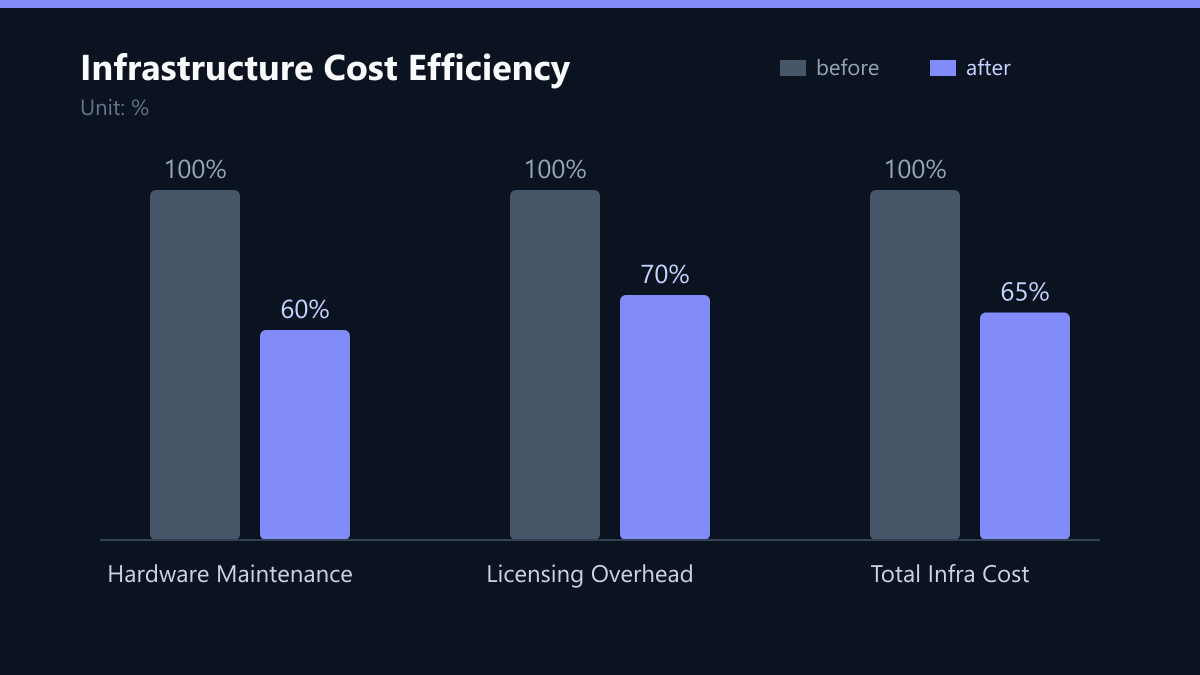
The solution is to map all integration points early in the project lifecycle. Use API gateways to decouple legacy systems from new cloud services. This abstraction layer ensures that data flows remain stable even as the underlying infrastructure changes. It allows you to migrate components incrementally without breaking the entire ecosystem.
Security and Compliance: The Non-Negotiable Baseline
Moving data to the cloud does not automatically make it secure. In fact, legacy software often lacks modern security patches and encryption standards. This creates a significant attack surface, especially if the system handles sensitive customer data. Non-compliance with GDPR or industry standards can lead to severe legal and financial consequences, including fines and reputational damage.
You must watch for specific security gaps: outdated authentication mechanisms that are vulnerable to brute-force attacks, a lack of encryption at rest and in transit for legacy databases, and inadequate logging and monitoring capabilities for auditing purposes. These gaps are often invisible until a security audit or a breach occurs.
Implement a zero-trust architecture from the start. Ensure that all data is encrypted and that access controls are strictly defined. Regular security audits should be part of the migration roadmap, not an afterthought. This proactive approach reduces risk and builds confidence with stakeholders and customers.
The Power of Phased Migration
Attempting to migrate an entire legacy ecosystem in one go is a high-risk strategy. It increases the likelihood of critical failures and makes it difficult to isolate and fix issues. A phased approach allows you to migrate non-critical workloads first, test the infrastructure, and build confidence. This methodical progression is essential for complex legacy environments.
The benefits of a phased approach are clear: reduced risk to core business operations, the ability to refine processes and tools based on early lessons learned, and easier rollback procedures if a specific phase fails. Start with low-risk applications such as development or testing environments. Once stability is proven, move to production workloads. This incremental strategy minimizes disruption and allows your team to adapt gradually to new tools and workflows.
Performance: Testing Before You Break
Cloud environments operate differently from on-premise data centers. Network latency, resource contention, and scaling behaviors can significantly impact application performance. Without rigorous testing, you may discover performance bottlenecks only after the migration is complete. This leads to user frustration and potential business loss.
Key performance metrics to monitor include application response time and throughput, database query performance and latency, and network bandwidth utilization and packet loss. Conduct load testing in a staging environment that mirrors your production cloud setup. Optimize code and configuration based on the results. Use auto-scaling policies to ensure that resources adjust dynamically to demand, reducing both cost and performance risks.
Typical Mistakes to Avoid
- Ignoring Licensing Costs: Failing to check if legacy software licenses are valid in the cloud can lead to unexpected bills. Always verify licensing terms before migration.
- Underestimating Network Latency: Assuming cloud network speeds are identical to on-premise can lead to slow applications. Test latency thoroughly, especially for database-heavy workloads.
- Skipping Data Validation: Moving data without validating integrity can result in silent corruption. Implement automated data validation checks during the migration process.
- Lack of Rollback Plan: Without a clear rollback strategy, a failed migration can cause extended downtime. Define rollback criteria and test them before the cutover.
How You Measure Success
To ensure your migration is successful, track the following KPIs:
- Infrastructure Cost Reduction: Aim for a 20-40% reduction in total infrastructure costs. Measure this by comparing pre-migration on-premise costs with post-migration cloud bills.
- Application Response Time: Monitor average response time before and after migration. A 10-20% improvement is a good target for well-optimized applications.
- Uptime Percentage: Ensure that uptime remains at 99.9% or higher during and after migration. Any dip in uptime indicates a need for further optimization.
- Security Incident Rate: Track the number of security incidents or vulnerabilities identified. A decrease in critical vulnerabilities post-migration is a key success indicator.
Checklist for Legacy Cloud Migration
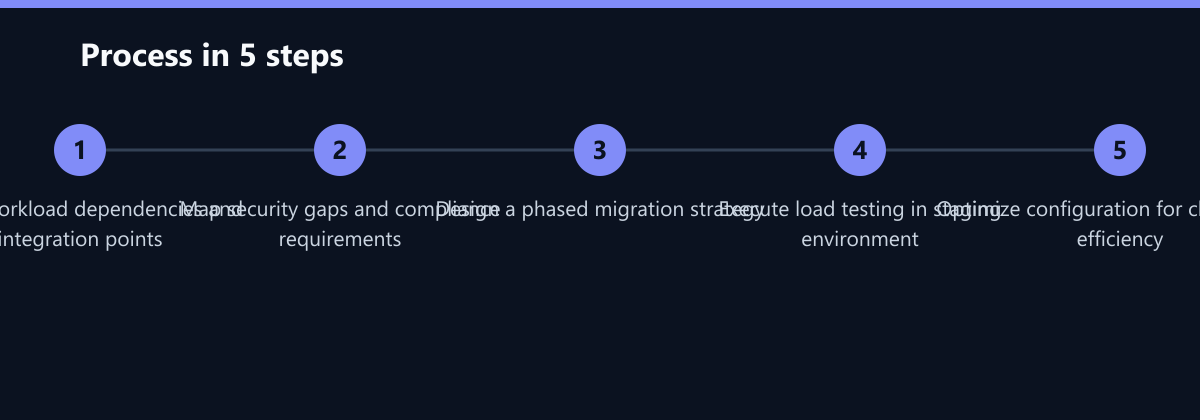
- Complete Workload Assessment: Identify all applications and their dependencies.
- Map Integration Points: Document all connections to CRM, ERP, and third-party services.
- Define Security Requirements: Ensure GDPR compliance and implement zero-trust architecture.
- Develop Phased Plan: Start with low-risk applications and move to production.
- Conduct Load Testing: Validate performance in a staging environment.
- Establish Rollback Strategy: Define criteria and test rollback procedures.
By following these strategies and avoiding common pitfalls, you can ensure a secure, efficient, and cost-effective migration to the cloud. The key is to plan thoroughly, test rigorously, and iterate continuously. This approach not only reduces costs but also enhances the performance and scalability of your legacy systems, providing a solid foundation for future innovation.
Passend dazu
- Cloud Services & Cloud Migration
- Web & Software Development
- IT Compliance & Data Protection
- Azure vs. AWS for Mid-Market Enterprises: Cost, Security, and Migration
- Managed IT Support vs. Inhouse IT: Cost-Benefit Analysis for SMEs
- Migration eines PHP-Systems auf Laravel und PHP 8.3
- GDPR-Compliant Backup: Data Minimization and Deletion Concepts in the Cloud
- MES Migration to AWS Without Production Line Downtime
- RPA for Order Fulfillment: How a DACH Retailer Cut Processing Errors by 60% Using Power Automate
- Migrating from Legacy PHP to Modern E-Commerce Stacks
- Segmentation Strategies in Salesforce Marketing Cloud for Targeted Journeys