The Hidden Security Layer: Why Your Helpdesk Matters
Most mid-sized organizations operate under a dangerous assumption: that cybersecurity is the sole responsibility of the SOC (Security Operations Center) or the CISO. In reality, the first point of contact for a security incident is rarely the security team. It is the IT helpdesk. Employees report suspicious emails, strange pop-ups, or blocked logins to the team they trust daily. If this team lacks specific security training, you lose critical minutes while the threat spreads. A single phishing email can compromise an account within seconds. The helpdesk is not just a support channel; it is your primary detection mechanism. Treating it as such changes how you structure workflows and train staff. You shift from a reactive support model to a proactive security posture. This shift is essential for businesses that lack dedicated security operations centers. Without this transformation, your security perimeter has a significant gap right at the front door.
Why Standard Support Processes Fail Against Phishing
Standard IT tickets focus on restoring functionality. The goal is to get the user back to work quickly. This approach is dangerous when the issue is a security threat. If a user reports a suspicious email, the standard response might be to check if the email client is working correctly. This misses the actual threat. Phishing attacks rely on social engineering, not just technical flaws. The user is not experiencing a technical error; they are experiencing a social attack. The helpdesk must recognize this difference immediately. Without specific protocols, agents may delete the email without preserving evidence. They may fail to isolate the user’s account. They may not notify the security team in time. These gaps allow attackers to escalate privileges or deploy malware. You need a distinct process for security-related tickets that overrides standard support SLAs. The standard “fix it fast” mindset must be replaced by a “contain it safely” mindset.
Implementing a Phishing-Specific Ticket Workflow
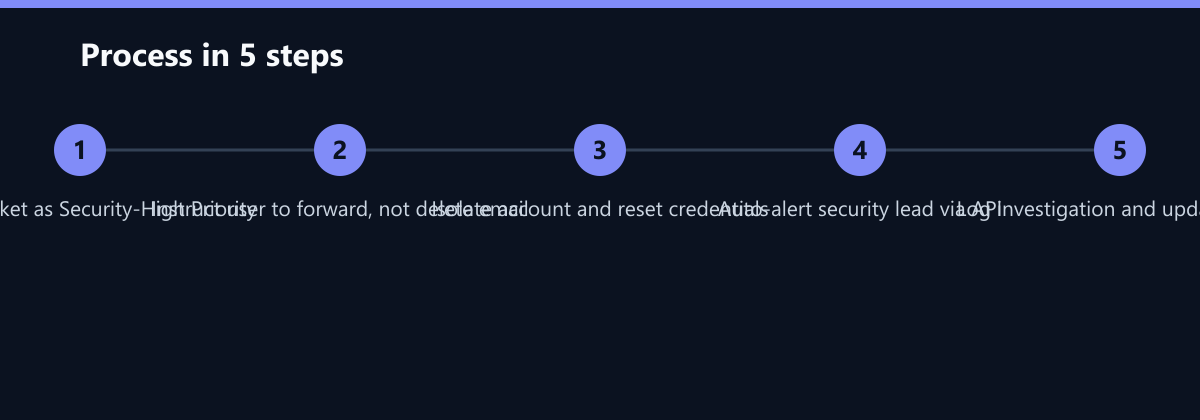
You need a dedicated workflow for security reports. This workflow must be faster and more rigid than standard support tickets. Here is how to structure it:
- Immediate Triage: Classify the ticket as ‘Security - High Priority’ upon receipt. Do not let it sit in the general queue.
- Evidence Preservation: Instruct the agent to ask the user to forward the email to a secure inbox, not delete it. This is crucial for forensic analysis.
- Account Isolation: If the user clicked a link or entered credentials, reset the password immediately. Force a multi-factor authentication (MFA) check if possible.
- Notification: Automatically alert the security lead or CISO via a specific channel. Use API triggers to ensure no human delay.
- Investigation: Check logs for unusual activity from the user’s IP or device. Look for data exfiltration or lateral movement signs.
This process ensures that no critical step is skipped. It creates a clear chain of custody for the incident. It also provides data for future training. Every phishing report becomes a learning opportunity. You can identify which departments are most targeted. You can see which email subjects are most effective for attackers. This data helps you refine your security awareness programs. The workflow must be documented and accessible to all helpdesk agents. It should be part of their onboarding and regular refresher training.
Training Agents to Spot and Handle Threats
Your helpdesk agents are the human firewall. They need to know what to look for. Training should focus on recognition and response, not just technical troubleshooting. Agents must understand the signs of a phishing attempt. They should know how to verify if an email is legitimate. They need to be comfortable asking users difficult questions about what they clicked or typed. This requires confidence and clear authority. Agents must feel empowered to override normal procedures when security is at risk. This can be a cultural shift in organizations where customer service is the top priority. You must balance empathy with security rigor. Agents should be trained to remain calm and non-judgmental. Users often feel ashamed when they fall for a scam. If agents react with blame, users will stop reporting incidents. You need a culture of reporting without punishment. This ensures that you catch threats early. Regular simulations can help agents practice these scenarios. Tabletop exercises are more effective than multiple-choice tests. They allow agents to practice decision-making under pressure. For example, simulate a scenario where a user has already entered credentials. The agent must decide whether to reset the password, block the user, or both, within a five-minute window. This builds muscle memory for critical actions.
Measuring Success: Metrics That Matter
You cannot improve what you do not measure. Track specific KPIs for your helpdesk’s security performance. These metrics should be reviewed monthly by IT leadership. Key metrics include:
- Mean Time to Report (MTTR): How quickly do users report suspicious emails? A lower time indicates better user awareness.
- Mean Time to Resolve (MTTR) for Security Tickets: How fast does the helpdesk isolate the threat? This measures workflow efficiency.
- Phishing Click Rate: From internal simulations, what percentage of users click? This measures training effectiveness.
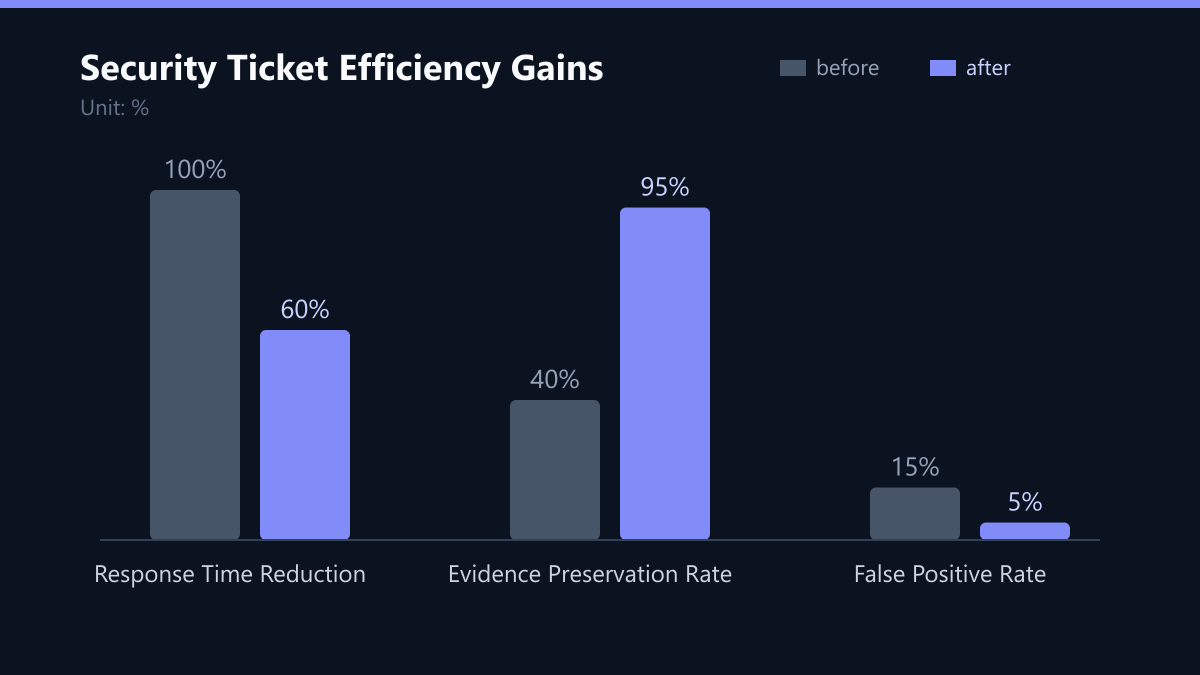
- False Positive Rate: How often are legitimate emails flagged as phishing? A high rate indicates overly strict filters or agent hesitation.
A low MTTR for security tickets indicates an efficient workflow. A high false positive rate suggests that your agents are too cautious or your filters are too strict. You need to find the balance. These metrics also help you justify budget for security tools. You can show the board that a small investment in helpdesk training saves significant potential losses. You can demonstrate the ROI of your security awareness program. Data-driven decisions lead to better resource allocation. They also help you identify trends. If MTTR is increasing, you may need more staff or better tools. If the click rate is high, you need better training. Use this data to drive continuous improvement. For instance, if your baseline MTTR for security tickets is 45 minutes, aim to reduce it to 15 minutes within six months. This specific goal makes the improvement tangible and measurable.
Integration with Broader Security Strategies
The helpdesk does not operate in a vacuum. It must be integrated with your broader security infrastructure. This includes email security gateways, endpoint detection and response (EDR) tools, and identity management systems. When a helpdesk agent flags a phishing email, the system should automatically block the sender domain. It should scan all other inboxes for the same message. It should check if the user’s device has any malware. This automation reduces the burden on agents. It also speeds up the response time. You need clear interfaces between the helpdesk ticketing system and your security tools. APIs can facilitate this integration. For example, a ticket can trigger an automated scan of the user’s endpoint. The results can be added back to the ticket automatically. This creates a seamless workflow. It ensures that no manual steps are forgotten. It also provides a complete audit trail. This is crucial for compliance with regulations like GDPR and NIS2. You must be able to show that you responded to incidents promptly and effectively. Integration is not optional; it is necessary for modern security operations. Without it, you are relying on manual copy-pasting of data, which is slow and error-prone. Automate the blocking, the scanning, and the logging. Let the agents focus on the human element: communicating with the user and making the final containment decision.
Typical Mistakes to Avoid
- Deleting Evidence: Agents often delete the phishing email to “clean up” the user’s inbox. This destroys forensic data. Always instruct users to forward, not delete.
- Lack of Authority: Agents feel unable to override standard procedures. If they are afraid to ask “Did you click?”, they will miss the threat. Give them explicit authority.
- No Automation: Relying on manual email notifications to the CISO is too slow. Use API triggers to alert the security team instantly.
- Punitive Culture: If users are blamed for clicking, they will hide the incident. This hides the problem and allows the attacker to persist. Reward reporting, not just perfect behavior.
Checklist for Implementation
- Define the ‘Security-High Priority’ ticket category in your helpdesk system.
- Create a standard operating procedure (SOP) for phishing reports.
- Train all agents on the SOP using tabletop exercises.
- Integrate your helpdesk with email gateways and EDR tools via API.
- Establish baseline KPIs for MTTR and False Positive Rate.
- Schedule quarterly refresher training for agents.
- Review KPIs monthly and adjust workflows based on data.