The Gap Between Technical Noise and Business Value
Most IT dashboards are a graveyard of technical noise. They display CPU usage, packet loss, and raw server uptime with high fidelity. While these metrics confirm that the hardware is powered on, they fail to answer the only question that matters to the board of directors: Is the business making money? For a CIO, the challenge is no longer just keeping servers up; it is translating technical data into financial impact.
When a system slows down, customers do not perceive ‘high latency’ or ‘database timeouts.’ They perceive delayed order confirmations, frustrated shoppers, and abandoned carts. This guide bridges that critical gap. It moves beyond generic observability to outline five specific Key Performance Indicators (KPIs) that directly correlate with revenue protection, contractual obligations, and operational efficiency. By shifting focus from technical health to business health, IT transforms from a cost center into a strategic revenue enabler.
1. Mean Time to Resolution (MTTR) as a Financial Lever
Mean Time to Resolution (MTTR) is the average time required to restore a critical service after a failure. While uptime is often cited as a primary success metric, it is largely a vanity metric. MTTR, however, is a financial metric. It measures the efficiency of your team in stopping the bleeding when things go wrong.
The impact on revenue is direct and quantifiable. In a B2B SaaS environment, every minute of downtime can equate to thousands of dollars in lost subscription renewals or service credits. In e-commerce, MTTR correlates linearly with abandoned carts during peak traffic hours. A high MTTR is rarely just a technical issue; it is a symptom of process inefficiencies, such as poor alerting configurations, lack of automated failover, or insufficient on-call documentation.
The target for critical business applications should be an MTTR below 15 minutes. If your current average exceeds 60 minutes, you are not merely losing uptime; you are ceding market share to competitors who recover faster. Reducing MTTR by even 20% can save significant revenue during peak failure windows. To achieve this, focus on automated remediation scripts and streamlined communication protocols between engineering and support teams.
2. SLA Breach Frequency and Severity Scoring
Service Level Agreements (SLAs) are binding contracts, not suggestions. Tracking SLA compliance is not just about avoiding financial penalties; it is about maintaining trust with enterprise clients. A single severe breach can trigger a contract review, leading to termination or renegotiated terms that are unfavorable to the vendor.
To monitor this effectively, you must move beyond a simple pass/fail binary. You need a weighted scoring model that considers three components:
- Breach Frequency: How often do you miss the target? For example, missing a 99.9% uptime target three times in a quarter indicates a systemic reliability issue.
- Severity Score: Weight breaches by their business impact. A five-minute outage of a customer login portal is far more severe than a ten-minute slowdown of an internal wiki page.
- Financial Penalty Exposure: Calculate the actual dollar value of potential penalties. This translates technical failures into a number the CFO can understand.
If your SLA compliance rate drops below 99.5%, it is a red flag for the entire executive team, not just the IT Director. Proactive monitoring of SLA health allows you to negotiate better terms, upgrade infrastructure proactively, or adjust customer expectations before penalties accumulate. This metric turns compliance from a legal burden into a strategic asset.
3. Customer-Perceived Performance (RUM)
Server-side metrics can be misleading. A server can report 100% health while the user experience is terrible due to network latency, CDN configuration issues, or browser rendering problems. Real User Monitoring (RUM) measures the actual experience of your customers, providing an unvarnished view of performance.
The critical RUM KPIs to track include:
- Time to First Byte (TTFB): This indicates server response speed and is the first signal of backend health.
- Page Load Time: The total time for a page to become fully interactive for the user.
- Error Rate: The percentage of sessions that encounter JavaScript or API errors.
The business impact of these metrics is well-documented. Studies consistently show that a one-second delay in page load time can reduce conversions by 7%. High error rates lead to spikes in support tickets, increasing operational costs and detracting from customer satisfaction. Poor mobile performance directly impacts mobile-first customer segments, which now dominate many markets.
Integrate RUM data directly into your executive dashboard. If TTFB exceeds 200ms, it should trigger an immediate investigation. This metric is the closest proxy for ‘customer satisfaction’ that IT can measure, making it indispensable for any business-centric monitoring strategy.
4. Incident Volume and Trend Analysis
Looking at a single incident in isolation is reactive. Looking at the trend of incident volume is predictive. A rising trend in minor incidents often precedes a major failure. This KPI helps you shift from firefighting to prevention, allowing you to identify systemic weaknesses before they cause catastrophic outages.
To analyze trends effectively, focus on three dimensions:
- Week-over-Week Volume: Is the number of alerts increasing? If yes, determine if it is due to legitimate business growth or infrastructure instability.
- Repeat Offenders: Which systems or services generate the most tickets? These are your ‘problem children’ that require refactoring, patching, or replacement.
- Change Correlation: Did incidents spike after a recent deployment? This highlights process gaps in your CI/CD pipelines and the need for better staging environments.
A healthy IT environment shows a stable or decreasing incident volume as a percentage of total transactions. If incident volume grows faster than your user base, your infrastructure is not scaling properly. This KPI provides the data necessary to justify budget requests for automation, better engineering resources, or infrastructure upgrades.
5. Cost Per Transaction (CPT)
IT is often viewed as a cost center. To prove its value, you must measure the efficiency of IT spend relative to business output. Cost Per Transaction (CPT) calculates the IT overhead required to process a single business unit, such as one order, one API call, or one user session.
The calculation is straightforward:
Total Monthly IT Infrastructure & Support Costs / Total Monthly Transactions.
This metric matters for three reasons:
- Efficiency Benchmarking: Compare CPT across different regions, cloud providers, or legacy vs. new systems to identify inefficiencies.
- Growth Scalability: As revenue grows, CPT should ideally decrease due to economies of scale. If CPT rises, you are over-provisioning or using inefficient services.
- Budget Defense: A stable or decreasing CPT demonstrates that IT is scaling efficiently with the business, supporting the argument for continued investment in technology.
For a mid-sized company, a 10% reduction in CPT can save hundreds of thousands of dollars annually. This metric aligns IT goals with the CFO’s bottom line, making it a powerful tool for strategic planning and resource allocation.
Implementation Strategy: From Data to Decision
Implementing these KPIs requires more than just installing monitoring tools. It requires a cultural shift in how IT reports to the business. The goal is to create a feedback loop where technical data drives business decisions.
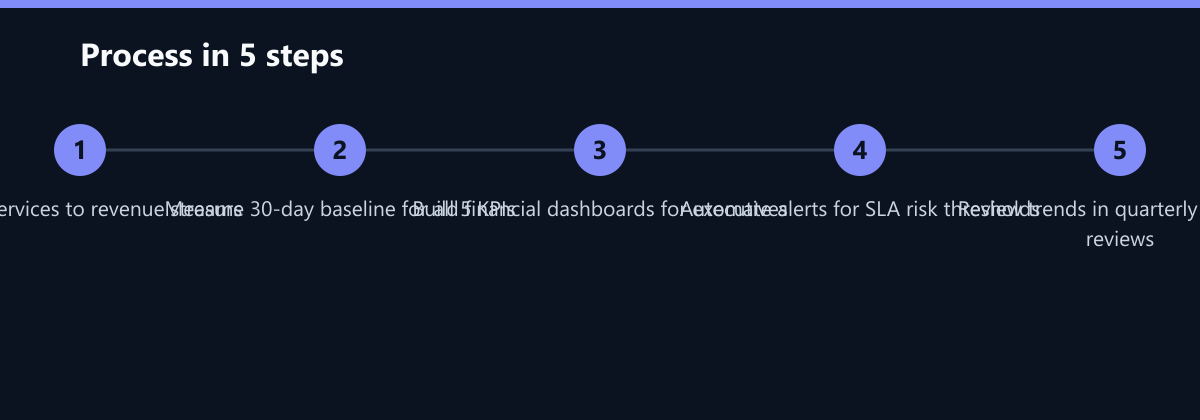
- Define Business Criticality: Map every IT service to a specific revenue stream or compliance requirement. Not all services are equal; prioritize those with the highest financial impact.
- Set Baselines: Measure current performance for the five KPIs over a 30-day period. You cannot improve what you do not measure, and you need a baseline to track progress.
- Automate Reporting: Use dashboards that display these KPIs in financial terms (dollars, percentages, minutes) rather than technical terms. Executives need to see the bottom line, not the CPU load.
- Review Quarterly: Discuss these metrics in executive meetings, not just IT team stand-ups. This ensures that IT performance is aligned with broader business goals.
Start small. Pick one critical service, define its MTTR and RUM targets, and track them for a month. Once you see the correlation between these metrics and business outcomes, the case for expanded monitoring becomes undeniable.
Typical Mistakes to Avoid
Even with the right KPIs, organizations can fail to derive value if they make common implementation errors.
- Chasing Vanity Metrics: Focusing on 99.99% uptime for non-critical internal tools while ignoring customer-facing performance. This misallocates resources and distracts from revenue-critical issues.
- Lack of Context in Reporting: Presenting raw data without context. For example, reporting a 5-minute outage without explaining that it occurred during a peak sales event, where the financial impact was significant.
- Ignoring Trend Analysis: Reacting only to acute incidents and ignoring the slow build-up of minor issues that indicate systemic decay. This leads to surprise outages rather than planned maintenance.
How You Measure Success
To ensure your monitoring strategy is working, you must measure the impact of your improvements. Here are concrete KPIs and methods to track success:
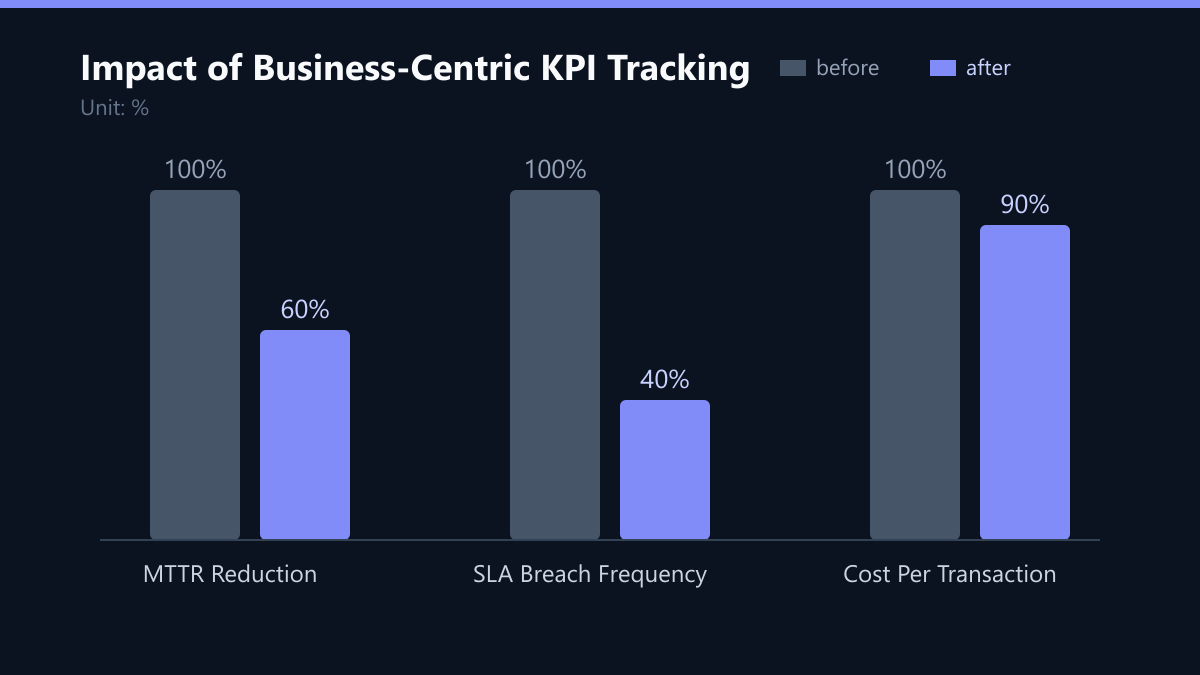
- MTTR Reduction Rate: Measure the percentage decrease in average resolution time quarter-over-quarter. A target reduction of 20% within six months is a reasonable benchmark for most mid-sized enterprises.
- SLA Penalty Avoidance: Track the total dollar value of penalties avoided due to proactive monitoring and intervention. This directly quantifies the ROI of your monitoring investment.
- CPT Efficiency Gain: Monitor the percentage change in Cost Per Transaction. A consistent decrease of 5-10% per quarter indicates successful scaling and efficiency improvements.
Checklist for CIOs
Use this checklist to ensure your monitoring strategy is business-centric:
- Are all critical IT services mapped to specific revenue streams?
- Is MTTR for critical services below 15 minutes?
- Do you have a weighted scoring model for SLA breaches?
- Is Real User Monitoring (RUM) integrated into your executive dashboard?
- Are you tracking incident volume trends to predict future failures?
- Is Cost Per Transaction calculated and reviewed monthly?
- Are these KPIs discussed in quarterly business reviews with the CFO?
By adopting these five KPIs and avoiding common pitfalls, you can transform IT monitoring from a technical necessity into a strategic advantage. This approach not only protects revenue but also builds trust with stakeholders by demonstrating the tangible value of IT investments.