The Silent Cost of Noise
Alert fatigue is not merely an operational inconvenience; it is a critical business risk that directly impacts service availability and revenue. When engineers are bombarded with excessive, non-critical notifications, the human element fails. They begin to ignore pings, and in doing so, they miss the early, subtle signs of system failure. The consequence is prolonged downtime and significantly higher remediation costs.
The core issue is a broken signal-to-noise ratio. When the volume of noise overwhelms the signal, the team’s cognitive load spikes, leading to increased Mean Time to Resolution (MTTR), higher burnout rates, and missed compliance deadlines. To fix this, you must move away from treating every metric spike as an emergency and instead focus on actionable, high-priority signals.
Mapping Technical Metrics to Business Value
Before adjusting a single threshold, you must define what actually matters to your business. A common mistake is to monitor everything. Instead, prioritize indicators that directly affect customer experience and operational continuity. A database query timeout is a technical issue, but a failed checkout process is a business failure. Your monitoring strategy must reflect this distinction.
Focus on four core areas to filter out irrelevant data:
- Availability: Is the system up and responsive for the end-user?
- Performance: Is the user experience within acceptable latency limits?
- Data Integrity: Are transactions being processed correctly without corruption?
- Security: Are there signs of unauthorized access or behavioral anomalies?
By anchoring your monitoring to these business outcomes, you create a framework for deciding which metrics deserve critical alerts and which can be relegated to informational logs.
Moving Beyond Static Thresholds
Static thresholds (e.g., “alert if CPU > 80%”) are often the root cause of alert fatigue. Business loads fluctuate naturally; a server at 80% CPU during a Black Friday sale is normal, but the same load on a quiet Tuesday night is a critical anomaly. Static rules fail to capture this context.
To solve this, implement dynamic and statistical approaches. This means moving away from fixed numbers and toward behavioral baselines.
- Dynamic Baselines: Use historical data to establish an “expected range” for each metric. Alerts should only trigger when behavior deviates significantly from this norm. For example, if a service typically uses 40% memory, an alert at 90% is critical, but an alert at 50% might be noise.
- Composite Alerts: Single-metric alerts often produce false positives. Combine multiple indicators to confirm a state. For instance, high CPU alone is often noise, but high CPU combined with high memory and increased latency is a strong signal of a genuine issue.
- Hierarchical Escalation: Not all alerts require the same response. Define clear tiers to match the urgency to the action.
| Alert Tier | Threshold Logic | Action | Response Time |
|---|---|---|---|
| Warning | Deviation from baseline > 10% | Log & Monitor | 4 Hours |
| Critical | Service Unavailable or Error Rate > 5% | Page On-Call | 15 Minutes |
| Severe | Data Loss or Security Breach | Executive Notification | 5 Minutes |
This tiered approach ensures that your on-call team is only woken up for issues that require immediate human intervention, while lower-priority anomalies are handled asynchronously.
Implementing Intelligent Filtering
Even with perfect thresholds, noise can creep in through redundant notifications. A single network blip might trigger alerts from the switch, the router, the application server, and the database. This is where intelligent filtering becomes essential. You must consolidate related events into a single, actionable alert.
This reduces the cognitive load on your team. Instead of receiving 50 alerts about a network blip, they receive one summary alert with all relevant details. The implementation involves four key steps:
- Correlate Events: Link related logs and metrics from different sources. Modern monitoring platforms can automatically group alerts that share a common timestamp or dependency path.
- Deduplicate: Suppress repeated alerts for the same root cause. If an alert has already been acknowledged, do not send a second one for the same issue within a defined window.
- Suppress Maintenance Windows: Integrate your change management system with your monitoring platform. Automatically mute alerts for affected services during scheduled maintenance windows to prevent unnecessary notifications.
- Route by Context: Send infrastructure alerts to the network team and application errors to the development team. Misrouted alerts cause confusion and delay resolution.
The Continuous Optimization Cycle
Threshold tuning is not a one-time project. It is a continuous process. What works today may become noise in six months as your infrastructure evolves, traffic patterns shift, or new services are deployed. You must establish a regular review process to analyze alert history.
Look for two specific data points: false positives (alerts that required no action) and missed signals (incidents that were not alerted). Adjust your thresholds based on this data. If a specific alert has a high false-positive rate, tighten the threshold or add a composite condition. If you are missing incidents, loosen the threshold or add a new metric.
Typical Mistakes to Avoid
- Over-monitoring: Monitoring every possible metric without business context. This creates noise and distracts from critical signals.
- Ignoring Maintenance Windows: Failing to suppress alerts during planned changes leads to unnecessary on-call pages and team frustration.
- Static Thresholds in Dynamic Environments: Using fixed limits for systems with variable loads, resulting in constant false positives during peak times.
- Lack of Review: Setting thresholds once and never revisiting them. Infrastructure changes quickly render old thresholds obsolete.
How You Measure Success
You cannot improve what you do not measure. To ensure your tuning strategy is working, track these specific KPIs:
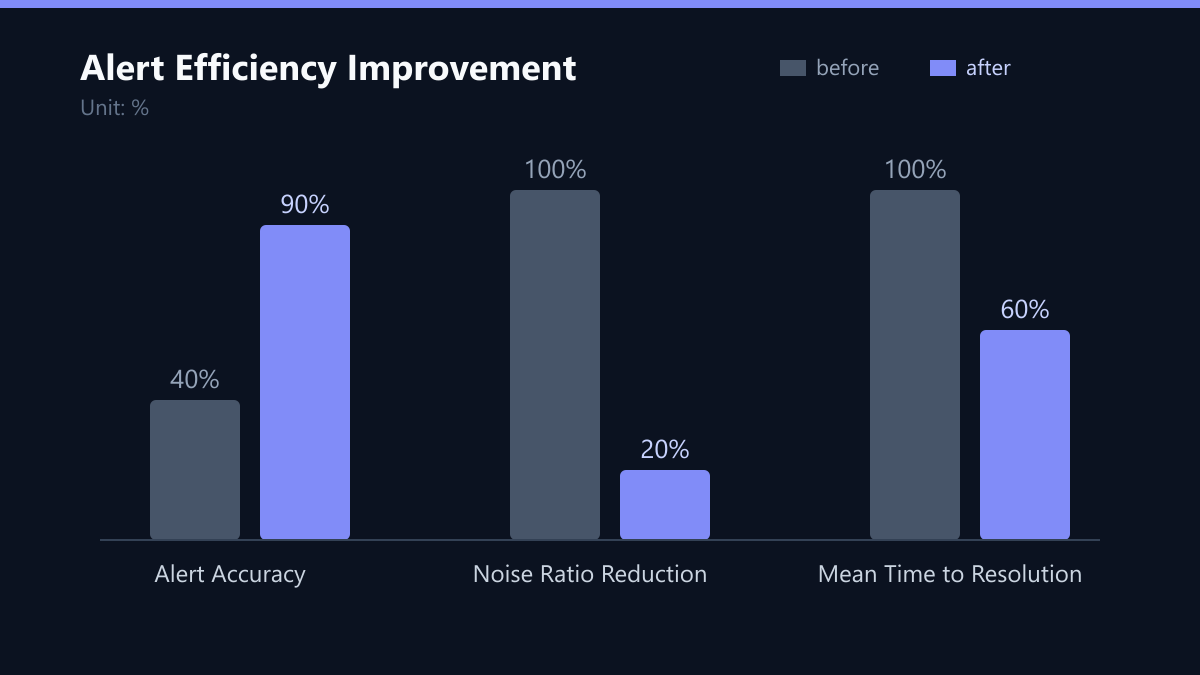
- Alert Accuracy: The percentage of alerts that required actual action. Aim for >90%.
- Noise Ratio: The number of non-actionable alerts per actionable alert. Aim for a ratio below 10:1.
- Time to Acknowledge: How quickly the team responds to critical alerts. This should decrease as fatigue reduces.
- Mean Time to Resolution (MTTR): The total time to resolve an incident. This should improve as teams focus on real issues.
Checklist for Threshold Tuning
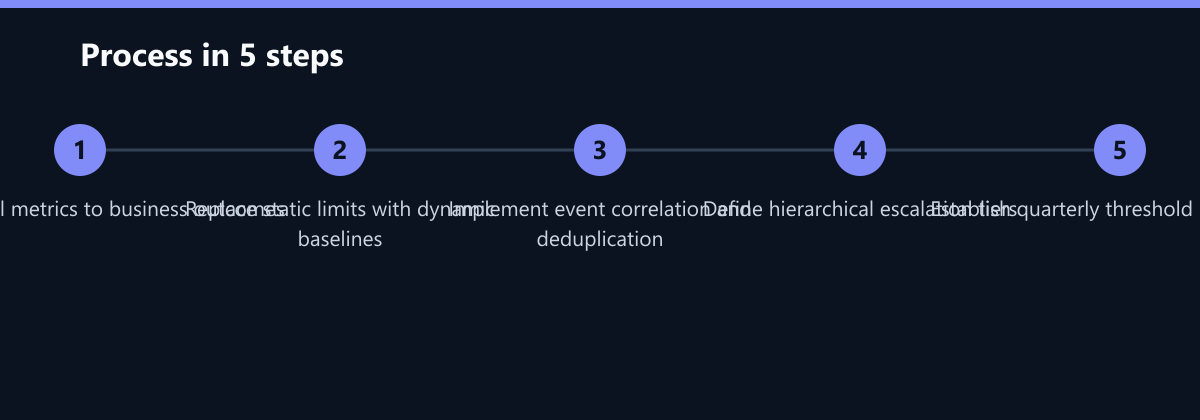
- Identify top 10 business-critical metrics.
- Replace static thresholds with dynamic baselines for variable loads.
- Implement composite alerts for high-noise metrics.
- Configure deduplication and correlation rules.
- Integrate change management for automatic suppression.
- Establish a quarterly review process for alert history.
By following this structured approach, you transform your monitoring system from a source of stress into a reliable tool for business continuity. The result is a focused team, faster resolution times, and a significant reduction in operational risk.