The True Price of Waiting: Reactive IT Failures
Reactive maintenance is the default mode for many organizations lacking dedicated IT resources. It operates on a simple, flawed premise: fix it when it breaks. While this approach seems economical initially, it exposes mid-market businesses to significant financial and operational volatility. When a system fails, the immediate response is rarely structured; it is ad-hoc troubleshooting that consumes senior management time and derails critical projects.
The financial impact extends far beyond the repair invoice. The primary cost is invisible: lost productivity during outages, potential data loss, and reputational damage. For a mid-sized firm, a two-hour server outage can cost between $5,000 and $50,000, depending on the industry and operational dependency. Furthermore, reactive fixes often apply temporary patches rather than addressing root causes, leading to a cycle of recurring failures that erode user trust and operational efficiency.
The risks of a purely reactive strategy are systemic:
- Unpredictable Downtime: There is no clear resolution timeline, creating uncertainty for business planning.
- Emergency Premiums: Out-of-hours support commands significantly higher service fees.
- Security Exposure: Delayed patching leaves vulnerabilities open for extended periods.
- Lack of Visibility: Without continuous monitoring, teams cannot see performance trends before they become crises.
Shifting the Paradigm: Proactive IT Maintenance
Proactive maintenance flips the script. Instead of reacting to failures, it involves continuously monitoring systems to identify and resolve potential issues before they impact users. This strategy shifts the focus from fixing broken components to optimizing performance and preventing failures entirely. It relies heavily on data, automation, and scheduled interventions.
Core IT Services implements this through 24/7 monitoring and predictive analytics. By tracking metrics such as disk usage, network latency, and security logs, IT teams can anticipate bottlenecks. For instance, if a database server shows a 15% increase in query time over three days, the team investigates immediately. This intervention happens before performance degrades to a point that affects end-users, preventing a potential outage.
The core components of a proactive approach include:
- Continuous Monitoring: Real-time alerts for hardware, software, and network anomalies.
- Scheduled Patching: Automated updates for OS and applications during off-peak hours.
- Capacity Planning: Regular reviews of storage, bandwidth, and licensing needs.
- Security Audits: Monthly vulnerability scans and compliance checks (ISO 27001, NIS2).
Comparative Analysis: Cost and Impact
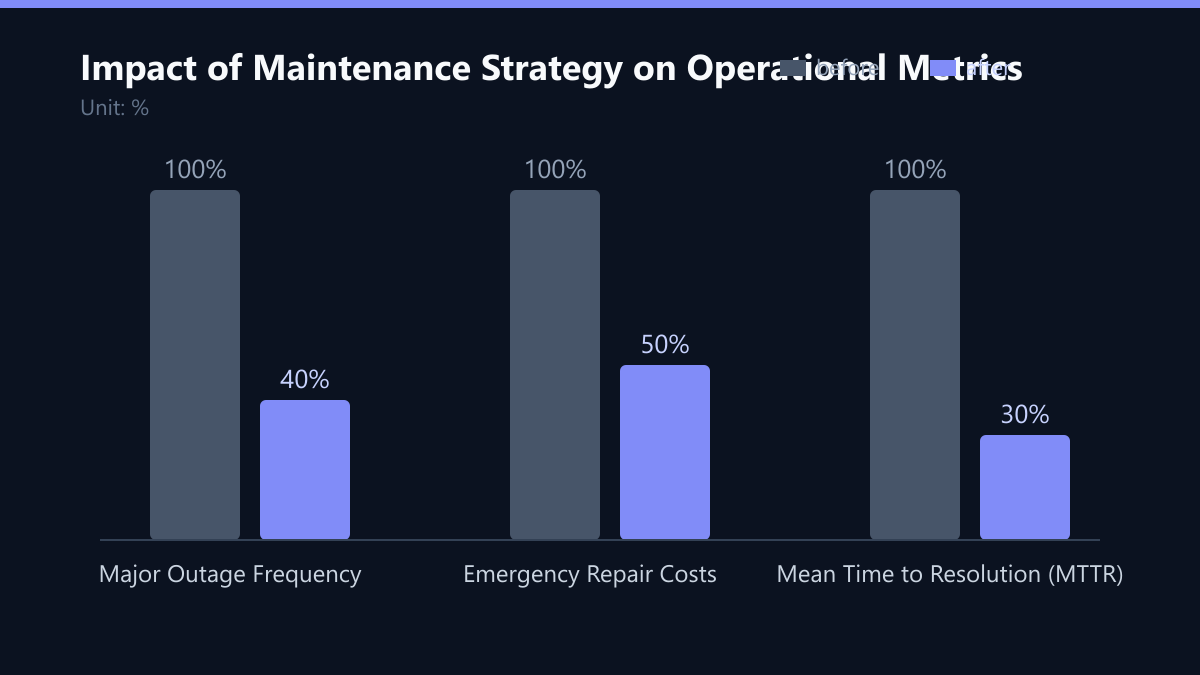
The financial difference between proactive and reactive strategies becomes substantial over a three-to-five-year horizon. While reactive maintenance appears cheaper in the short term due to lower upfront costs, the cumulative expense of emergency repairs and productivity losses usually exceeds the cost of a managed proactive service.
Proactive maintenance stabilizes the IT environment, allowing the business to plan with confidence. It reduces the variance in IT spending, making budgeting more accurate. Furthermore, it enhances security posture, which is critical for avoiding regulatory fines and data breaches.
| Metric | Reactive Maintenance | Proactive Maintenance |
|---|---|---|
| Downtime Frequency | High, unpredictable | Low, controlled |
| Response Time | Hours to days | Minutes to hours |
| Security Risk | High (delayed patches) | Low (continuous monitoring) |
| Cost Predictability | Low (emergency fees) | High (fixed monthly fee) |
| User Satisfaction | Low (frequent interruptions) | High (stable performance) |
Strategic Benefits for the Mid-Market
For mid-sized companies, IT is no longer just a support function; it is a strategic asset. Proactive maintenance enables digital transformation by providing a stable foundation for new technologies like AI and cloud migration. When the core infrastructure is reliable, innovation can proceed without constant firefighting.
Key strategic advantages include:
- Enhanced Compliance: Automated documentation and audit trails support GDPR, NIS2, and ISO 27001 requirements.
- Scalability: Infrastructure is scaled proactively to handle growth, preventing performance degradation.
- Talent Retention: Employees are more productive when their tools work reliably, reducing frustration and turnover.
- Business Continuity: Robust backup and disaster recovery plans ensure quick recovery from major incidents.
Implementing a Proactive Strategy
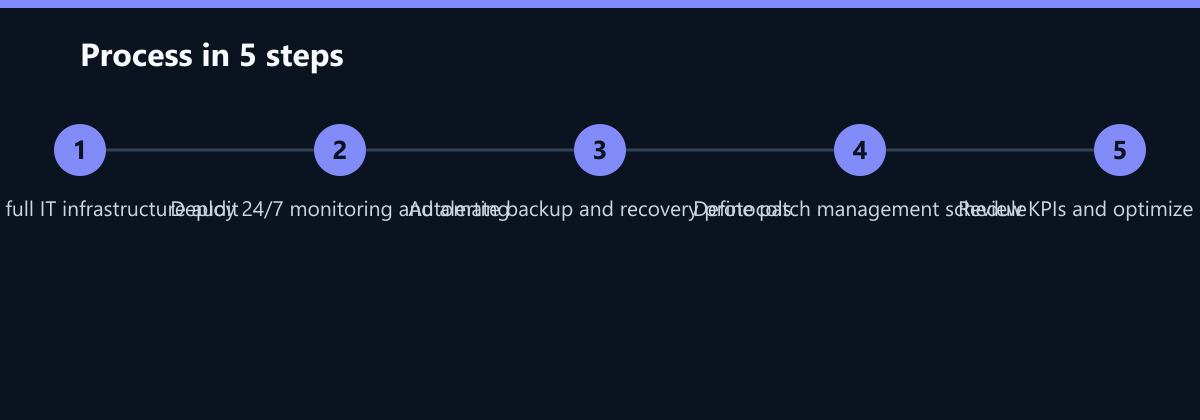
Transitioning from reactive to proactive maintenance requires a structured approach. It is not merely about installing monitoring software; it involves changing the organizational mindset and establishing clear processes. The first step is a comprehensive IT audit to assess the current state of all systems.
Next, define key performance indicators (KPIs) such as mean time to resolution (MTTR) and system uptime. Establish a service level agreement (SLA) that outlines response times and resolution targets. Finally, integrate automation for routine tasks like backups and patch management to free up human resources for strategic initiatives.
Steps to transition:
- Conduct a full IT infrastructure audit.
- Implement 24/7 monitoring and alerting systems.
- Establish automated backup and recovery protocols.
- Create a patch management schedule.
- Review and optimize processes quarterly.
The Role of Managed Services
For most mid-market companies, building an in-house team capable of 24/7 proactive monitoring is cost-prohibitive. Managed Service Providers (MSPs) like Core IT Services offer a scalable solution. They combine expert knowledge with advanced tools to deliver proactive care without the overhead of full-time staff.
An MSP acts as an extension of your IT department, handling the day-to-day management of your infrastructure. This allows your internal team to focus on strategic projects and business innovation. The partnership model ensures that your IT environment is always aligned with your business goals and security requirements.
Why choose a managed proactive approach:
- Access to specialized expertise without hiring costs.
- Guaranteed uptime through 24/7 monitoring.
- Regular compliance reporting and security updates.
- Predictable monthly costs for better budgeting.
Typical Mistakes to Avoid
Even with the best intentions, organizations often stumble during the transition to proactive maintenance. Avoiding these common pitfalls can save months of frustration and wasted budget.
- Ignoring Alert Fatigue: Deploying monitoring tools without tuning thresholds leads to an overwhelming number of false positives. This causes teams to ignore alerts, missing critical signals. You must regularly refine alert rules based on actual impact.
- Treating Proactive Maintenance as a One-Time Project: Proactive IT is an ongoing process, not a destination. If you stop reviewing KPIs and optimizing configurations after the initial setup, the system will drift back into a reactive state.
- Lack of Documentation: Without clear documentation of changes and configurations, troubleshooting remains slow even with monitoring in place. Ensure that every automated change is logged and that runbooks are up to date.
How You Measure Success
To ensure your proactive strategy is delivering value, you must track specific KPIs. Here is how to measure success concretely:
- Mean Time to Resolution (MTTR): Track the average time taken to resolve incidents. A proactive strategy should reduce this by 30-50% within the first year. Method: Compare average resolution times from ticketing system logs before and after implementation.
- Uptime Percentage: Aim for 99.9% or higher. Method: Use monitoring tools to calculate availability over a 30-day period. Any dip below this threshold should trigger a root-cause analysis.
- Cost per Incident: Monitor the financial impact of each outage, including labor and lost productivity. Method: Assign a cost value to downtime hours and track the total per quarter. A proactive strategy should show a declining trend.
Checklist for Implementation
Use this checklist to ensure your transition to proactive maintenance is thorough and effective:
- Audit Complete: All hardware, software, and network components are inventoried and assessed.
- Monitoring Deployed: 24/7 monitoring is active with tuned alert thresholds for critical services.
- SLA Defined: Service Level Agreements are established with clear response and resolution times.
- Automation Set: Backups, patch management, and routine maintenance tasks are automated.
- KPI Baseline: Initial KPIs (MTTR, Uptime, Cost) are recorded to measure future improvements.
- Review Schedule: Quarterly review meetings are scheduled to optimize processes and update configurations.