The Hidden Cost of Manual Triage
In the modern IT landscape, speed is the new currency. For mid-sized businesses, every minute of unplanned downtime carries a significant financial burden, with estimates ranging from $150 to $500 per minute. This figure is not just an abstract statistic; it represents lost productivity, missed opportunities, and eroded customer trust. The primary challenge for IT leaders has shifted from simply solving problems to solving them faster than the business can afford to wait.
Traditional ticketing systems are built on a linear, human-centric model. A user reports an issue, a human agent reads the ticket, identifies the category, and assigns it to the correct team. This process, while familiar, introduces latency and a high probability of human error. AI-driven automation eliminates this bottleneck by handling the first 60% of incidents autonomously. This shift is not merely about speed; it is a fundamental change in operational philosophy, moving from reactive firefighting to proactive stability.
By integrating artificial intelligence into the service desk, Managed Service Providers (MSPs) can reduce the mean time to resolution (MTTR) significantly. The core promise of AI in this context is a 50% reduction in response times. This article details the specific mechanisms that achieve this result and how it translates into tangible operational KPIs for your organization.
Accelerating the First Minute: AI Triage in Action
The most significant delay in IT support often occurs not during the fix, but during the classification phase. When a user submits a ticket, the system must understand the intent. Human agents typically spend several minutes reading, interpreting, and categorizing the request. AI Natural Language Processing (NLP) performs this step in seconds.
The automation process involves three critical steps that collectively shave minutes off the initial response:
- Instant Classification: The AI analyzes the ticket text and associated metadata to categorize the issue precisely. For example, it distinguishes between “Email Delivery Failure” and “Hardware Malfunction” with high accuracy.
- Priority Scoring: Based on historical data, the severity of the error, and the user’s role in the organization, the system assigns a priority level (P1 to P4) without requiring human input. This ensures that critical issues for key stakeholders are flagged immediately.
- Auto-Routing: The ticket is directed to the specialized team or individual agent with the highest historical success rate for that specific error code. This eliminates the “guesswork” often associated with manual assignment.
The result of this streamlined process is a reduction in the time from ticket creation to agent action from an average of 45 minutes to under 5 minutes. For critical business applications, this speed is the difference between a minor inconvenience and a major operational failure. By removing the human bottleneck in the initial phase, the entire support workflow accelerates.
Predictive Maintenance: Solving Problems Before They Exist
Reactive support is inherently expensive. It requires immediate human attention, often at inconvenient times, and focuses on damage control. AI transforms MSPs from problem solvers to problem preventers by continuously analyzing telemetry data from servers, networks, and endpoints.
Machine learning models identify patterns that precede system failures. These patterns might be subtle, such as a gradual increase in disk I/O latency or a slight rise in network packet loss, which human monitoring tools might miss. By acting on these signals, the MSP can resolve issues before the user ever experiences an outage.
Key benefits of predictive AI include:
- Disk Space Prediction: Algorithms forecast storage exhaustion up to 72 hours in advance. This triggers automated cleanup scripts or expansion requests, preventing service interruptions due to full drives.
- Network Anomaly Detection: AI flags unusual traffic patterns that may indicate potential DDoS attacks or misconfigurations. This allows for early intervention before the network becomes overwhelmed.
- License Compliance Monitoring: Systems track software license usage in real-time. This prevents service interruptions due to expired contracts or unexpected license violations, which can be costly and disruptive.
By resolving approximately 30% of potential issues before they become tickets, the remaining workload for human agents decreases significantly. This reduction in volume directly contributes to the 50% reduction in average response time for the remaining critical incidents. The agents are no longer drowning in routine tickets; they are focused on high-impact problems.
Enhancing Security Response with AI
Cybersecurity threats require immediate and precise action. Human analysts often face “alert fatigue,” a state where the volume of alerts leads to delayed responses to genuine threats. AI-powered Security Information and Event Management (SIEM) systems correlate thousands of events per second to identify real threats amidst the noise.
AI in security operations enables several critical capabilities:
- Real-Time Threat Containment: If a compromise is detected, the system can automatically isolate the affected endpoint from the network within seconds. This limits the lateral movement of malware and contains the breach.
- Phishing Detection: NLP models analyze email content, sender behavior, and attachment metadata to block malicious messages before they reach user inboxes. This is far more effective than traditional keyword-based filters.
- Vulnerability Prioritization: AI ranks vulnerabilities based on exploitability and asset criticality. This guides patching efforts, ensuring that the most dangerous holes are plugged first.
For mid-sized companies, this automated security layer is crucial. It ensures that IT compliance with regulations like GDPR and NIS2 is maintained without requiring a dedicated, expensive security operations center (SOC) for every alert. The AI handles the routine monitoring, allowing the human security team to focus on strategy and complex incident response.
Impact on Operational KPIs and SLAs
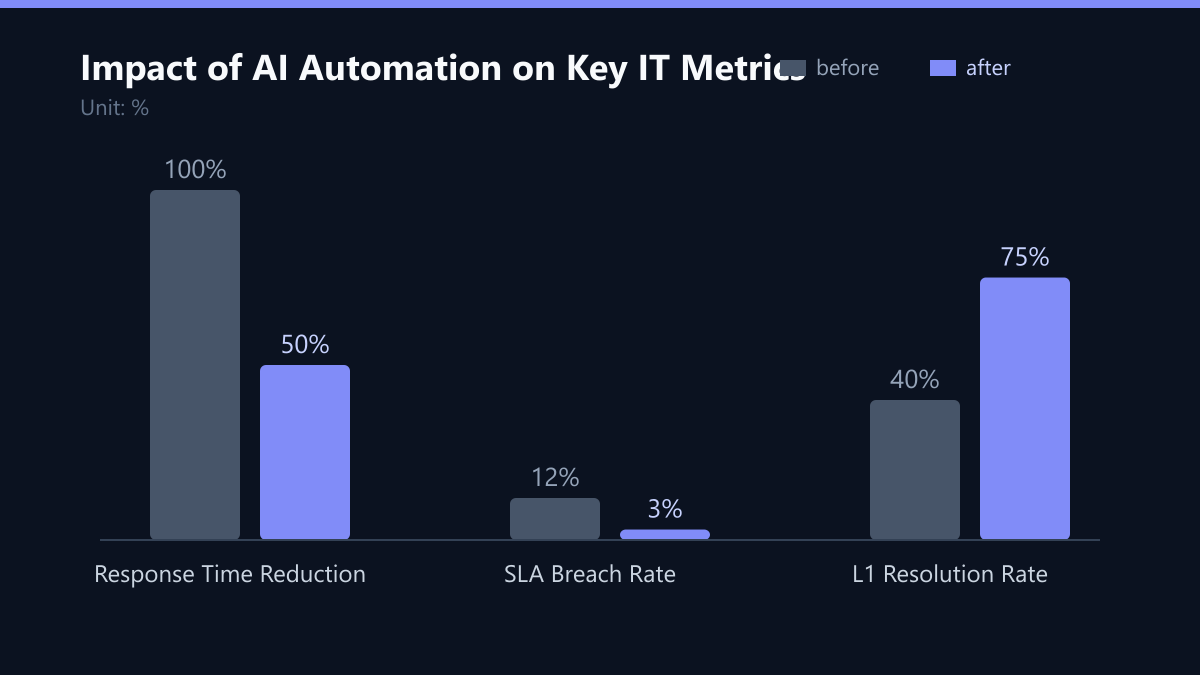
The implementation of AI automation directly improves the key performance indicators that define MSP success. Business leaders can track these improvements through clear, measurable data points. The following table compares traditional MSP performance with AI-enhanced operations.
| Metric | Traditional MSP | AI-Enhanced MSP |
|---|---|---|
| Average First Response Time | 45 Minutes | 5 Minutes |
| Ticket Resolution Rate (L1) | 40% | 75% |
| MTTR (Mean Time to Resolve) | 4 Hours | 2 Hours |
| SLA Breach Rate | 12% | 3% |
Why this matters for your business:
- Cost Efficiency: There is a reduced need for large support teams for routine tasks. This allows for a more lean operational structure.
- Higher SLA Compliance: Performance remains consistent even during peak load or staff shortages. The AI does not get tired or distracted.
- Improved User Satisfaction: Faster resolutions lead to higher employee productivity and satisfaction scores. Users perceive the IT department as a partner rather than a bottleneck.
By automating routine tasks, your IT team can focus on strategic projects like cloud migration and digital transformation, rather than spending 80% of their time on password resets and printer issues. This shift in focus is where the long-term value of AI automation lies.
Implementation Strategy for Mid-Sized Enterprises
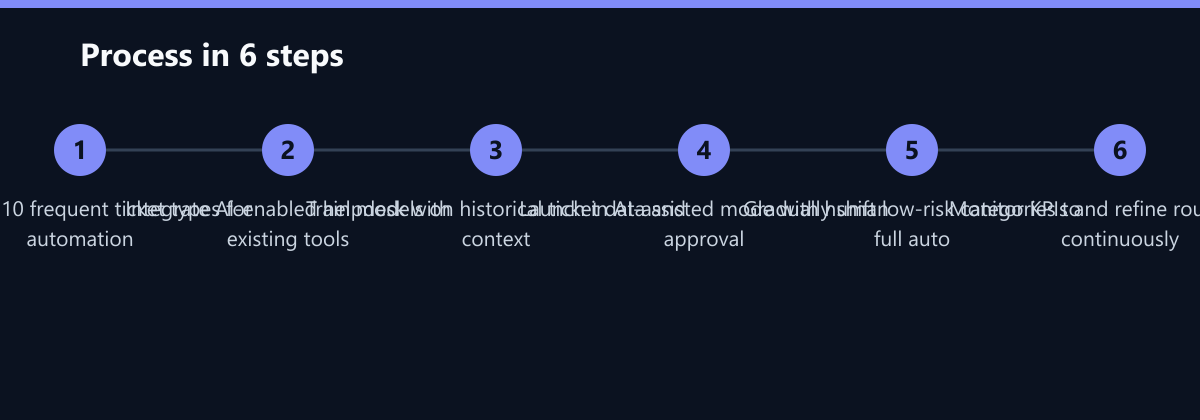
Adopting AI in IT operations does not require a complete overhaul of your infrastructure. A phased approach ensures minimal disruption and delivers quick wins. Here is a recommended step-by-step implementation strategy:
- Audit Current Workflows: Identify the top 10 most frequent ticket types. These are prime candidates for automation because they are repetitive and well-defined.
- Integrate AI Service Desk: Deploy an AI-enabled helpdesk platform that can connect with your existing ticketing system. Ensure API compatibility to avoid data silos.
- Train the Model: Use historical ticket data to train the AI on your specific environment and terminology. The model needs to understand your unique context to classify tickets accurately.
- Monitor and Refine: Start with AI-assisted mode, where human approval is required for actions. Gradually move to full automation for low-risk categories as confidence in the system grows.
Critical Success Factors:
- Data Quality: AI is only as good as the data it processes. Clean, well-structured ticket data is essential for accurate classification and routing.
- Change Management: Train your IT staff to work alongside AI tools, not against them. Emphasize that AI is a tool to enhance their capabilities, not a replacement.
- Vendor Selection: Choose an MSP or AI partner that offers transparent reporting on automation rates and response times. You need visibility into the system’s performance.
By following this structured approach, mid-sized companies can achieve the 50% reduction in response times within six to twelve months, securing a competitive advantage in operational efficiency.
Typical Mistakes to Avoid
While the benefits of AI automation are clear, organizations often stumble during implementation. Avoiding these common pitfalls can save time and resources.
- Over-Automation of Complex Issues: Attempting to automate high-complexity, low-frequency issues leads to poor user experiences. Start with high-frequency, low-complexity tickets. Complex issues require human judgment and context that AI may lack.
- Ignoring Data Quality: Feeding the AI with messy, inconsistent ticket data results in poor classification and routing. If the input is garbage, the output is garbage. Invest time in cleaning and standardizing your historical data before training the model.
- Lack of Human Oversight: Moving too quickly to full automation without a period of human oversight can lead to critical errors. Always start with a “human-in-the-loop” model for a few months to build trust and refine the system.
- Neglecting Change Management: Failing to communicate the benefits and changes to IT staff can lead to resistance. If your team feels threatened by the AI, they may not use it effectively or may even work around it. Ensure clear communication and training.
How You Measure Success
To ensure your AI implementation is delivering value, you need to track specific KPIs. Do not rely on anecdotal evidence; use data.
- Mean Time to Resolution (MTTR): This is the most direct measure of efficiency. Track MTTR before and after implementation. A 50% reduction is a strong indicator of success.
- First Response Time: Measure the time from ticket creation to the first agent action. This should drop from 45 minutes to under 5 minutes.
- L1 Resolution Rate: Track the percentage of tickets resolved at the first level without escalation. An increase from 40% to 75% indicates that the AI is effectively handling routine issues.
- SLA Breach Rate: Monitor the percentage of tickets that miss their SLA targets. A reduction from 12% to 3% shows improved reliability and compliance.
- User Satisfaction Score (CSAT): Regularly survey users to gauge their satisfaction with IT support. Faster responses and fewer errors should lead to higher CSAT scores.
Measure these KPIs monthly and compare them against your baseline. Adjust your AI configuration and routing logic based on the data. Continuous improvement is key to maintaining the benefits of AI automation.
Checklist for AI Implementation
Use this checklist to guide your implementation process:
- Conducted a thorough audit of current ticket workflows.
- Identified the top 10 most frequent ticket types for automation.
- Selected an AI-enabled helpdesk platform with strong API integration capabilities.
- Cleaned and standardized historical ticket data for model training.
- Trained the AI model on your specific environment and terminology.
- Launched the system in AI-assisted mode with human approval.
- Established a baseline for key KPIs (MTTR, First Response Time, etc.).
- Trained IT staff on how to work alongside the AI tools.
- Implemented a monitoring dashboard to track automation rates and performance.
- Scheduled regular reviews to refine routing logic and model performance.