The Hidden Cost of Manual IT Requests
Mid-sized companies often face a paradox: employees expect instant digital solutions, yet IT teams are bogged down by repetitive, low-complexity tasks. Every password reset or software installation consumes valuable hours that could be spent on strategic infrastructure improvements. The impact on operational efficiency is measurable. According to industry benchmarks, up to 40% of all helpdesk tickets are routine requests that do not require human intervention. When these tasks clog the queue, response times for critical incidents increase, leading to frustrated business units and potential revenue loss.
A structured self-service IT portal shifts this dynamic. It acts as a digital front door, allowing employees to resolve common issues independently. This approach does not just save time; it fundamentally changes the relationship between IT and the business by promoting autonomy and transparency. By moving low-value tasks out of the human queue, IT leaders can redirect their teams toward high-value projects that drive business growth.
Feature 1: Intelligent Knowledge Base with AI Search
The foundation of any effective self-service portal is a searchable knowledge base. However, traditional static PDFs or poorly organized wikis fail because users rarely read long documents when they need a quick fix. Modern portals integrate AI-driven natural language processing. This allows employees to type queries like “my printer is jammed” or “how do I reset my MFA code” in plain language. The system then surfaces the most relevant solution article instantly.
- Contextual Suggestions: As users navigate the portal, the AI suggests related articles based on their current action.
- Feedback Loops: Users can rate the usefulness of an article. Low-rated content triggers automatic alerts for IT documentation teams to update or remove outdated information.
- Multilingual Support: For international teams, automatic translation ensures that knowledge is accessible regardless of language barriers.
This feature is critical because it addresses the “last mile” of user frustration. If an employee can find the answer in under 30 seconds, they are far less likely to open a ticket. The AI component ensures that even non-technical users can navigate complex IT environments without needing to know specific terminology.
Feature 2: Automated Password and Access Management
Password resets are consistently the number one driver of helpdesk volume. In many organizations, this single task accounts for 20-30% of all tickets. Automating this process is the quickest win for reducing load. A robust portal integrates directly with Active Directory, Microsoft 365, or Azure AD. Employees can reset passwords, enable multi-factor authentication (MFA), or unlock accounts through a secure, guided workflow. The system verifies identity through pre-configured methods, such as security questions or SMS codes, ensuring security is not compromised.
Key benefits include:
- 24/7 Availability: Employees are not stuck waiting for business hours to resolve access issues.
- Policy Enforcement: The portal enforces complexity rules automatically, reducing the risk of weak credentials.
- Audit Trail: Every reset is logged, providing compliance evidence for ISO 27001 or GDPR audits without manual effort.
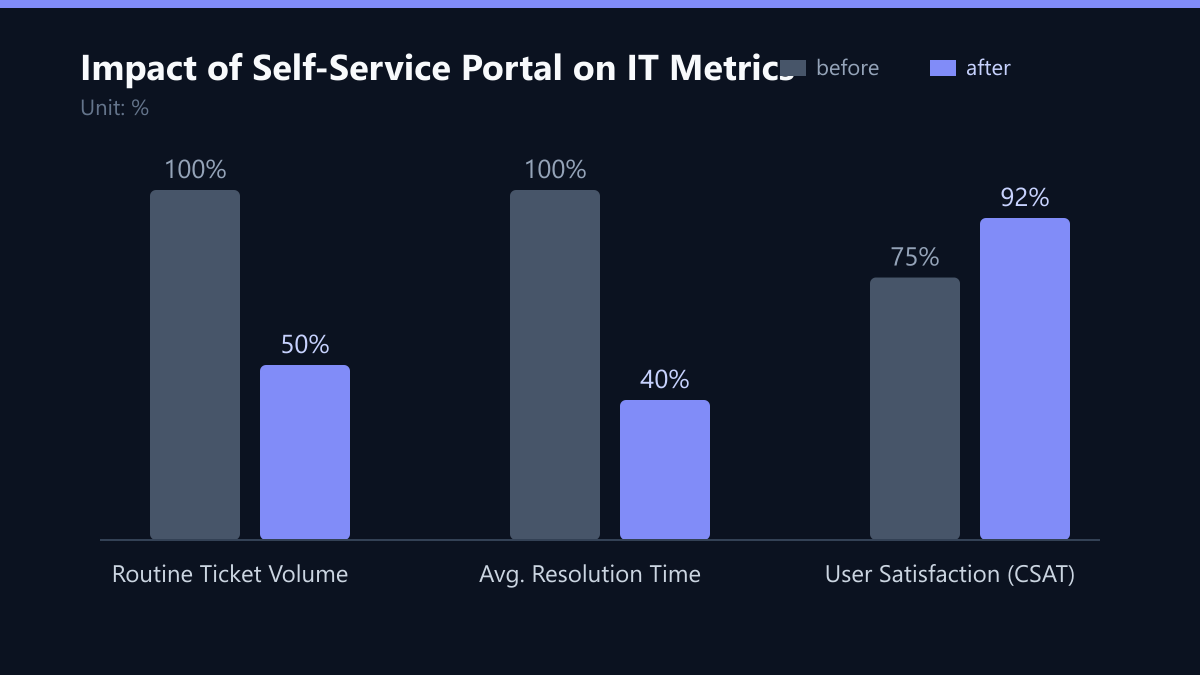
This automation not only reduces ticket volume but also improves security posture. By removing human error from the password reset process, organizations ensure that security policies are applied consistently across the entire workforce. The audit trail provides a clear record of who accessed what and when, which is invaluable during security incidents or compliance audits.
Feature 3: Guided Software and Hardware Provisioning
Onboarding new employees or issuing new hardware often involves multiple manual steps: creating accounts, installing software, and configuring network settings. This process is prone to human error and delays. Self-service portals allow authorized users to request standard software packages or hardware upgrades through a pre-approved catalog. The system triggers automated scripts to deploy the requested items to the user’s device.
For hardware requests, the portal can track inventory levels in real-time. If a specific laptop model is out of stock, the system automatically suggests an approved alternative and updates the request status. This eliminates the back-and-forth emails between IT and the requesting department.
- Standardization: Only approved software versions are available, reducing security risks from unvetted applications.
- Speed: Deployment time drops from days to minutes for standard configurations.
- Cost Control: Managers can set budget caps for hardware requests, ensuring financial compliance before approval is granted.
By standardizing the provisioning process, IT teams can ensure that every device is configured according to best practices. This reduces the risk of misconfigurations that can lead to security vulnerabilities or performance issues. The ability to set budget caps also gives finance teams greater visibility into IT spending, helping to control costs and avoid unexpected expenditures.
Feature 4: Real-Time Ticket Status and SLA Transparency
One of the biggest sources of “status update” tickets is the lack of visibility into ongoing issues. When employees do not know where their request stands, they escalate or re-submit tickets, doubling the workload for IT agents. A modern portal provides a live dashboard for each user. It displays the current status of every open ticket, assigned agent, and estimated resolution time. If a ticket exceeds its Service Level Agreement (SLA), the system automatically notifies both the employee and the IT manager.
This transparency builds trust. Employees feel heard and informed, which significantly reduces the frequency of follow-up inquiries. For IT leaders, this means fewer interruptions and a clearer view of team performance.
- Automated Notifications: Users receive email or push notifications at each stage of the workflow.
- SLA Breach Alerts: Managers are alerted before a breach occurs, allowing for proactive resource reallocation.
- Historical Data: Users can view their past tickets, helping them identify recurring issues on their specific devices.
By providing real-time visibility, organizations can reduce the “noise” in their helpdesk. Employees no longer need to call or email to ask for an update; they can simply check the portal. This not only saves time for IT agents but also improves the overall user experience by providing a sense of control and predictability.
Feature 5: Integrated Remote Support Handoff
While self-service aims to reduce tickets, some issues still require human intervention. The friction in transitioning from self-service to agent-assisted support often causes delays. The best portals include a seamless handoff mechanism. If an employee cannot resolve an issue via the knowledge base, they can initiate a remote support session directly from the portal. The agent receives full context, including the user’s device details, recent tickets, and error logs, before even connecting.
This context-rich handoff reduces the “troubleshooting time” per ticket. Agents do not need to spend ten minutes asking basic questions; they can dive straight into the technical problem.
- Pre-Connection Diagnostics: The portal can run lightweight diagnostics on the user’s device before the agent connects, identifying common faults automatically.
- Secure Remote Access: Uses encrypted, session-based remote control that does not require permanent administrative rights on the user’s machine.
- Post-Session Reports: A summary of the actions taken is automatically attached to the ticket, serving as documentation for future reference.
This feature is crucial for complex issues that cannot be resolved through self-service. By providing agents with a full context before they connect, organizations can significantly reduce the time spent on each ticket. This not only improves efficiency but also enhances the quality of support by allowing agents to focus on solving the problem rather than gathering information.
Implementation Strategy for Mid-Market Enterprises
Implementing a self-service portal is not a one-time project but an iterative process. Start with high-volume, low-complexity tasks such as password resets and basic knowledge base articles. Measure the impact on ticket volume within the first 90 days. As the system matures, expand to software provisioning and remote support integration. It is crucial to involve IT staff in the design phase. If agents view the portal as a threat rather than a tool, adoption will suffer. Training sessions should emphasize that the portal handles the routine, allowing agents to focus on complex, high-value problems.
Key Metrics to Track:
- Deflection Rate: Percentage of inquiries resolved without agent interaction.
- Average Handling Time (AHT): Reduction in time spent per ticket for remaining issues.
- User Satisfaction (CSAT): Feedback scores from employees using the portal.
- Cost per Ticket: Overall reduction in operational IT costs.
By prioritizing these five features, organizations can achieve a 50% reduction in helpdesk volume within six months, freeing up IT resources for strategic innovation and business growth.
Typical Mistakes to Avoid
- Ignoring User Experience: A complex or unintuitive portal will not be used. Keep the interface simple and ensure that the most common tasks are accessible within two clicks.
- Lack of Content Management: If the knowledge base is not regularly updated, it will become a source of frustration rather than a solution. Assign ownership for content updates and use feedback loops to identify outdated articles.
- Poor Integration with Existing Tools: If the portal does not integrate seamlessly with your ITSM and identity management systems, it will create silos and duplicate work. Ensure that all data flows bidirectionally and that single sign-on is enabled.
- Underestimating Change Management: Even the best portal will fail if users do not trust it or do not know how to use it. Invest in training and communication to build confidence and encourage adoption.
How You Measure Success
To ensure that your self-service portal is delivering value, you need to track specific KPIs. Here are three key metrics and how to measure them:
- Deflection Rate: This is the percentage of inquiries that are resolved without agent interaction. You can measure this by tracking the number of tickets that are closed via the self-service portal versus those that require agent intervention. A target deflection rate of 50% is a good benchmark for mid-sized companies.
- Average Handling Time (AHT): This metric measures the average time it takes to resolve a ticket. You can measure this by tracking the time from ticket creation to resolution. A reduction in AHT indicates that the portal is helping agents to resolve issues more efficiently.
- User Satisfaction (CSAT): This metric measures how satisfied users are with the portal. You can measure this by sending a short survey after each interaction. A target CSAT score of 90% or higher indicates that users are finding the portal useful and easy to use.
By tracking these KPIs, you can identify areas for improvement and ensure that your portal is delivering the expected value. Regularly review these metrics with your IT team and make adjustments as needed to optimize performance.
Checklist for Launching Your Self-Service Portal
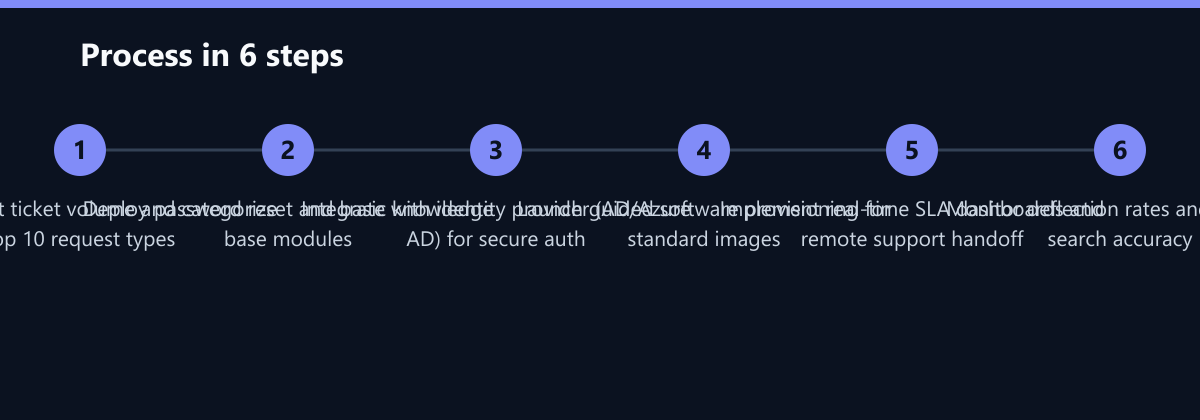
- Audit Current Ticket Volume: Identify the top 10 request types and categorize them by complexity.
- Select a Platform: Choose a self-service portal that integrates with your existing ITSM and identity management systems.
- Develop Content: Create a knowledge base with articles for the most common issues. Use AI to enhance search and discovery.
- Implement Automation: Automate password resets, software provisioning, and hardware requests.
- Launch and Train: Roll out the portal to a pilot group and gather feedback. Train IT agents on how to use the portal and how to hand off tickets.
- Monitor and Optimize: Track KPIs and make adjustments based on user feedback and performance data.
By following this checklist, you can ensure a successful launch and maximize the benefits of your self-service IT portal.