The Hidden Revenue Leak in Your Store
Checkout abandonment is frequently misdiagnosed as a pure user experience problem. While design matters, the root cause is often technical debt. For mid-sized enterprises, every percent of abandoned carts represents significant lost revenue that can be recovered through engineering precision. The goal is not just to look good, but to remove invisible barriers that cause users to leave before completing a purchase.
Key Drivers of Technical Abandonment:
- Slow page load times exceeding 3 seconds.
- Security warnings or mixed content errors.
- Complex form validation that frustrates users.
- Lack of trust signals during the payment phase.
By addressing these technical root causes, you create a seamless path from cart to confirmation. This approach yields higher ROI than superficial design changes alone, as it addresses the actual friction points in the user journey.
1. Eliminate Latency with Critical CSS and Caching
Speed is the primary technical determinant of checkout success. If the checkout page takes longer than 3 seconds to load, a significant portion of visitors will abandon the process. This latency is often caused by unoptimized scripts and excessive HTTP requests.
Implementation Steps:
- Implement Critical CSS to prioritize above-the-fold content rendering.
- Use a robust caching layer such as Redis or Varnish to serve static assets faster.
- Minify and combine JavaScript files to reduce payload size.
- Leverage a Content Delivery Network (CDN) to serve assets from geographically closer servers.
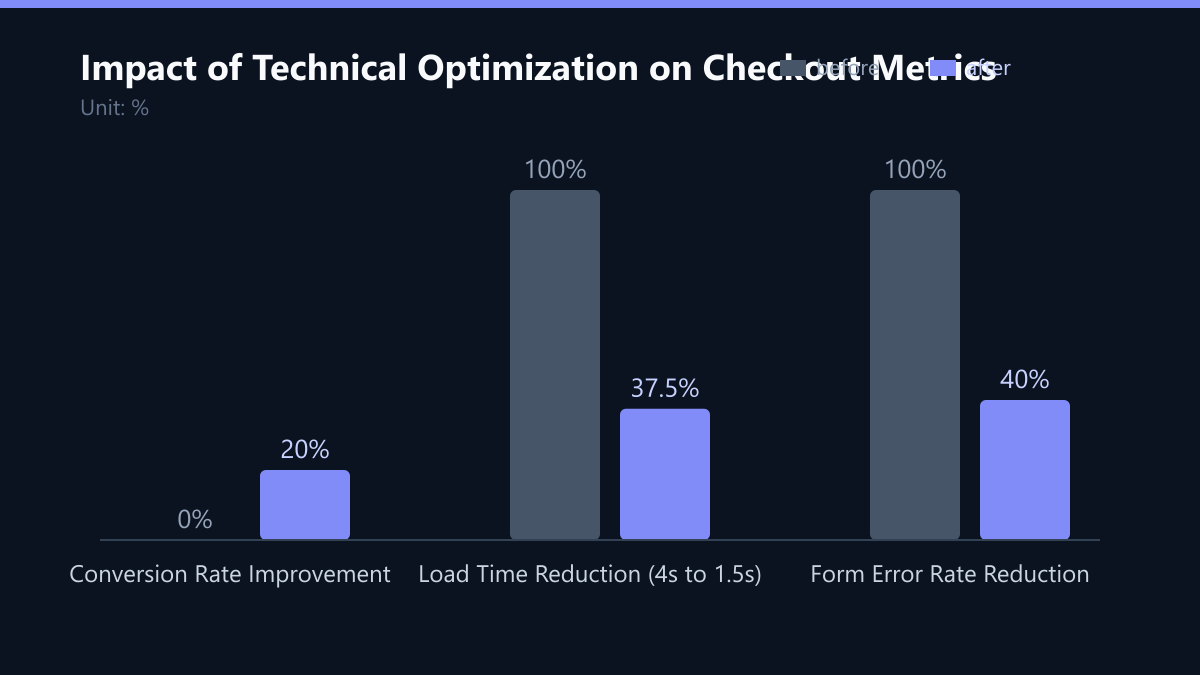
Impact: Reducing load time from 4 seconds to 1.5 seconds can improve conversion rates by up to 15%. This fix requires backend configuration but delivers immediate, measurable results.
2. Build Trust with Strict HTTPS and Security Headers
Browsers display prominent warnings for insecure connections, which instantly erodes user trust. Mixed content errors, where HTTP and HTTPS resources are mixed, are a common source of friction in WooCommerce stores. Users associate these warnings with potential data theft, making a clean, secure checkout environment a prerequisite for high-value transactions.
Technical Requirements:
- Ensure all resources, including images and scripts, load over HTTPS.
- Implement HSTS (HTTP Strict Transport Security) headers to force secure connections.
- Use valid SSL certificates with automatic renewal to avoid expiration issues.
- Regularly scan for and remove deprecated plugins that may introduce security vulnerabilities.
3. Reduce Cognitive Load with Smart Form Validation
Aggressive or unclear form validation is a major source of user frustration. If a user enters an address format that is technically correct but rejected by your validation logic, they are likely to leave. The system must guide, not block. Reducing the number of keystrokes and clarifying errors decreases cognitive load, which directly correlates with higher form completion rates.
Best Practices:
- Validate fields on blur rather than on submit to provide immediate feedback.
- Display specific, actionable error messages (e.g., “Please enter a valid postal code” instead of “Invalid input”).
- Auto-fill available data using browser APIs to reduce typing effort.
- Ensure that error messages do not clear the entire form, preserving user-entered data.
4. Remove Friction with Guest Checkout and One-Click Options
Forcing users to create an account before purchasing adds unnecessary steps and data entry. Many customers prefer to buy without the commitment of account creation. Removing this barrier reduces friction and accelerates the transaction. This approach captures immediate sales while still allowing you to collect marketing consent later. It respects the user’s time and privacy preferences, leading to higher satisfaction.
Configuration Tips:
- Enable the Guest Checkout option in WooCommerce settings.
- Integrate One-Click Buy features for returning customers using stored tokenized payment methods.
- Offer a prominent option to save details for future purchases after the transaction is complete.
- Ensure the guest checkout process is visually distinct and clearly labeled.
5. Stabilize Payment Gateway Integration
Payment processing is the final hurdle. Delays in communicating with the payment gateway can cause timeouts or failed transactions. A robust integration ensures that the payment phase is as fast and reliable as the rest of the site. Unreliable payment processing leads to direct revenue loss; technical stability in this phase is non-negotiable for e-commerce success.
Technical Optimizations:
- Use async processing for payment verification to keep the user interface responsive.
- Implement retry logic for transient network errors to prevent false negatives.
- Choose a payment gateway with low API latency and high uptime SLAs.
- Test payment flows across different browsers and devices to identify compatibility issues.
6. Measure Reality with Real-User Monitoring
You cannot fix what you do not measure. Lab tests do not reflect real-world user experiences. Real-User Monitoring (RUM) provides data on how actual customers interact with your checkout process. RUM data helps prioritize fixes based on actual user impact. It reveals issues that are invisible in staging environments, such as specific browser bugs or regional network delays.
Key Metrics to Track:
- Time to Interactive (TTI): When the page is fully usable.
- Error Rates: Frequency of JavaScript errors during checkout.
- Drop-off Points: Specific steps where users abandon the process.
- Geographic Performance: Variations in speed and success rate by region.
7. Maintain Performance with Regular Audits
WooCommerce stores are dynamic ecosystems. New plugins, updates, and theme changes can introduce performance regressions. A proactive maintenance schedule ensures that your checkout remains optimized over time. Regular audits prevent technical debt from accumulating. They ensure that your e-commerce infrastructure scales with your business without compromising speed or reliability.
Audit Checklist:
- Remove unused plugins and themes to reduce attack surface and load time.
- Keep core, plugins, and themes updated to the latest stable versions.
- Review database queries for inefficiencies, especially in product and cart tables.
- Conduct quarterly performance benchmarks to track trends and identify degradation.
Typical Mistakes to Avoid
- Ignoring Mobile Performance: Optimizing only for desktop while mobile traffic often accounts for the majority of checkout attempts. Mobile networks are slower, making latency issues more pronounced.
- Over-Optimizing for Lab Conditions: Relying solely on synthetic testing tools like Lighthouse without validating against real-user data. Lab tests assume perfect network conditions that do not exist for end-users.
- Blocking JavaScript Execution: Loading non-critical scripts in the header that block the rendering of the checkout form. This creates a perceived delay even if the server response time is fast.
- Neglecting Browser Compatibility: Failing to test across older browser versions or specific mobile browsers that may handle form validation or payment scripts differently.
How You Measure Success
To determine if your technical fixes are working, you must track specific KPIs before and after implementation.
- Checkout Conversion Rate: The percentage of users who reach the checkout page and complete the purchase. Target: Increase by 10-20% after optimization.
- Time to Interactive (TTI): The time it takes for the page to become fully interactive. Target: Under 2.0 seconds on 4G networks.
- Form Abandonment Rate: The percentage of users who start filling out the form but do not submit it. Target: Reduce by 15% through better validation and error handling.
- Payment Failure Rate: The percentage of attempted payments that fail due to technical errors. Target: Less than 1% of total transactions.
Method: Use a Real-User Monitoring (RUM) tool to capture baseline data for two weeks. Implement the fixes. Then, compare the KPIs over the next four weeks. Ensure that traffic volume and seasonality are consistent to isolate the impact of technical changes.
Passend dazu
- IT Consulting & IT Strategy
- AI Consulting & AI Strategy
- Increasing Conversion Rate by 18% Through Implementation of AI-Powered Product Recommendations in a US B2B Industrial Trade Company
- Cloud Services & Cloud Migration
- IT Compliance & Data Protection
- E-Commerce Development
- Building a Self-Service IT Portal: 5 Features That Reduce Helpdesk Volume by Half