The Illusion of Health: Why CPU and RAM Lie
Most IT managers rely on CPU and memory utilization as the primary health indicators for server infrastructure. While these metrics provide a snapshot of capacity, they often fail to reflect the actual user experience. A server can show 20% CPU usage while suffering from severe performance degradation due to disk I/O bottlenecks or network latency.
For business leaders, this discrepancy creates a false sense of security. Applications may respond slowly, or transactions may fail, even when traditional resource graphs look healthy. To maintain service levels that support revenue generation, you must look deeper than simple resource consumption. This article outlines the specific Key Performance Indicators (KPIs) that correlate directly with business outcomes and user satisfaction.
Latency: The True Measure of User Experience
Response time is the single most important indicator of application health from an end-user perspective. It measures the duration from when a request is sent to when the first byte of the response is received. High latency directly impacts customer satisfaction and can lead to abandoned carts in e-commerce environments.
Key Metrics to Monitor:
- Average Response Time: The mean time for requests to complete. Establish a baseline and set alerts for deviations.
- 95th and 99th Percentile Latency: These values reveal the experience of the slowest users. A high 99th percentile indicates intermittent issues that averages hide.
- Time to First Byte (TTFB): Critical for web performance and SEO rankings. It isolates server-side processing speed from client-side rendering.
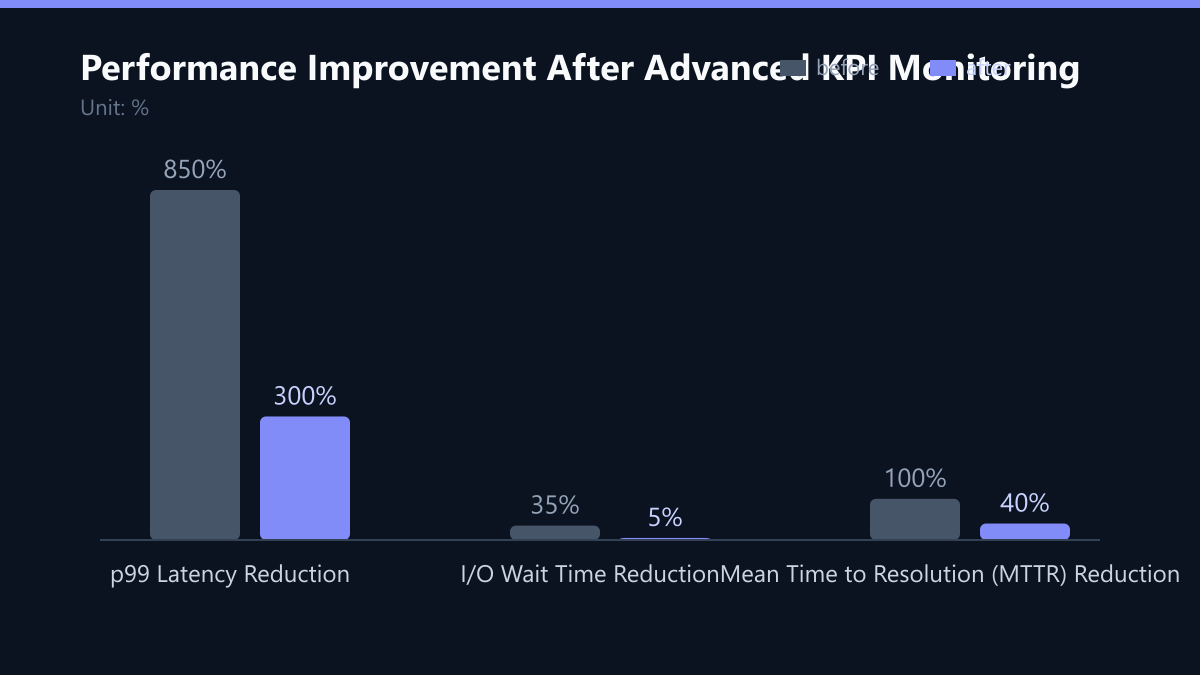
If your average response time is low but the 99th percentile is high, you likely have a specific component, such as a slow database query or an external API dependency, causing sporadic delays. Addressing these outliers is often more effective than optimizing the average case.
Storage Bottlenecks: The Silent Performance Killer
Disk Input/Output (I/O) operations are frequently the bottleneck in database-heavy applications. While CPU metrics show processing power, I/O metrics reveal how quickly data can be read from or written to storage. In virtualized or cloud environments, storage performance can vary significantly based on the underlying hardware and storage tier.
Critical I/O Indicators:
- IOPS (Input/Output Operations Per Second): Measures the number of read/write operations per second. Low IOPS on high-demand databases will cause application hangs.
- I/O Wait Time: The percentage of time the CPU waits for disk operations to complete. High I/O wait times indicate that the storage system cannot keep up with the workload.
- Throughput: The volume of data transferred per second. Essential for backup jobs and large file transfers.
For example, a server with idle CPU but high I/O wait times is effectively stalled. Monitoring these metrics allows you to identify when an upgrade to SSD storage or a storage tier change is necessary to maintain performance standards.
Network Stability: Beyond Bandwidth
In hybrid cloud or multi-site architectures, network performance is as critical as server capacity. Network issues often manifest as application timeouts rather than explicit errors, making them difficult to diagnose without dedicated monitoring. Packet loss, even at low rates, can significantly degrade the performance of real-time applications and VoIP systems.
Network KPIs to Track:
- Bandwidth Utilization: Monitor peak usage to ensure you are not nearing your contract limits, which can trigger throttling or additional costs.
- Packet Loss Percentage: Even 1% loss can cause noticeable delays in interactive applications. Sudden spikes often indicate hardware failures or routing issues.
- Jitter: Variation in packet delay. High jitter is detrimental to video conferencing and streaming services.
- Connection Errors: Monitor TCP retransmissions. High retransmission rates suggest network instability or server overload.
Proactive network monitoring helps distinguish between internal server issues and external connectivity problems, speeding up incident resolution and reducing downtime.
Application Layer Health: The Business Perspective
Infrastructure metrics do not tell the whole story. You must monitor the application layer to understand how the system performs under real-world conditions. Error rates and availability directly impact business operations and customer trust. A server can be fully operational at the OS level while the application fails to process transactions.
Essential Application KPIs:
- Error Rate: The percentage of requests that return error codes (4xx or 5xx). A sudden increase often indicates a software bug, database lock, or configuration error.
- Uptime and Availability: Calculate availability based on successful health checks, not just server power status. Aim for 99.9% or higher for critical systems.
- Queue Length: For asynchronous processing systems, monitor the number of pending tasks. A growing queue indicates that processing capacity is insufficient.
- Database Connection Pool Usage: High usage levels can lead to connection timeouts and application crashes during peak traffic.
By correlating application errors with infrastructure metrics, you can pinpoint the root cause of outages more efficiently. This approach reduces Mean Time to Resolution (MTTR) and minimizes the financial impact of downtime.
Implementation Roadmap: From Data to Action
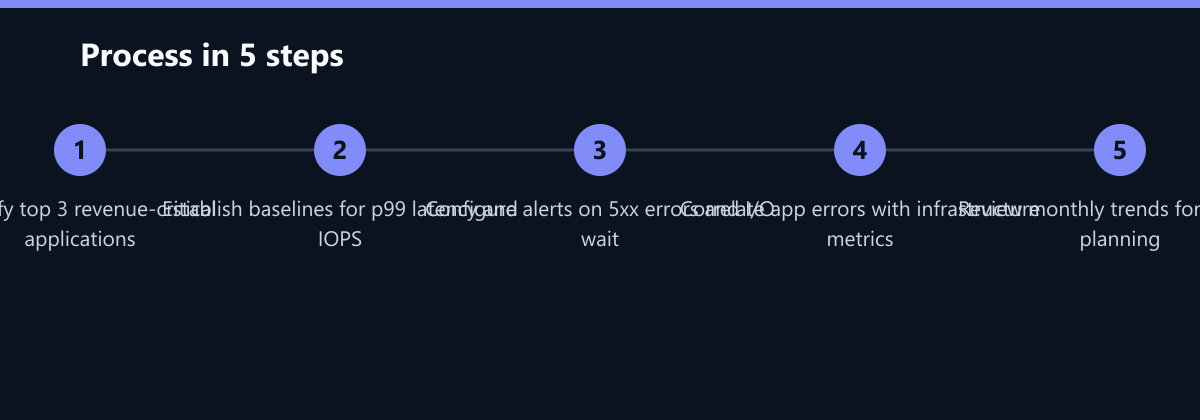
Transitioning from basic monitoring to advanced KPI tracking requires a structured approach. Do not attempt to monitor everything at once; focus on the metrics that impact revenue first.
- Identify Critical Assets: List the top three applications that generate revenue or are essential for operations. These are your primary monitoring targets.
- Establish Baselines: Record current performance levels for p99 latency, IOPS, and error rates during normal business hours. This baseline is crucial for distinguishing anomalies from normal variance.
- Configure Smart Alerts: Set thresholds based on your baselines. For example, alert if p99 latency exceeds 1.5x the baseline or if 5xx errors exceed 1% of total requests.
- Correlate Data Sources: Ensure your monitoring tool can overlay application logs with infrastructure metrics. This allows you to see if a spike in CPU usage coincides with a spike in database queries.
- Review and Refine: Conduct a monthly review of trend data. Adjust thresholds if you find too many false positives or if the business load has changed significantly.
Typical Mistakes to Avoid
Even with the right tools, organizations often misinterpret data or configure monitoring incorrectly. Avoid these common pitfalls:
- Alerting on Averages Only: Setting alerts based on average response time hides intermittent spikes. If your p99 latency is consistently high while the average is low, users are suffering, but your alerts remain silent.
- Ignoring I/O Wait in Virtualized Environments: In shared cloud environments, I/O wait can be caused by “noisy neighbors” rather than your own hardware limits. Failing to distinguish between local and shared resource contention leads to unnecessary hardware upgrades.
- Monitoring Infrastructure Without Context: High CPU usage is not inherently bad if it correlates with a planned batch job. Without correlating infrastructure metrics with application events, you will waste time investigating false alarms.
How You Measure Success
To justify the investment in advanced monitoring, you must track the impact on business operations. Use these KPIs to measure success:
- Mean Time to Resolution (MTTR): Track the average time taken to resolve incidents. Advanced monitoring should reduce this by identifying root causes faster. A target reduction of 30-40% is typical after implementation.
- False Positive Rate: Measure the percentage of alerts that do not require action. A well-tuned system should have a low false positive rate, ensuring that when an alert fires, it is actionable.
- Uptime Percentage: Calculate availability based on successful health checks. Aim for 99.9% or higher for critical systems. Track the trend to ensure stability over time.
- Cost Per Incident: Estimate the financial impact of each downtime event. A reduction in MTTR and incident frequency directly lowers this cost, providing a clear ROI for the monitoring strategy.
Checklist for Advanced KPI Monitoring
Use this checklist to ensure your monitoring strategy is comprehensive and actionable:
- Baseline Established: Documented baseline values for p99 latency, IOPS, and error rates for all critical applications.
- Alert Thresholds Configured: Alerts set for deviations from baselines, not just absolute limits.
- Correlation Enabled: Monitoring tool overlays application logs with infrastructure metrics.
- On-Call Rotation Defined: Clear process for who is notified and how to respond to critical alerts.
- Monthly Review Scheduled: Regular meeting to review trends, adjust thresholds, and plan capacity.
By implementing these advanced KPIs, you move beyond reactive firefighting to proactive performance management. This approach ensures that your IT infrastructure supports business growth rather than merely maintaining the status quo. It provides a clear framework for evaluating the effectiveness of your hosting environment and guiding future infrastructure decisions.