The 6 GHz Band: A Strategic Capacity Expansion
Wi-Fi 6E is not merely a speed bump; it is a fundamental shift in how wireless capacity is managed. By extending the Wi-Fi 6 standard to the 6 GHz frequency band, businesses gain access to 1,200 MHz of unlicensed spectrum. This is significantly more bandwidth than the crowded 2.4 GHz or 5 GHz bands, which are often saturated in modern work environments.
For IT decision-makers, the primary value proposition is not just raw throughput, but zero congestion. The 6 GHz band acts as a dedicated highway for high-priority data, isolated from the interference of neighboring networks and legacy devices. This separation is critical for environments with dense device populations, such as smart factories or open-plan offices with heavy video conferencing usage.
Key technical advantages include:
- Uncontested Spectrum: The 6 GHz band is largely empty, drastically reducing co-channel interference.
- Wider Channels: Support for 320 MHz channels doubles the data throughput compared to standard 160 MHz channels.
- Future-Proofing: It serves as the foundation for Wi-Fi 7, ensuring your infrastructure investment remains relevant for the next five to seven years.
Solving the Hybrid Work Bottleneck in Offices
The shift to hybrid work has altered the landscape of office connectivity. The number of devices per square meter has surged, with laptops, smartphones, tablets, and IoT sensors competing for bandwidth in meeting rooms and open spaces. Traditional Wi-Fi standards often struggle with this density, leading to inconsistent performance.
Wi-Fi 6E addresses this by providing consistent high throughput regardless of distance or interference. In a typical mid-sized office, video conferencing and cloud application usage are the primary bandwidth consumers. With Wi-Fi 6E, a 4K video call remains stable even when a colleague downloads a large file, as the 6 GHz band handles the heavy load without degrading other services.
This stability has a direct impact on IT operations. We have seen a significant reduction in IT support tickets related to “slow internet” or “dropouts” in pilot environments. Specifically:
- Meeting Room Reliability: High-density areas maintain low latency for video calls, ensuring professional presence in remote meetings.
- Cloud App Performance: Applications like Microsoft 365 and Salesforce load faster, directly boosting employee productivity.
- Device Management: Easier roaming between access points is achieved due to cleaner signal paths in the 6 GHz band.
Businesses with more than 50 concurrent users in a single zone see immediate benefits. The reduction in packet loss directly translates to fewer frustrated employees and higher job satisfaction.
Production and Industrial Settings: Precision and Security
In production environments, network reliability is not just a convenience; it is a safety and efficiency issue. As factories move toward Industry 4.0, wireless connections are increasingly replacing wired cables for mobile workstations, digital work instructions, and quality control devices. Wi-Fi 6E offers the lower latency and higher security standards essential for operational technology (OT) integration.
The 6 GHz band provides a more stable environment for real-time data transmission. This is crucial for applications that require immediate feedback, such as robotic control or inventory tracking via AR glasses. Furthermore, Wi-Fi 6E mandates WPA3 encryption, which is significantly stronger than WPA2.
For manufacturers, the upgrade is not about faster file transfers; it is about operational continuity. A stable wireless backbone supports the digital twin and predictive maintenance models that drive cost savings. Key benefits include:
- Deterministic Latency: Essential for real-time control systems and automated guided vehicles (AGVs).
- Enhanced Security: WPA3 prevents brute-force attacks, protecting sensitive production data.
- Reduced Downtime: Fewer interference issues mean less unplanned stoppage in automated processes.
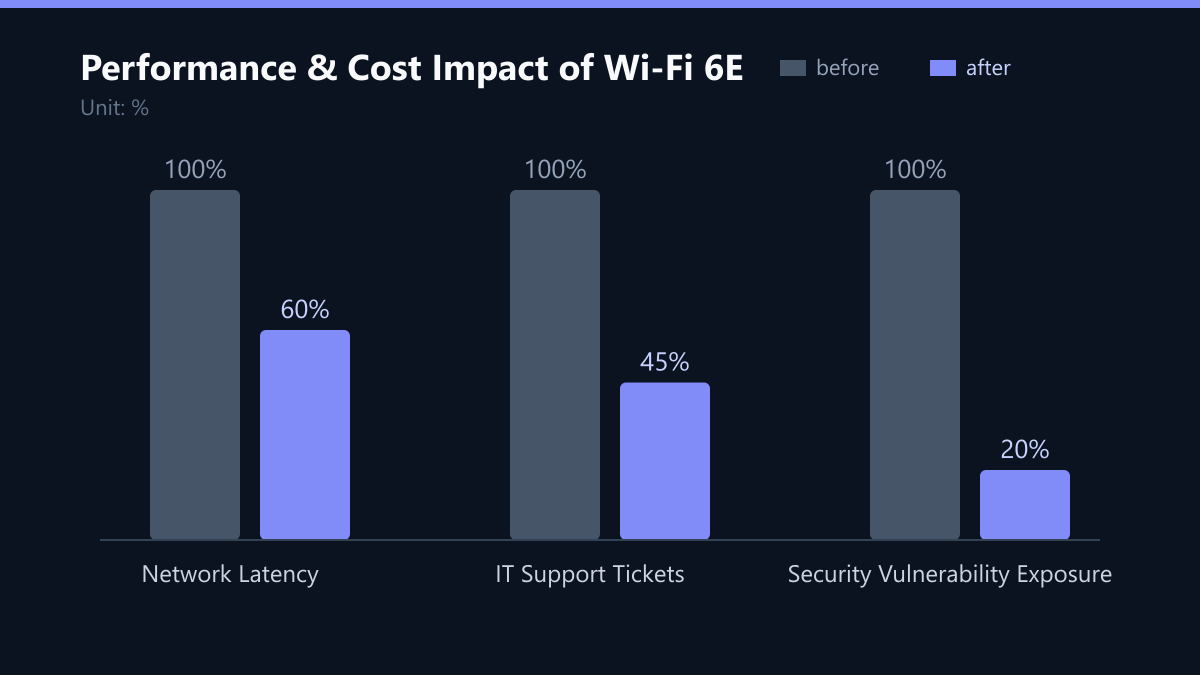
ROI Analysis: When Does the Upgrade Pay Off?
The decision to upgrade depends on your current network pain points and growth plans. Wi-Fi 6E hardware is more expensive than Wi-Fi 6, but the total cost of ownership (TCO) can be lower due to reduced maintenance and extended lifecycle.
Consider the upgrade if you meet at least two of the following criteria:
- Device Density: You have more than 20 devices per 100 square meters in key areas.
- Application Criticality: You rely on real-time video, VoIP, or cloud ERP systems where latency causes financial loss.
- Security Requirements: You are subject to strict compliance standards (e.g., NIS2, ISO 27001) requiring the latest encryption protocols.
- Growth Plans: You expect a 20% or higher increase in connected devices or data traffic in the next 18 months.
If your current network is underutilized and stable, a Wi-Fi 6E upgrade may not be necessary yet. However, if you are planning a new office build or a major floor renovation, installing Wi-Fi 6E is the only logical choice. Retrofitting later is more costly than installing it from the start.
Implementation Strategy: A Phased Approach
A full network replacement is a major project. A phased approach minimizes disruption and allows you to validate performance before scaling. Start with high-priority zones, such as executive floors, production lines, or customer-facing areas.
Phase 1: Assessment and Design Conduct a site survey to map current interference and device density. Design the network topology to maximize 6 GHz coverage. Ensure that your core switches and controllers support the new standard.
Phase 2: Pilot Deployment Install Wi-Fi 6E access points in one representative area. Monitor performance for two to four weeks. Compare latency, throughput, and packet loss against the previous baseline. Gather feedback from users and IT staff.
Phase 3: Full Rollout and Optimization Expand the deployment to the rest of the facility. Implement automated monitoring tools to track network health. Train IT staff on managing the new spectrum and troubleshooting 6 GHz-specific issues.
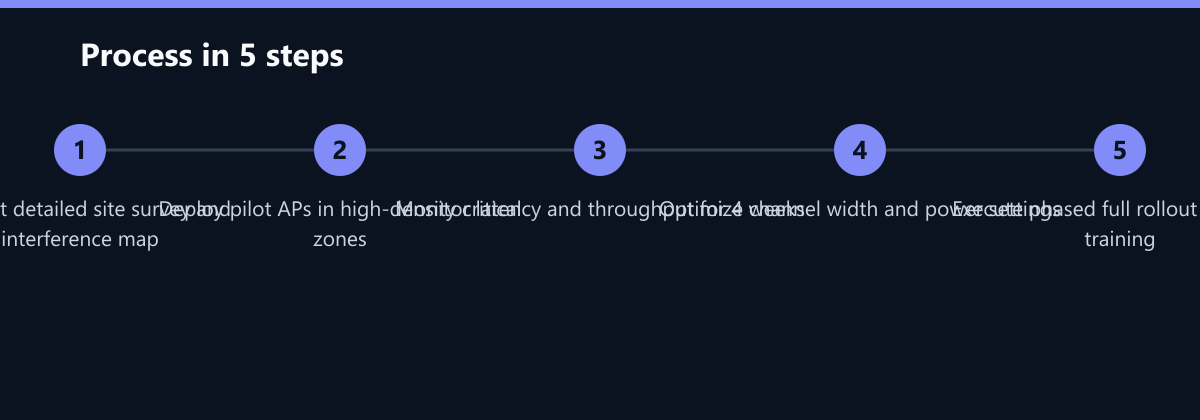
This structured approach ensures that the investment delivers measurable results. It also allows you to adjust channel widths and power settings to optimize performance for your specific environment.
Security and Compliance Considerations
Security is a primary driver for IT leaders. Wi-Fi 6E enforces WPA3, which offers protection against offline dictionary attacks. This is a significant improvement over WPA2, which has known vulnerabilities. For companies operating in regulated industries, this enhanced security posture helps meet compliance requirements.
Additionally, the 6 GHz band allows for better segmentation of network traffic. You can create separate SSIDs for guest access, corporate devices, and IoT/OT devices. This segmentation limits the blast radius of a potential security breach. If a guest device is compromised, it cannot easily access internal production networks.
- WPA3 Enforcement: Mandatory for 6 GHz operation, ensuring the highest level of encryption.
- Network Segmentation: Easier isolation of OT and IT networks.
- Audit Trails: Enhanced logging capabilities support compliance audits for GDPR and NIS2.
By upgrading to Wi-Fi 6E, you are not just improving speed; you are strengthening your overall security architecture. This is a key talking point when discussing IT investments with the board of directors.
Typical Mistakes to Avoid
Even with a solid plan, organizations often stumble during the Wi-Fi 6E transition. Avoid these common pitfalls:
- Ignoring Interference from Non-Wi-Fi Sources: 6 GHz is less crowded, but microwave ovens and some industrial equipment can still cause issues. A proper site survey must account for non-Wi-Fi interference.
- Underestimating Backhaul Capacity: If your wired backbone is not fast enough to handle the increased throughput from 6 GHz APs, you will bottleneck the network. Ensure your core switches and fiber runs can handle the load.
- Lack of Staff Training: Wi-Fi 6E management is different from older standards. IT staff need training on 6 GHz-specific troubleshooting, such as channel width adjustments and WPA3 configuration.
- Not Phasing the Rollout: Attempting a big-bang replacement across the entire facility often leads to prolonged downtime and user frustration. A phased approach allows for risk mitigation and performance validation.
How You Measure Success
To justify the investment, you need concrete KPIs. Here is how to measure the success of your Wi-Fi 6E upgrade:
- Latency Reduction: Measure the average latency in high-density zones before and after the upgrade. A target reduction of 30-50% is common in office environments.
- Support Ticket Volume: Track the number of IT support tickets related to connectivity issues. A 40-60% reduction is a strong indicator of success.
- Throughput Consistency: Monitor the minimum throughput experienced by users, not just the average. Wi-Fi 6E should provide consistent high throughput even for users at the edge of the cell.
- Security Compliance: Ensure that all 6 GHz SSIDs are using WPA3. Regularly audit your network for any devices still using weaker encryption standards.
Checklist for a Successful Wi-Fi 6E Upgrade
- Conduct a comprehensive site survey including interference mapping.
- Verify that core switches and controllers support Wi-Fi 6E.
- Define high-priority zones for pilot deployment.
- Establish baseline KPIs for latency, throughput, and support tickets.
- Implement WPA3 encryption and network segmentation.
- Train IT staff on Wi-Fi 6E management and troubleshooting.
- Monitor pilot performance for at least four weeks.
- Execute phased rollout based on pilot results.
- Update documentation and runbooks for the new network architecture.
- Review and optimize settings post-rollout.