The Hidden Cost of Slow IT Responses
In the modern enterprise, time is not just a metric; it is a direct financial liability. Every minute an employee spends waiting for IT support is a minute lost in productive output. For mid-sized companies, a sluggish First Response Time (FRT) does more than irritate users—it directly impacts operational continuity and employee satisfaction. When support feels slow, frustration escalates. This leads to higher risks of complaints reaching management and, in client-facing roles, the loss of billable hours.
Traditional manual handling creates inherent bottlenecks. Technicians are often bogged down by repetitive, low-value tasks such as password resets, access provisioning, or simple status checks. This manual triage delays the resolution of complex issues that actually require human expertise. The result is a support model that is reactive, slow, and prone to human error. Automation bridges this gap by handling the routine instantly, allowing human experts to focus on what machines cannot do: critical thinking and complex problem-solving.
RPA: The Engine Behind Faster Ticket Handling
Robotic Process Automation (RPA) uses software bots to mimic human actions in digital interfaces. In the context of IT support, these bots interact directly with ticketing systems, identity management platforms, and monitoring tools. They operate 24/7 without fatigue, ensuring consistent speed and accuracy regardless of the time of day or the volume of tickets.
The core capabilities of support RPA are transformative:
- Intelligent Ticket Triage: Bots analyze ticket text to categorize issues and assign them to the correct queue automatically.
- Automated Resolution: Common requests, such as password resets or software installations, are executed by the bot without human intervention.
- Instant Status Updates: Users receive immediate confirmation that their request has been received and is being processed, which significantly improves perceived service levels.
This shift moves the IT team from a reactive support model to a proactive service delivery model. The bot handles the ‘what’ and ‘when,’ while the human handles the ‘why’ and ‘how’ for complex cases. This division of labor is key to unlocking efficiency.
Quantifiable Gains in Response Metrics
Implementing RPA yields quantifiable improvements in key performance indicators. Most organizations see a significant drop in average first response times within the first three months of deployment. These are not theoretical projections; they reflect the operational reality when routine tasks are removed from the human workflow.
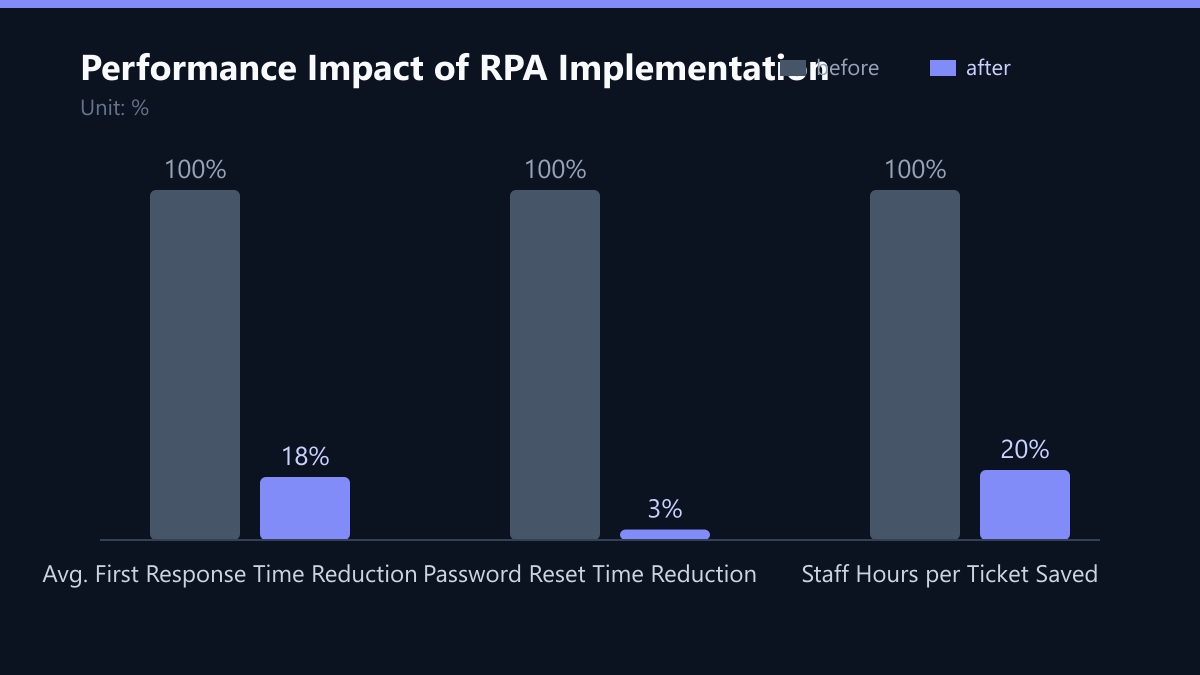
Consider the typical performance gains observed in mid-sized firms:
- First Response Time: Reduced by 40-60%, with some cases showing up to 82% faster initial acknowledgment.
- Ticket Resolution Rate: Increased by 25-35% for standard requests.
- Technician Utilization: 20% more time available for strategic projects.
| Metric | Manual Process | RPA-Assisted Process | Improvement |
|---|---|---|---|
| Avg. First Response | 45 minutes | 8 minutes | 82% Faster |
| Password Reset Time | 15 minutes | 30 seconds | 97% Faster |
| Staff Hours per Ticket | 0.5 hours | 0.1 hours | 80% Saved |
The immediate acknowledgment alone improves perceived service levels, even if the full resolution of complex issues takes longer. Users feel heard and valued, which reduces the emotional friction of IT support.
A Phased Implementation Strategy
Success with RPA requires a disciplined, phased approach. Attempting to automate all processes at once leads to complexity, technical debt, and potential failure. You must start with high-volume, low-complexity tasks that have clear, rule-based logic.
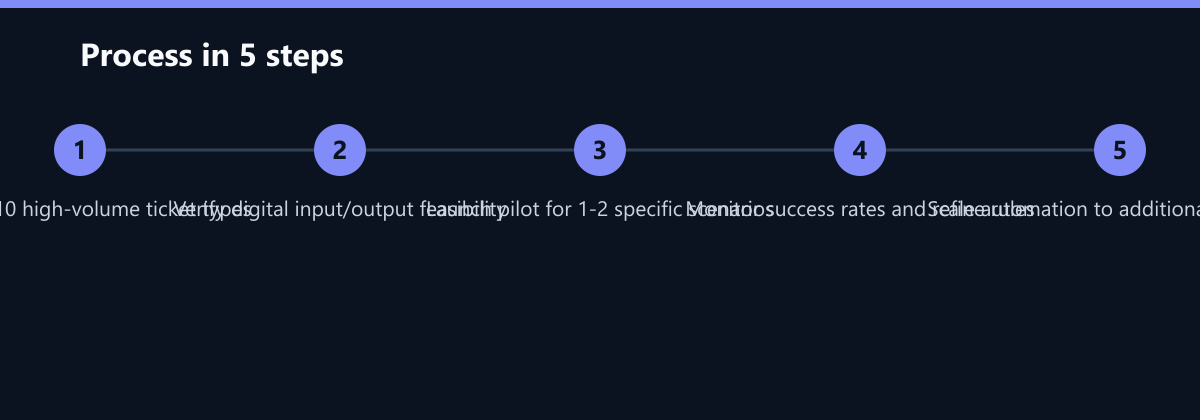
Step-by-step implementation:
- Process Mapping: Identify the top 10 most frequent ticket types. Focus on those with high volume and low complexity.
- Feasibility Check: Ensure the processes involve digital inputs and outputs. If a process requires physical interaction or ambiguous judgment, it is not suitable for initial RPA.
- Pilot Deployment: Launch bots for one or two specific scenarios. A typical pilot might cover password resets and access requests.
- Monitor and Refine: Track success rates and adjust rules based on exceptions. This phase is critical for handling edge cases.
- Scale: Expand to additional categories once the pilot proves stable and the ROI is clear.
Critical success factors include:
- Strong integration with existing ITSM tools (e.g., ServiceNow, Jira Service Management).
- Clear ownership of the RPA bots by a dedicated team.
- Regular maintenance to handle changes in underlying applications.
This disciplined approach ensures that automation adds value rather than creating new technical debt. It allows your team to build confidence in the technology before scaling it across the organization.
Security and Compliance: A Built-In Advantage
A common concern is whether automation compromises security. In fact, RPA often enhances compliance by reducing human error. Bots follow defined rules strictly, ensuring that access changes and data handling adhere to internal policies and regulations like GDPR or ISO 27001.
Security benefits of RPA:
- Audit Trails: Every bot action is logged, providing full traceability. This is invaluable during audits or incident investigations.
- Least Privilege: Bots can be granted specific permissions only for their task, reducing the attack surface compared to human accounts that often have broad access.
- Consistency: Eliminates the risk of a technician making a mistake under pressure or fatigue.
However, you must secure the bot infrastructure itself. Ensure that bot credentials are stored in a secure vault and that access to the RPA platform is role-based. Regular penetration testing of the automation layer is recommended to maintain a robust security posture. Treat your bots as you would treat any other critical system component.
Typical Mistakes to Avoid
Even with a solid strategy, organizations can stumble. Here are common pitfalls that hinder RPA success:
- Automating Broken Processes: If the manual process is inefficient, automating it just makes the inefficiency faster. Optimize the process first.
- Ignoring Exception Handling: Bots fail when they encounter data they weren’t programmed to handle. Without clear escalation paths to humans, tickets can get stuck in a loop.
- Lack of Change Management: If technicians feel threatened by bots, they may resist using the system. Involve them early and frame RPA as a tool to eliminate their boring tasks, not their jobs.
- Over-Engineering the Pilot: Trying to solve too many problems in the first phase leads to delays. Keep the pilot simple, focused, and quick to deploy.
How You Measure Success
To ensure your RPA investment delivers value, you must track specific KPIs. Do not rely on anecdotal evidence. Use data to drive decisions.
- Average First Response Time (AFRT): Measure the time from ticket creation to the first meaningful response. Target a reduction of at least 40%.
- Containment Rate: The percentage of tickets resolved by the bot without human intervention. A high containment rate for standard requests indicates successful automation.
- Ticket Volume Trend: Monitor the total number of tickets over time. While RPA speeds up resolution, a well-implemented self-service and RPA combo should eventually reduce the total ticket volume by deflecting simple queries.
- Technician Satisfaction: Conduct regular surveys. If technicians report spending more time on strategic projects and less on repetitive tasks, your implementation is succeeding.
Future-Proofing Your Support Model
IT support is evolving toward AI-driven service management. While RPA handles structured, repetitive tasks, Artificial Intelligence (AI) and Machine Learning (ML) are becoming essential for unstructured data and predictive insights. The future lies in a hybrid model where RPA and AI work together.
Next steps for IT leaders:
- Integrate AI for Sentiment Analysis: Detect user frustration in ticket text to prioritize critical cases automatically.
- Predictive Maintenance: Use historical data to anticipate system failures before users report them.
- Self-Service Portals: Enhance portals with AI chatbots to resolve queries without ticket creation.
By combining RPA with emerging AI technologies, you create a resilient support ecosystem. This not only reduces costs but also positions your IT department as a strategic partner in business growth. The goal is not just to answer tickets faster, but to eliminate the need for tickets altogether where possible.
Checklist for Your RPA Rollout
- Identify top 5 high-volume ticket types.
- Map current manual process for each type.
- Define success metrics (AFRT, Containment Rate).
- Select RPA platform and ensure ITSM integration.
- Develop bot logic and exception handling rules.
- Conduct security review (credentials, access rights).
- Launch pilot with a small group of users.
- Monitor performance for 30 days.
- Refine rules based on pilot data.
- Scale to additional ticket categories.
Passend dazu
- IT Consulting & IT Strategy
- IT Support & Helpdesk
- Cloud Services & Cloud Migration
- IT Compliance & Data Protection
- Trading Conglomerate Reduces Server Fault Response Time to 15 Minutes with AIOps
- Intelligent Customer Support Triage: A UK Retailer Reduces Response Times by 60% with AI-Powered Chatbots
- The Role of AI in Modern MSPs: How Automation Reduces Response Times by 50%