The Human Firewall: Why Technical Controls Alone Fail
Technical firewalls, endpoint detection, and zero-trust architectures are the backbone of modern IT security. However, they operate in a digital space, while social engineering attacks operate in the human space. A determined attacker does not need to crack encryption; they only need to manipulate trust, urgency, or authority. For mid-sized companies, this risk is disproportionately high. Unlike large enterprises with dedicated 24/7 Security Operations Centers (SOCs), mid-sized firms often lack the bandwidth to monitor every subtle behavioral anomaly in real-time. Your employees are the primary target. A single click on a malicious link, a single phone call confirming a password, or a single USB stick plugged in can expose your entire network to ransomware or data exfiltration.
Assuming your staff is safe is a dangerous gamble. You must measure the effectiveness of your human defense. Regular, realistic drills provide the hard data needed to identify weak points. This approach shifts security from a theoretical policy document to a practiced habit. When a real attack occurs, your team will react correctly under pressure because they have already experienced the pressure in a safe environment.
Drill 1: The Phishing Email Simulation
Phishing remains the most common initial access vector for cyberattacks. This drill tests whether employees can identify suspicious emails under normal working conditions. You do not need expensive software to start; a well-crafted email template is sufficient. The goal is to measure two critical metrics: the click rate and the report rate.
Implementation Steps:
- Create a realistic email that mimics a known vendor or internal IT request. Use familiar branding and language.
- Include a harmless link that logs the click but does not execute malware.
- Send the email to a random sample of 20-30 employees across different departments to ensure statistical relevance.
- Measure the percentage of users who click the link versus those who report it to IT.
Key Metrics:
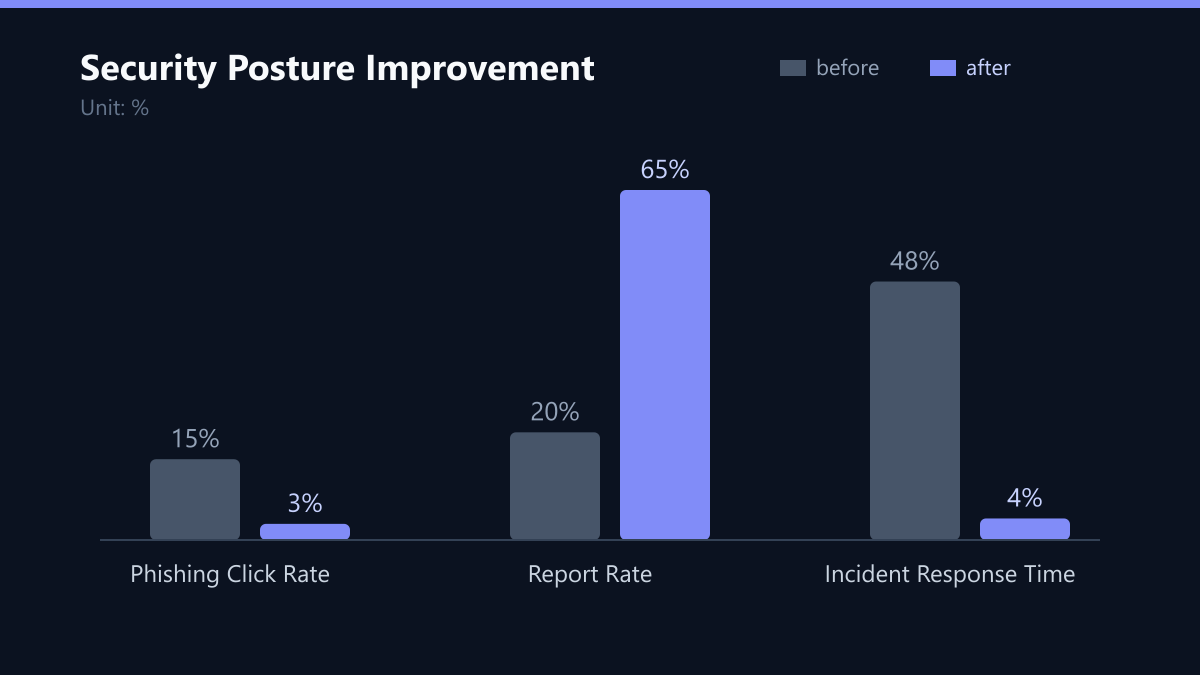
- Click Rate: The percentage of users who clicked the link. Aim for under 5%. If your baseline is 15%, a drop to 3% represents an 80% improvement in resilience.
- Report Rate: The percentage of users who reported the email to IT. Aim for over 50%. A high report rate indicates a strong security culture.
- Time to Report: The average time from receipt to reporting. Faster is better, as it reduces the window of opportunity for real attacks.
Drill 2: The Voice Phishing (Vishing) Call
Attackers increasingly use phone calls to bypass email filters and reach decision-makers directly. Vishing relies on social pressure, authority, and urgency. This drill tests how your staff handles urgent, unsolicited phone requests for sensitive information. It is critical to test roles with high access rights, such as finance managers, IT administrators, or HR leads.
Scenario Design:
- An external caller identifies themselves as a senior IT vendor or internal executive.
- They request an urgent password reset, a wire transfer verification, or confirmation of a purchase order.
- The caller uses professional language and creates a sense of an immediate deadline, such as “the server will go down in 10 minutes if you don’t act.”
Evaluation Criteria:
- Does the employee verify the caller’s identity through a known, independent channel (e.g., calling back a known number)?
- Do they refuse to provide credentials or approve transactions over the phone?
- Do they escalate the call to their manager or the IT security team?
A successful outcome is not just hanging up; it is following your internal verification protocol. This drill highlights gaps in your call handling procedures and employee awareness of social pressure tactics. It reveals whether your staff understands that “urgent” is often a tactic, not a fact.
Drill 3: The USB Drop Attack
Physical security is often an afterthought in digital-first companies. A single USB stick left in a parking lot, reception area, or break room can introduce malware directly into your network. This drill tests physical security awareness and incident reporting procedures. It is particularly effective for testing receptionists, office managers, and employees who work in shared spaces or handle visitors.
Execution Plan:
- Place a USB stick with a visible, tempting label (e.g., “Payroll 2024” or “Project X Confidential”) in a high-traffic area.
- Monitor who picks it up and plugs it into a computer.
- Note the time between placement and discovery, and whether it is reported.
Risk Assessment:
- If plugged in, the device should be monitored for any data exfiltration attempts.
- Use a sanitized USB stick with no active payload to avoid accidental network compromise during the test.
- Track if the employee reports the found item to IT or facilities management.
This drill reveals physical security gaps and the effectiveness of your “see something, say something” culture. It also tests whether your endpoint protection can detect and block unauthorized USB devices. If your endpoint management system does not alert you when an unknown USB device is connected, you have a technical gap that needs immediate fixing.
Drill 4: The Pretexted Data Request
Pretexting involves creating a fabricated scenario to obtain specific information. This drill tests your team’s adherence to data privacy regulations like GDPR and NIS2. It focuses on verifying the identity of requesters before sharing sensitive data. This is crucial for roles handling customer data, HR records, or financial information.
Test Scenario:
- An email or phone call from a “compliance officer” or “auditor” requests a list of employees, customer data, or financial statements.
- The requester cites a vague legal obligation or an urgent audit deadline.
- The request seems plausible but lacks specific authorization details, such as a formal mandate or reference number.
Success Indicators:
- The employee requests official identification or a written mandate.
- The employee consults with their data protection officer or manager before acting.
- The employee does not send data until verification is complete.
This drill directly impacts your compliance posture. A failure here can lead to regulatory fines and reputational damage. It reinforces the importance of verifying authority before action. In a world where deepfakes and AI-generated voices are becoming more common, the “call back” verification step is more important than ever.
Drill 5: The Insider Threat Simulation
Not all threats come from outside. Internal actors, whether malicious or negligent, can cause significant damage. This drill tests access controls and monitoring capabilities. It simulates a scenario where an employee attempts to access files outside their role or exfiltrate data to a personal cloud drive. This is not about accusing employees of wrongdoing but testing your technical and procedural safeguards.
Technical Setup:
- Use your existing DLP (Data Loss Prevention) tools or file access logs.
- Simulate an attempt to copy sensitive files to an unauthorized external drive or cloud service.
- Monitor if the system blocks the action and alerts the security team.
Procedural Test:
- Observe how IT responds to the alert.
- Test if the incident is investigated promptly.
- Verify if access rights are reviewed and adjusted if necessary.
This drill ensures your technical controls are active and that your incident response process is efficient. It helps you detect anomalies early and prevent data breaches caused by internal errors or malicious acts. If your DLP tools are not configured to alert on specific high-risk actions, this drill will expose that configuration gap.
Analyzing Results and Closing the Loop
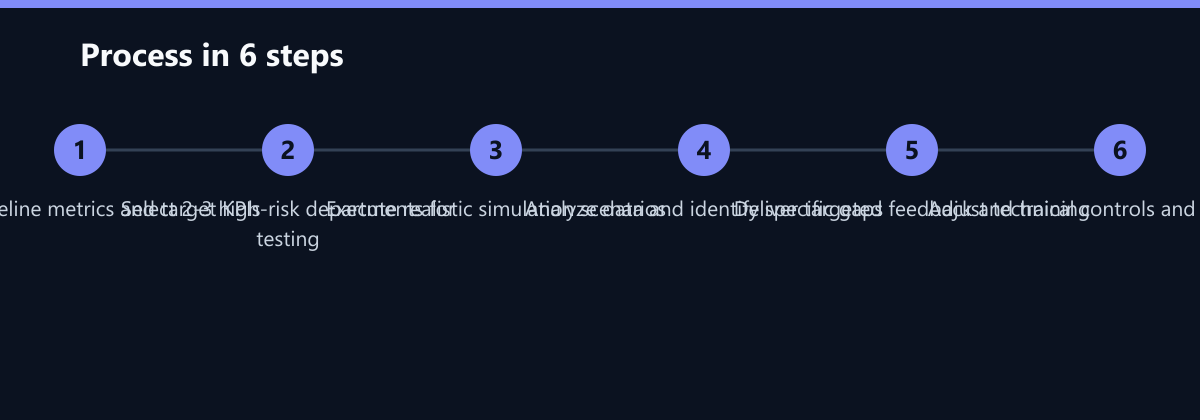
Running drills is only half the work. The real value comes from analyzing the results and implementing improvements. You need a clear process to turn data into action. Without this, drills become a box-ticking exercise with no long-term benefit. The goal is to reduce the risk of a successful attack by addressing the specific weaknesses identified.
Action Plan:
- Aggregate Data: Combine results from all drills to identify common weaknesses. Look for patterns across departments or roles.
- Targeted Training: Provide specific feedback to employees who failed drills. Focus on the specific mistake, not general theory. For example, if someone clicked a phishing link because they trusted the sender, teach them how to verify the sender’s email address.
- Technical Adjustments: If technical controls failed (e.g., USB not blocked, DLP not alerting), fix the configuration immediately.
- Repeat and Refine: Schedule the next round of drills in 3-6 months. Change the scenarios to avoid predictability. Attackers change their tactics, so your tests must evolve.
Reporting to Leadership:
- Present key metrics to management in a concise dashboard.
- Highlight trends over time (e.g., click rate decreasing from 15% to 5%).
- Link security improvements to business risk reduction. Show how a 50% reduction in click rates correlates with a lower probability of a ransomware event.
By closing the loop, you create a continuous improvement cycle. Your team becomes more resilient, and your organization reduces its exposure to social engineering attacks. This proactive approach is essential for maintaining trust with customers and partners in an increasingly connected world.
Typical Mistakes to Avoid
- Punishing Employees for Failures: If employees fear punishment, they will hide mistakes and not report suspicious activities. Treat failures as learning opportunities. A supportive approach encourages reporting and learning, while a punitive approach leads to hiding mistakes.
- Using Unpredictable or Unrealistic Scenarios: The drill must be realistic enough to be effective but safe enough to avoid legal or operational issues. Avoid scenarios that could cause actual financial loss or legal liability if not handled correctly.
- Ignoring the “Report Rate”: Focusing only on the click rate is a mistake. A low click rate is good, but a low report rate means your team is not engaged. You need to incentivize and recognize reporting behavior.
- Failing to Update Technical Controls: If a drill reveals that a technical control (like USB blocking) is not working, fixing it is not optional. It is a critical part of the drill’s value. If you ignore the technical gap, you are leaving the door open.
How You Measure Success
To measure the success of your social engineering defense program, track these KPIs:
- Phishing Click Rate: The percentage of employees who click on a phishing link. Target: <5%.
- Report Rate: The percentage of employees who report a suspicious email or call. Target: >50%.
- Time to Report: The average time from receiving a suspicious item to reporting it. Target: <1 hour.
- Incident Response Time: The time from detection of a simulated insider threat to containment. Target: <4 hours.
Use these metrics to track progress over time. A consistent downward trend in click rates and an upward trend in report rates indicate a strengthening security culture. Present these metrics to leadership to demonstrate the ROI of your security investments.
Checklist for Implementation
- Define Objectives: What specific risks are you testing? (Phishing, Vishing, USB, Pretexting, Insider).
- Select Participants: Choose a random sample across departments, including high-risk roles.
- Design Scenarios: Create realistic, safe scenarios that mimic real-world attacks.
- Execute Drills: Run the drills in a controlled environment. Ensure no real data is compromised.
- Collect Data: Log all interactions, clicks, calls, and reports.
- Analyze Results: Identify patterns and specific weaknesses.
- Provide Feedback: Give immediate, specific feedback to participants.
- Implement Fixes: Address technical gaps and procedural weaknesses.
- Report to Leadership: Present metrics and trends to management.
- Schedule Next Round: Plan the next set of drills in 3-6 months.
Passend dazu
- IT Consulting & IT Strategy
- AI Consulting & AI Strategy
- Digitalization of a Swiss Engineering Firm: 60% Reduction in Email Latency through Exchange Online and Modern Identity Management
- Cloud Services & Cloud Migration
- IT Compliance & Data Protection
- IT & Data Recovery (Disaster Recovery)
- Aligning Your 3-Year IT Roadmap with Business Growth Targets