The Silent Erosion of IT Value
IT departments often operate under a misconception: that headcount equals capacity. In reality, for mid-sized enterprises, the inefficiency of manual support processes creates a hidden cost that directly impacts operational continuity. Every minute an agent spends on a repetitive password reset is a minute stolen from strategic infrastructure improvements. This drift is not just a nuisance; it is a structural failure that inflates operational budgets while simultaneously degrading the user experience.
The problem is rarely the effort of the agents, but the design of the workflow. Without precise measurement, IT leaders cannot distinguish between necessary complexity and avoidable friction. Ignoring metrics like average handling time, first-contact resolution rates, and escalation percentages leads to a bloated support team. This team becomes expensive to maintain yet slow to deliver tangible business value. The solution is not to work harder, but to automate the predictable and predict the unpredictable.
Overload: The Weight of Repetitive Queries
The most immediate productivity killer in any IT helpdesk is volume. Specifically, the sheer weight of low-complexity, high-frequency tickets. In most organizations, password resets, access requests, and basic software configuration issues consume 60-70% of an agent’s day. This ratio is unsustainable. It leaves human experts with little bandwidth for complex troubleshooting, proactive maintenance, or relationship building with key business stakeholders.
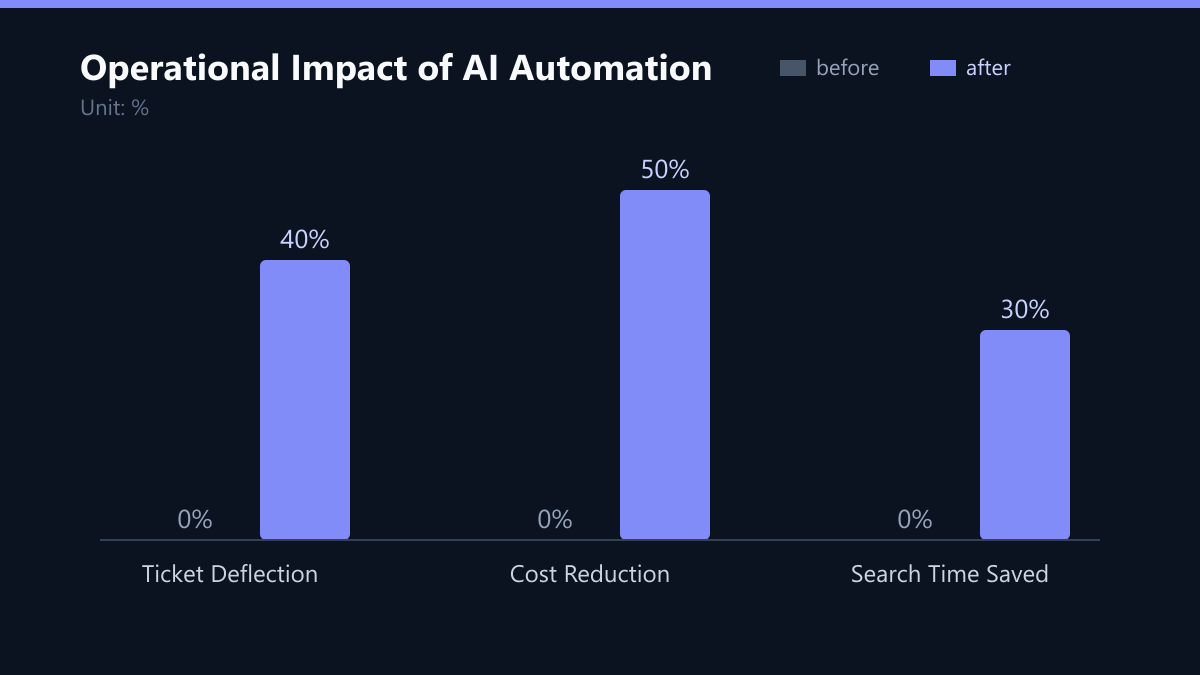
The AI solution here is straightforward: deflection. Implement an AI-powered virtual agent for Level 1 support. These systems are designed to instantly resolve common issues without human intervention. By automating the top 10-20 most frequent ticket types, you can deflect up to 40% of incoming tickets. This is not a marginal gain; it is a fundamental shift in capacity. It allows your human agents to focus on high-value tasks that actually require judgment, empathy, and technical depth. The result is a faster service for simple requests and a deeper service for complex ones.
Knowledge Fragmentation: The Search Penalty
Even when agents are not overwhelmed by volume, they are often slowed down by information gaps. A common scenario is an agent facing a moderately complex issue, lacking access to an accurate, up-to-date troubleshooting guide. They spend valuable minutes searching through outdated documents, checking forums, or asking colleagues for help. This inconsistency leads to slower resolution times and a frustrating user experience, as the answer often depends on which agent picks up the ticket.
AI can solve this by turning your historical data into a living knowledge base. Use Natural Language Processing (NLP) to automatically extract insights from closed tickets. The system categorizes issues and suggests relevant articles to agents in real-time. This ensures that every agent, regardless of their seniority, has access to the best available solution. This capability can reduce internal search time by up to 30%. It transforms the knowledge base from a static archive into a dynamic decision-support tool, ensuring consistency and speed across the entire team.
Triage Failures: The Cost of Misjudgment
Manual triage is not only slow; it is prone to human error and cognitive bias. Critical issues may be delayed if an agent misjudges the severity, while low-priority tasks clutter the queue, preventing urgent problems from being addressed promptly. In a fast-paced business environment, a misclassified ticket can mean the difference between a minor annoyance and a significant revenue loss.
Deploy machine learning algorithms to analyze ticket content and automatically assign priority levels. The system learns to identify keywords and patterns indicating critical system failures, such as “server down,” “payment gateway error,” or “data loss.” It routes these tickets to senior engineers immediately, bypassing the standard queue. This ensures that high-impact issues are resolved first, minimizing business downtime. The AI acts as a 24/7 triage officer, ensuring that severity is based on data, not guesswork.
From Reactive to Proactive: Predicting Failure
Traditional helpdesks are inherently reactive. They wait for users to report problems. This approach is inefficient and often results in longer resolution times because the issue has already impacted the user. Users experience frustration before the IT team even becomes aware of the issue. The IT function becomes a fire-fighting service rather than an enabler.
Integrate AI-driven monitoring tools that predict potential failures based on historical data and real-time system metrics. If a server shows signs of impending failure, such as unusual disk usage patterns or memory leaks, the system can create a ticket automatically and alert the relevant team. This shifts the IT function from reactive to proactive. By addressing issues before they affect end-users, you prevent downtime entirely. This not only improves satisfaction but also reduces the total volume of tickets, as many issues are resolved before they become user-visible problems.
Data Blindness: The Reporting Bottleneck
Generating reports for management often requires manual data extraction and formatting. This is time-consuming and provides limited insight into long-term trends. IT leaders struggle to make data-driven decisions without accurate, real-time analytics. They often rely on anecdotal evidence or outdated snapshots to justify budget requests or resource allocation.
Automate report generation using AI analytics tools. These tools provide real-time dashboards with key performance indicators (KPIs) and trend analysis. They allow IT leaders to identify recurring issues, optimize resource allocation, and demonstrate the value of IT operations to the business. Instead of spending hours on Excel sheets, leaders can view a live pulse of IT health. This data-driven approach empowers IT to move from a cost center to a strategic partner.
Implementation: A Strategic Path to ROI
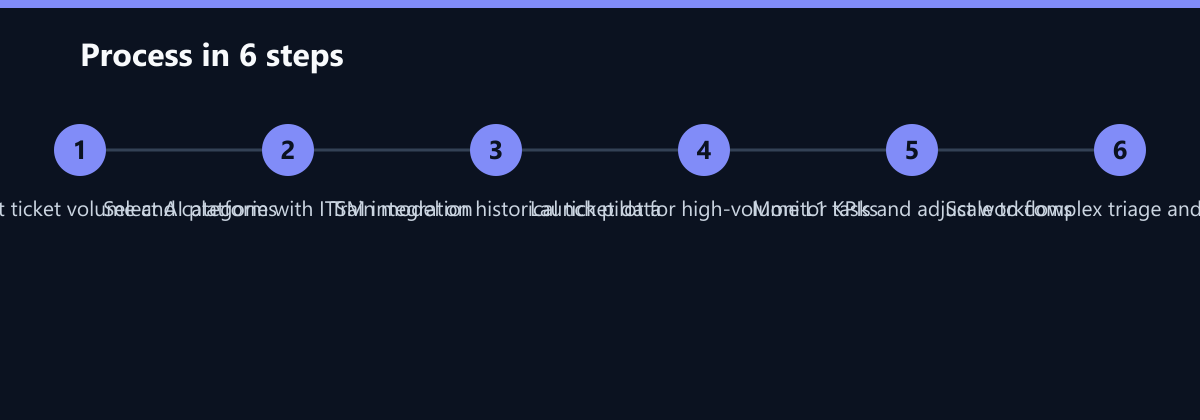
Transitioning to AI automation requires a strategic approach, not a hasty purchase. Start with a pilot program focusing on high-volume, low-complexity tasks. Measure the impact on handling time and user satisfaction before scaling up. A successful implementation follows a clear path:
- Audit Current State: Analyze your last 12 months of ticket data. Identify the top 20 ticket types and their volume. This defines your quick wins.
- Select the Right Platform: Choose an AI platform that integrates seamlessly with your existing ITSM tool. Integration is critical; siloed AI systems create more friction than they solve.
- Train the Model: Feed the AI with historical data. The more data, the better the model’s ability to predict and deflect. Ensure data quality by cleaning up old, irrelevant entries.
- Launch Pilot: Deploy the AI for Level 1 support. Monitor performance closely. Adjust workflows based on user feedback and system accuracy.
- Scale and Optimize: Once the pilot shows positive ROI, expand to triage, knowledge management, and reporting. Continuously refine the model as new patterns emerge.
Typical Mistakes to Avoid
Even with the right tools, organizations often stumble during implementation. Here are the most common pitfalls:
- Boiling the Ocean: Trying to automate everything at once. Start with the top 10-20 ticket types. Success here builds momentum and trust.
- Ignoring Change Management: Introducing AI without training agents on how to work with it. Agents must trust the system to use it effectively. Provide clear guidelines on when to override AI suggestions.
- Neglecting Data Quality: Garbage in, garbage out. If your historical data is messy, the AI will be inaccurate. Spend time cleaning and categorizing old tickets before training the model.
- Lack of Clear KPIs: Without defining success metrics upfront, you cannot measure ROI. Agree on baseline values for handling time, deflection rate, and user satisfaction before launch.
How You Measure Success
To ensure your AI investment delivers value, track these concrete KPIs:
- Ticket Deflection Rate: The percentage of tickets resolved by AI without human intervention. Target: 30-40% for L1 tickets.
- Average Handling Time (AHT): The total time to resolve a ticket. Target: 20-30% reduction for automated tickets.
- First-Contact Resolution (FCR): The percentage of tickets resolved in the first interaction. Target: 10-15% increase.
- User Satisfaction (CSAT): The average rating from post-ticket surveys. Target: Maintain or improve CSAT while reducing volume.
Method: Use your ITSM tool’s built-in analytics or a dedicated BI dashboard. Compare pre-implementation baselines with post-implementation data over a 90-day period. This provides a clear view of the impact and helps justify further investment.
Checklist for AI Helpdesk Transformation
- Baseline Established: Have you documented current AHT, FCR, and ticket volume for the last 6 months?
- Pilot Scope Defined: Have you identified the top 10-20 ticket types for automation?
- Integration Verified: Does the AI platform connect securely to your ITSM tool?
- Data Cleaned: Is your historical ticket data accurate and categorized?
- KPIs Agreed: Have you defined success metrics with leadership?
- Training Planned: Do you have a plan to train agents on the new AI workflows?
By addressing these five core issues, organizations can significantly reduce operational costs and improve service delivery. AI is not just a tool; it is a strategic asset that enables IT teams to focus on innovation and business enablement. The goal is not to eliminate the helpdesk, but to transform it into a high-value, data-driven function that drives business success.
Passend dazu
- Cross-Border HR Onboarding Automation: Reducing Time-to-Productivity by 50% for Pan-European Tech Startups
- Reducing Helpdesk Ticket Volume by 40% for a German Machine Manufacturer Through Root-Cause Analysis Instead of Reactive Troubleshooting
- IT Consulting & IT Strategy
- IT Support & Helpdesk
- Cloud Services & Cloud Migration
- IT Compliance & Data Protection
- 5 Common Errors in Legacy Software Cloud Migration and How to Avoid Them
- Azure vs. AWS for Mid-Market Enterprises: Cost, Security, and Migration
- Magento 2 vs. Shopify Plus: Cost-Benefit Analysis for Mid-Market E-Commerce
- Managed IT Support vs. Inhouse IT: Cost-Benefit Analysis for SMEs
- Boosting Employee Productivity by 15% in US Pharma
- Preventing 40,000 Euro Hourly Loss via Magento Observability on AWS
- KI im Helpdesk: Routine-Tickets automatisieren ohne Qualitätsverlust
- Helpdesk-KPIs im Mittelstand: Reaktionszeit und Zufriedenheit messbar verbessern
- Avoid Vendor Lock-in: Strategies for Portable IT Solutions
- AI Helpdesk Automation: Reducing Ticket Volume by 40 Percent
- SaaS Startup Scales Support Capacity Without Hiring by Integrating AI Chatbots into Helpdesk
- Building a Self-Service IT Portal: 5 Features That Reduce Helpdesk Volume by Half
- Data Loss Prevention vs Data Recovery: Clarifying the Difference
- How to Calculate the True ROI of AI Chatbots for Your IT Helpdesk
- Lowering IT Helpdesk Tickets by 30% in a European Consulting Agency via User Empowerment Programs