The Hidden Revenue Leak in Your Magento Store
Performance is often treated as a technical afterthought, a metric to be optimized for the sake of clean graphs. In reality, it is a direct revenue driver. Industry data consistently shows that a 100ms delay in page load time can reduce conversion rates by up to 7%. For a mid-sized enterprise processing thousands of orders monthly, this isn’t just a number; it is tangible lost sales and inflated customer acquisition costs.
Many store owners, frustrated by these metrics, assume the only solution is a full replatforming to a lighter CMS. This is a costly and risky assumption. The root cause of slowness is rarely the core platform itself, but rather specific implementation errors, resource mismanagement, or technical debt accumulated over years. By targeting these specific bottlenecks, you can achieve significant speed improvements while keeping your existing infrastructure, thereby protecting your hard-earned SEO equity and avoiding the downtime associated with system migrations.
Database Bloat: The Silent Killer
Magento relies heavily on database interactions for every page view. Over time, the database grows with logs, reports, and outdated data. This is the most common bottleneck in mature stores that have been live for more than a year. As the database size increases, query execution times slow down, creating a compounding effect on overall site speed.
To address this, you must treat database maintenance as a continuous process rather than a one-time fix. First, purge stale data regularly. Old report collections and logs serve no purpose for active users but consume significant I/O resources. Second, ensure efficient index management. Magento’s search and catalog indexes must be updated efficiently to prevent full table scans during user searches. Finally, utilize the Slow Query Log to identify and fix inefficient SQL statements. A well-implemented daily cron job for data cleanup can reduce database size by up to 30%, significantly improving response times for product pages and checkout processes.
Caching: The First Line of Defense
Magento offers multiple caching layers, including Full Page Cache (FPC), Block Cache, and Object Cache. Misconfiguration here leads to repeated heavy processing on every page view. If caching is disabled or not properly configured, the server works much harder than necessary, resulting in high CPU usage and slow response times.
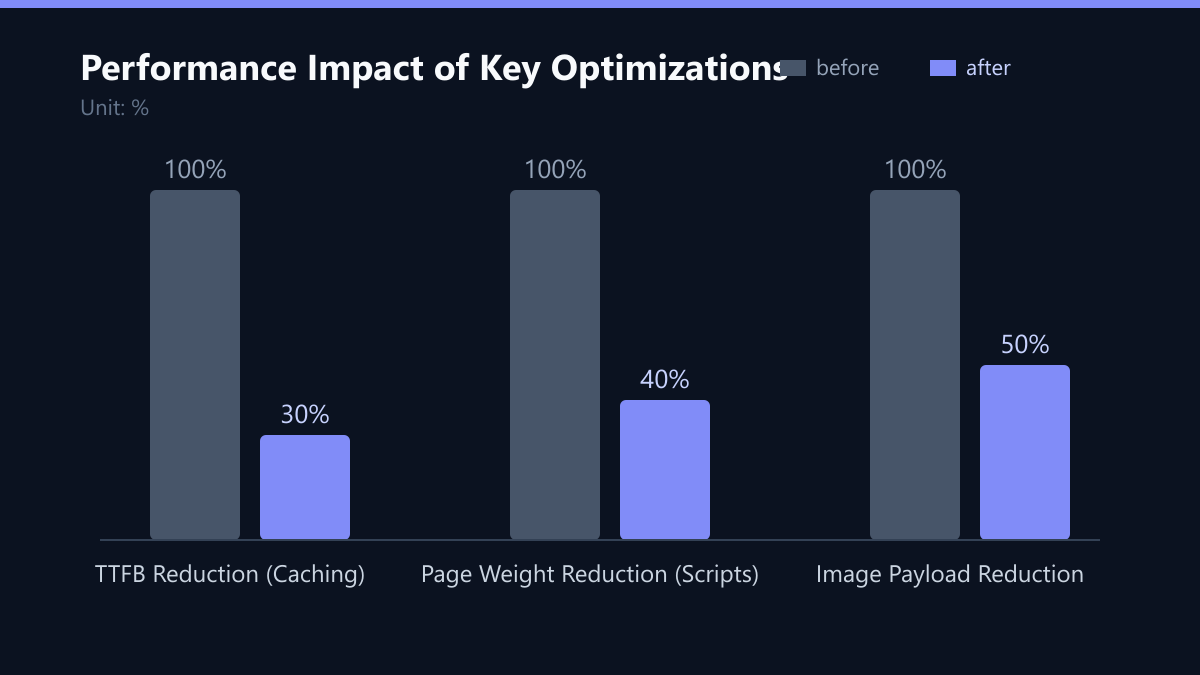
The most impactful step is enabling a robust Full Page Cache solution like Varnish or Redis. This serves static HTML to users instead of processing PHP code on every request. However, simply enabling it is not enough. You must optimize cache tags to ensure granular invalidation. If a single product price changes, you do not want to invalidate the entire cache; you want to invalidate only the specific block containing that product. Monitor your cache hit rates closely. A hit rate below 80% indicates a configuration problem where too many requests are bypassing the cache. Proper caching can reduce Time to First Byte (TTFB) by 50-70%, a metric that directly impacts Core Web Vitals and, consequently, Google rankings.
Third-Party Scripts: The Invisible Weight
Modern e-commerce stores are ecosystems of integrations. Analytics, chatbots, payment gateways, and marketing tools are essential, but each script adds to the page weight and blocks rendering. This is a major contributor to poor Largest Contentful Paint (LCP) scores. A single heavy analytics suite can add hundreds of kilobytes to a page and delay interactivity by seconds.
You need to audit your script load. Use browser developer tools to identify which scripts are blocking the main thread. Defer non-critical scripts such as analytics and tracking pixels to load only after the page is interactive. This allows the core content to render quickly. Additionally, remove unused extensions. Many stores carry extensions that were installed for a past campaign and never removed. These add code overhead without providing value. Reducing third-party scripts can decrease total page weight by 40-60%, leading to faster load times, especially on mobile devices, which account for the majority of e-commerce traffic.
Image Optimization: The Quick Win
Images often constitute the largest part of a web page’s total weight. Magento’s default image handling may not be optimized for modern web standards, leading to large file sizes and slow loading. This is particularly problematic for product galleries and hero images, which are critical for conversion.
Implementing modern image handling is a quick win that requires minimal development effort. First, use the WebP format. WebP offers better compression than JPEG or PNG without a visible loss in quality. Second, implement lazy loading. Ensure images below the fold load only when the user scrolls into view. This reduces the initial payload significantly. Third, optimize image dimensions. Serve images at the exact size required for the device, rather than downloading a 4K image to display it in a 300px thumbnail. Implementing these measures can reduce image payload by up to 50%, delivering immediate performance benefits.
Server Infrastructure: Scaling for Growth
As traffic grows, the underlying server infrastructure may become a bottleneck. Shared hosting or under-provisioned VPS instances cannot handle peak loads, leading to timeouts and slow responses. This is especially critical during sales events or holiday seasons when traffic can spike by 500% or more.
Upgrade to dedicated resources. Move to a VPS or dedicated server with sufficient CPU and RAM to handle your peak load with headroom. Implement load balancing to distribute traffic across multiple servers, preventing any single node from becoming overloaded. Use a Content Delivery Network (CDN) to offload static assets like images, CSS, and JavaScript to a global network of edge servers. This ensures that users receive content from the server closest to them, reducing latency. Right-sizing your server infrastructure ensures consistent performance regardless of traffic spikes, protecting your store’s reputation and sales stability.
Implementation Checklist
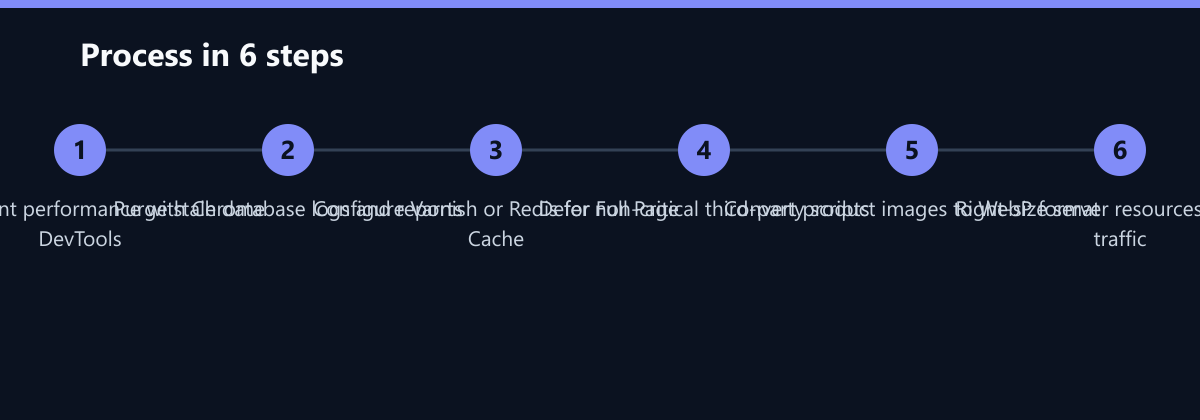
To ensure a structured approach to these optimizations, follow this phased checklist:
- Audit: Run a full performance audit using Chrome DevTools and GTmetrix to establish a baseline.
- Database: Set up cron jobs for log and report cleanup. Review slow query logs.
- Caching: Configure Varnish or Redis. Test cache hit rates after product updates.
- Scripts: Audit third-party scripts. Defer analytics and remove unused extensions.
- Images: Convert top 100 product images to WebP. Enable lazy loading.
- Infrastructure: Review server resources. Add CDN if not present.
Typical Mistakes to Avoid
Even with the right tools, teams often make errors that negate their efforts. Here are the most common pitfalls:
- Over-aggressive Cache Purging: Invalidating the entire cache whenever any part of the store changes leads to a cache miss rate near 100%. This forces the server to regenerate pages for every user, negating the benefits of FPC.
- Ignoring Mobile Performance: Optimizing for desktop load times while neglecting mobile. Since most traffic is mobile, LCP and TBT on mobile devices are the primary metrics that affect rankings and user experience.
- Neglecting Extension Compatibility: Installing new extensions without testing their impact on performance. Some extensions introduce heavy database queries or blocking scripts that degrade the site speed of the entire store.
- Lack of Monitoring: Implementing fixes and then walking away. Performance is a moving target. Without continuous monitoring, regressions can occur unnoticed until they impact revenue.
How You Measure Success
You cannot manage what you do not measure. To track the success of your optimization efforts, focus on these concrete KPIs:
- Largest Contentful Paint (LCP): Target a score under 2.5 seconds. Measure this using the Chrome User Experience Report (CrUX) data in Search Console.
- Time to First Byte (TTFB): Target a score under 800ms. Use server-side logging to measure the time from request receipt to first byte sent.
- Conversion Rate (CR): Track the change in CR before and after optimization. A 5-10% increase in CR is a direct indicator of performance improvement.
- Bounce Rate: Monitor the bounce rate on key landing pages. A decrease in bounce rate suggests that users are engaging with the content rather than leaving due to slow loads.
Strategic Phasing for Sustainable Results
Addressing these bottlenecks requires a structured approach. Start with a comprehensive performance audit to identify the specific issues in your store. Prioritize fixes based on their impact on Core Web Vitals and conversion rates.
- Phase 1: Quick Wins. Focus on image optimization and script deferral. These changes require minimal development effort and can show results within days.
- Phase 2: Backend Optimization. Implement database cleanup and caching configuration. These changes require more careful testing but provide deeper performance gains.
- Phase 3: Infrastructure Upgrades. Scale server resources and implement advanced caching strategies. This is a strategic investment that ensures your store can handle future growth.
By following this phased approach, you can achieve significant performance improvements without the cost and risk of a full replatforming. This strategy ensures a sustainable, long-term solution that scales with your business growth. Performance is not a one-time project; it is a continuous process of monitoring, optimizing, and adapting to the evolving needs of your customers and the platform.
Passend dazu
- IT Consulting & IT Strategy
- Magento 2 Performance-Optimierung im DACH-Raum
- B2B Shop Relaunch Magento 2 for a Machine Builder
- Magento / Adobe Commerce
- Cloud Services & Cloud Migration
- IT Compliance & Data Protection
- Magento 2 Search Optimization: Elasticsearch vs. Solr Performance Benchmarks
- Magento Performance Optimization: 5 Concrete Measures for Sub-2-Second Load Times
- 5 Common Process Bottlenecks: How to Identify Automation Candidates in Finance and Operations
- 5 Critical Metrics Every CFO Should Track in Their IT Monitoring Dashboard
- Headless Magento: When Decoupling the Frontend Is Worth the Investment
- 5 Common Bottlenecks in Manual Data Entry and How to Automate Them Safely
- Magento Extension Management: Avoiding Compatibility Issues During Upgrades