The Scaling Paradox: Why Manual Work Hurts Growth
Mid-sized companies often face a scaling paradox. As revenue grows, administrative overhead increases disproportionately. This happens because manual tasks do not scale linearly; they require more human hours. The core issue is not effort, but friction. Every manual handover, data entry, or approval step introduces latency and error risk. For CEOs and IT leaders, the goal is not to eliminate people, but to eliminate the tasks that do not add strategic value. Automation targets these low-value, high-volume activities to free up your teams for analysis and decision-making.
Bottleneck 1: Invoice Processing and Accounts Payable
Accounts Payable (AP) is typically the highest volume manual process in finance. Employees manually key data from PDFs or emails into ERP systems. This is time-consuming and prone to typos. When volume spikes, backlogs form, and cash flow visibility drops.
Signs of a bottleneck:
- Average processing time per invoice exceeds 15 minutes.
- Frequent queries from suppliers due to mismatched data.
- Late payment penalties or missed early payment discounts.
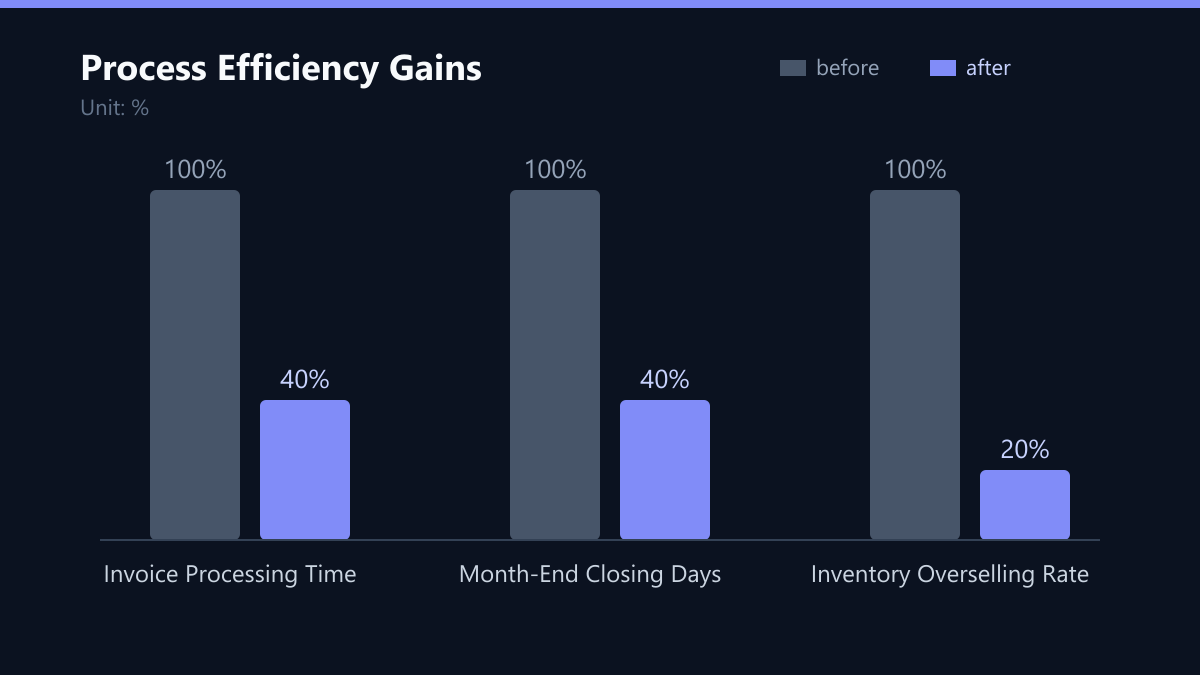
Automation Candidate: Intelligent Document Processing (IDP) combined with OCR. These tools extract data automatically, match it against purchase orders, and route exceptions for human review. This reduces processing time to under 5 minutes per invoice, a significant drop from the 15-minute baseline.
Bottleneck 2: Month-End and Year-End Closing
The financial closing process is critical for accurate reporting. However, it often relies on manual reconciliations across multiple systems (bank, ERP, CRM). Teams work overtime to gather data that is scattered across spreadsheets. This creates a bottleneck that delays strategic decisions.
Signs of a bottleneck:
- Closing takes more than 5 business days.
- Heavy reliance on Excel for data consolidation.
- Repeated manual reconciliation of bank transactions.
Automation Candidate: Automated reconciliation tools and API-driven data feeds. These systems pull data directly from source systems, match transactions automatically, and flag discrepancies. This can shorten the closing cycle from 5 days to 2 days, improving cash flow visibility and reducing audit risk.
Bottleneck 3: Order Fulfillment and Inventory Sync
In operations, the gap between sales and inventory is a major pain point. Manual stock updates lead to overselling or stockouts. Teams often use spreadsheets to track inventory across warehouses and sales channels, creating a data silo that prevents real-time decision-making.
Signs of a bottleneck:
- Frequent stockouts during peak seasons.
- Manual inventory counts taking days to complete.
- Discrepancies between ERP stock levels and actual warehouse stock.
Automation Candidate: Real-time inventory synchronization via APIs. Connect your ERP with warehouse management systems (WMS) and e-commerce platforms. Automated stock updates ensure accurate availability data, reducing overselling by up to 80%. This alignment between sales and stock is critical for customer satisfaction.
Bottleneck 4: Onboarding and Employee Data Management
HR and IT often struggle with new employee onboarding. This involves manual account creation, access provisioning, and document collection. Delays here impact productivity and compliance. Inconsistent access rights can also pose security risks if permissions are not standardized.
Signs of a bottleneck:
- New hires wait 3+ days for system access.
- Manual entry of employee data into multiple HR and IT systems.
- Inconsistent access rights due to manual provisioning.
Automation Candidate: Identity and Access Management (IAM) automation. Triggered by HR system events, these workflows automatically create accounts, assign roles, and send welcome packets. This ensures compliance and reduces IT ticket volume by 40%, allowing IT teams to focus on strategic initiatives rather than repetitive provisioning tasks.
How to Identify Your Top Automation Candidates
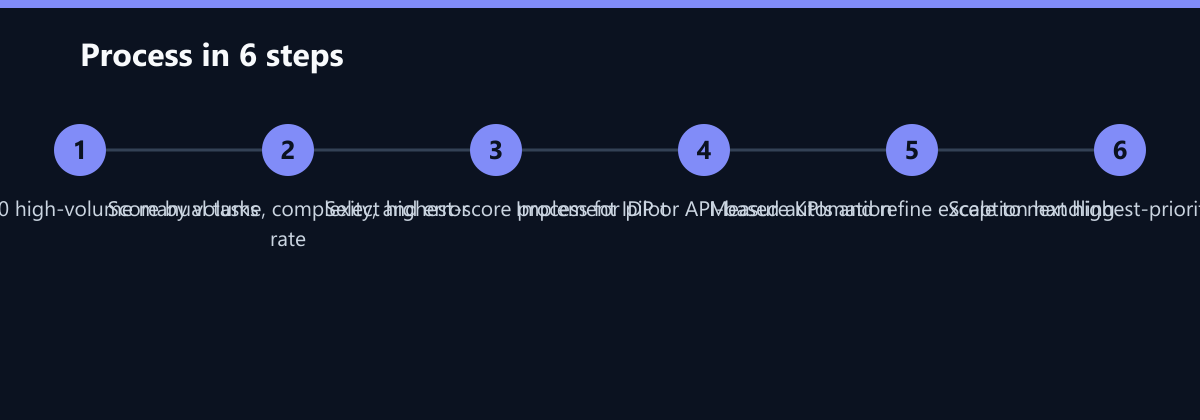
Not every process is worth automating. Focus on tasks that are high-volume, rule-based, and repetitive. Use this simple framework to prioritize:
- Volume: How many times does this task occur per week? (High volume = high ROI)
- Complexity: Is the logic simple and rule-based? (Simple rules = easy automation)
- Error Rate: How often do humans make mistakes? (High error rate = high risk)
- Cost: What is the fully loaded cost per transaction? (High cost = high savings potential)
Action Step: Map your top 10 processes using this matrix. Start with the highest score. Pilot a small automation project before scaling. This reduces risk and builds internal buy-in for broader digital transformation initiatives.
Typical Mistakes to Avoid
- Automating Broken Processes: Do not automate a process that is fundamentally flawed. If the input data is poor or the logic is incorrect, automation will just scale the error faster. Always clean up the process first.
- Ignoring Exception Handling: Many teams focus on the ‘happy path’ but neglect the exceptions. If 10% of invoices are complex, your automation must handle that 10% efficiently. Design robust fallbacks for human review.
- Lack of Stakeholder Buy-In: IT often implements automation without involving finance or operations. This leads to low adoption rates. Involve end-users early to ensure the solution fits their workflow and reduces their workload, not just their job scope.
How You Measure Success
To prove the value of automation, track these concrete KPIs:
- Processing Time: Measure the average time from receipt to completion for key tasks (e.g., invoice approval, month-end close). Target a 50-80% reduction.
- Error Rate: Track the number of manual corrections or rejected transactions. A drop in error rates directly correlates with cost savings and improved compliance.
- Cost per Transaction: Calculate the fully loaded cost (labor + overhead) per invoice, per order, or per report. Compare this before and after automation.
- Cycle Time: For processes like onboarding or order fulfillment, measure the total elapsed time from start to finish. Faster cycles improve customer and employee satisfaction.
Method: Use time-stamping logs from your ERP and automation platform. Compare baseline data (collected for 1-2 months) with post-implementation data. Report these metrics quarterly to stakeholders to maintain momentum.
Checklist for Your Automation Pilot
- Select a High-Volume Process: Choose a task with at least 50 instances per week.
- Define Success Metrics: Agree on 2-3 KPIs (e.g., time, error rate) with stakeholders.
- Map the Current State: Document every step, including manual workarounds.
- Identify Data Sources: Ensure all input data is available via API or file export.
- Build the Pilot: Implement the automation for a small subset of data or users.
- Test Exception Handling: Simulate errors and verify the fallback process.
- Measure and Report: Compare KPIs against the baseline and present results.
- Scale or Iterate: Based on results, decide whether to scale, refine, or stop.
By focusing on these specific bottlenecks and following a structured approach, you can unlock significant efficiency gains without overhauling your entire IT landscape. Start small, measure rigorously, and scale what works.
Passend dazu
- IT Consulting & IT Strategy
- Automatisierung der Kreditorenbuchhaltung bei einem deutschen Maschinenbauer: Reduktion der Durchlaufzeit um 60 Prozent
- Accelerating Compliance Audits in the Financial Sector
- IT Automation & Process Automation
- Cloud Services & Cloud Migration
- IT Compliance & Data Protection
- Process Automation in the Finance Department: Efficiency Through AI and RPA
- Microsoft Copilot vs. Azure AI Studio: The Right Choice for Process Automation
- 5 Common IT Support Mistakes That Increase Operational Costs
- 5 Common Errors in Legacy Software Cloud Migration and How to Avoid Them
- Ransomware Response Plan: 7 Steps to Recover Operations in Under 4 Hours
- Managed IT vs. Freelance Developers: When to Outsource Core IT Operations
- Avoiding Common Pitfalls in Magento 2 to 2.4 Upgrade
- Comparing Top AI Process Automation Platforms for the DACH Region
- The ROI of AI Automation: How to Calculate Payback Periods for Generative AI Projects
- ROI Calculator for IT Automation: Proving the Business Case to Your CFO in 3 Steps
- 5 Critical Performance Bottlenecks in Magento Stores and How to Fix Them
- Why Your Website Is Slow: Diagnosing Database and Server Bottlenecks
- AI in IT Operations: How Predictive Maintenance Cuts Incident Response
- RPA vs. AI Automation: Economic Value for the Mid-Market
- 5 Common Bottlenecks in Manual Data Entry and How to Automate Them Safely
- The Role of AI in Modern MSPs: How Automation Reduces Response Times by 50%
- Automated Failover Testing: Validating DR Plans Without Disrupting Operations
- Top 5 Automation Gaps in Finance
- IT Governance vs. IT Operations: Structuring Teams for Scalable Growth
- Why Generic Cybersecurity Courses Fail for Developers and Finance Teams
- RPA Roadmap: Planning Backoffice Automation in 90 Days