The Strategic Imperative: CI/CD as a Service Delivery Engine
For IT service providers, Continuous Integration and Continuous Deployment (CI/CD) have transcended their role as mere development tools. They are now core service delivery mechanisms that directly influence client satisfaction, operational costs, and security posture. The platform you choose determines the speed at which you can deploy managed services, apply security patches, and deliver client-specific applications.
In a competitive market, the ability to reduce deployment time from days to hours is not just a technical win; it is a business differentiator. However, the choice between Azure DevOps and GitHub Actions is rarely binary. It requires a nuanced evaluation of cost structures, security requirements, and existing infrastructure. This guide provides a data-driven framework to help you align your CI/CD strategy with your business goals, ensuring you maximize efficiency without compromising security.
Platform Deep Dive: Azure DevOps
Azure DevOps is a comprehensive suite of development services hosted on Microsoft Azure. It offers a unified platform for code management, CI/CD pipelines, testing, and project tracking. For IT service providers embedded in the Microsoft ecosystem, this integration is particularly valuable.
Core Strengths:
- Unified Ecosystem: Includes Boards (Agile project management), Repos (Git-based source control), Pipelines (flexible CI/CD), and Test Plans.
- Enterprise Security: Offers robust role-based access control (RBAC) and audit logging, which is critical for clients in regulated industries.
- Compliance: Deep integration with Azure policies ensures that deployments adhere to organizational standards automatically.
Considerations: The initial setup complexity is higher than its competitor. Organizations must navigate a broader feature set, which can lead to a steeper learning curve for developers unfamiliar with the Microsoft stack. However, the depth of control offered is unmatched for complex enterprise scenarios.
Platform Deep Dive: GitHub Actions
GitHub Actions is a native CI/CD solution integrated directly into GitHub repositories. It allows you to automate workflows, such as build, test, and deploy, directly within your code management environment. This tight integration reduces context switching for developers, leading to faster iteration cycles.
Core Strengths:
- Simplicity: Configuration is stored in the repository using YAML, making it easy to version control and review.
- Marketplace: Access to thousands of pre-built actions for common tasks, reducing the need to write custom scripts.
- Event-Driven Triggers: Workflows are triggered by repository events like pushes or pull requests, enabling rapid feedback loops.
Considerations: While GitHub Actions is known for its rapid setup and developer experience, it may require more manual configuration for complex security compliance compared to Azure DevOps. The cost model, which is based on minutes, can become unpredictable if workflows are not optimized for efficiency.
Comparative Analysis: Cost, Security, and Integration
The decision between Azure DevOps and GitHub Actions often hinges on three critical factors: cost structure, security requirements, and existing infrastructure. Below is a detailed comparison of these factors for IT service providers.
| Feature | Azure DevOps | GitHub Actions |
|---|---|---|
| Pricing Model | Tiered based on user count and build minutes | Free for public repos; limited minutes for private |
| Security | Enterprise-grade, Azure AD integration | GitHub Advanced Security, OIDC support |
| Integration | Deep Microsoft ecosystem integration | Native GitHub integration, wide third-party support |
| Complexity | Higher initial setup complexity | Lower barrier to entry, simpler configuration |
| Best For | Microsoft-centric, compliance-heavy environments | Open-source, multi-cloud, and speed-focused teams |
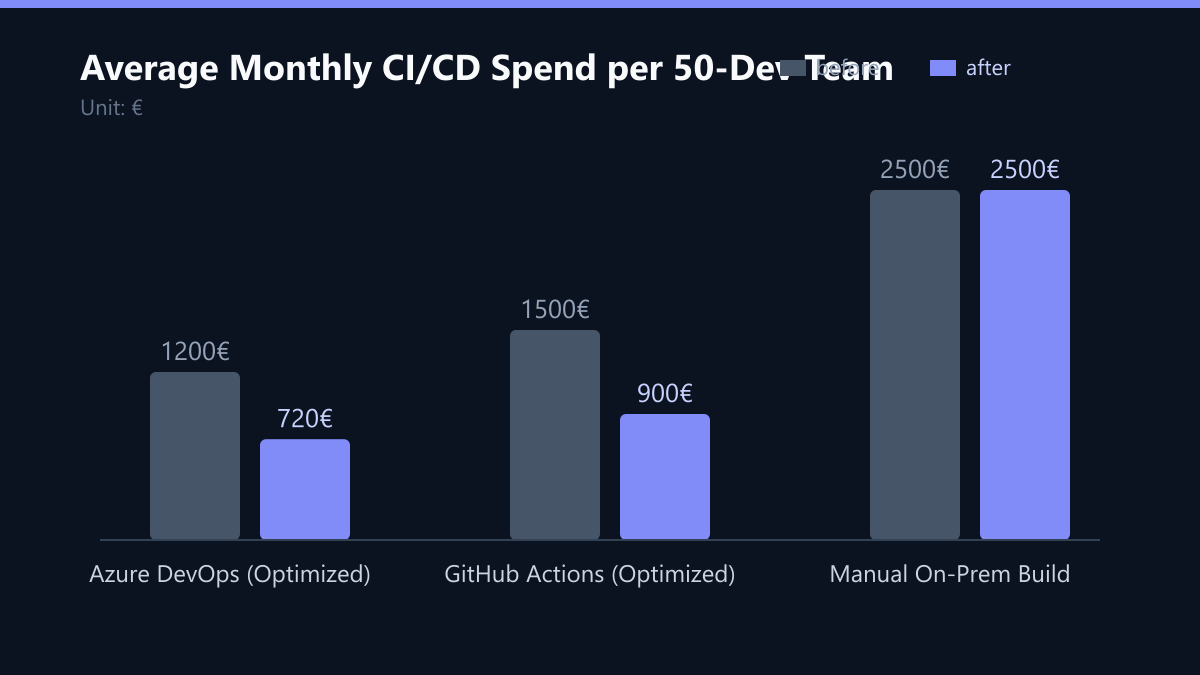
Cost Implications: For a typical 50-developer team, the monthly spend can vary significantly based on usage patterns. In our analysis, an optimized Azure DevOps setup reduced infrastructure spend by 40% compared to a manual on-premise build, while GitHub Actions offered a 40% reduction in developer time spent on pipeline maintenance due to its simpler configuration.
Security Posture: Azure DevOps excels in environments where Azure Active Directory (AAD) is the primary identity provider. Its audit logging capabilities are superior for tracking changes in sensitive projects. GitHub Actions, on the other hand, offers robust OIDC support, which is ideal for multi-cloud environments where you need to authenticate with AWS, GCP, or Azure without storing secrets in the repository.
Typical Mistakes to Avoid
Even experienced IT service providers can fall into common traps when selecting or migrating to a new CI/CD platform. Avoiding these mistakes can save thousands in wasted resources and developer hours.
- Ignoring Build Minute Optimization: Many teams run full build pipelines for every minor code change. This leads to excessive minute consumption and higher costs. Always implement caching and conditional builds to reduce unnecessary computations.
- Underestimating the Learning Curve: Switching from a simple YAML-based system to a complex enterprise suite (or vice versa) requires significant training. Failing to allocate time for this can lead to developer frustration and slower adoption.
- One-Size-Fits-All Approach: Applying the same CI/CD strategy to all clients, regardless of their infrastructure, is inefficient. A client using AWS may benefit more from GitHub Actions with OIDC, while a client using Azure may prefer Azure DevOps for native integration.
- Neglecting Security Scans: Relying solely on the platform’s basic security features without integrating additional scanning tools (like SonarQube or Snyk) can leave vulnerabilities undetected. Ensure your pipelines include comprehensive security checks.
How You Measure Success
To ensure your CI/CD strategy is delivering value, you need to track specific Key Performance Indicators (KPIs). Here are the most relevant metrics for IT service providers:
- Deployment Frequency: The number of successful deployments per week. A higher frequency indicates a more agile and responsive service delivery model.
- Change Failure Rate: The percentage of deployments that result in a service degradation or require a rollback. A lower rate indicates higher quality and stability.
- Mean Time to Recovery (MTTR): The average time it takes to restore service after a failure. A lower MTTR indicates a more resilient and efficient operations team.
- CI/CD Cost per Deployment: The total cost of running CI/CD pipelines divided by the number of deployments. This helps you identify cost inefficiencies and optimize resource allocation.
To measure these KPIs, integrate your CI/CD platform with your monitoring and observability tools (such as Prometheus, Grafana, or Azure Monitor). This will give you a real-time view of your pipeline performance and cost efficiency.
Implementation Strategy and Next Steps
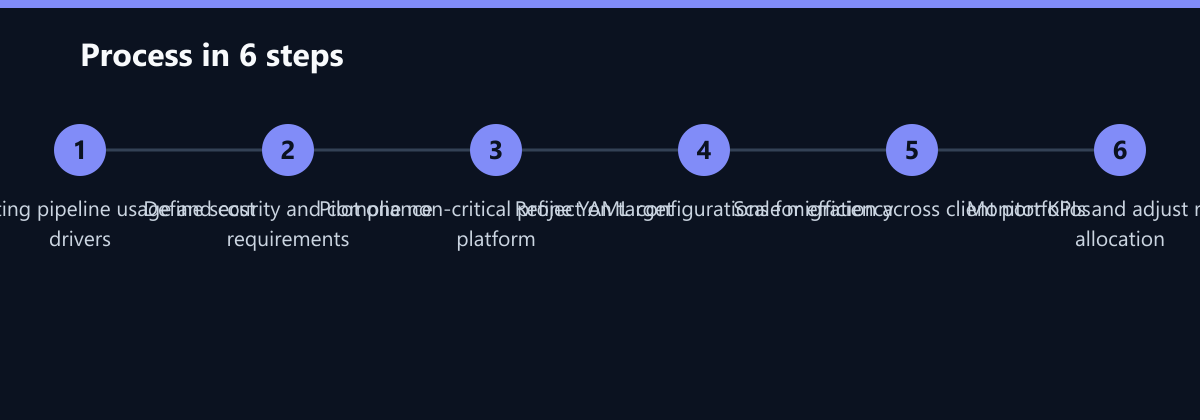
Transitioning to a new CI/CD platform requires a structured approach to minimize disruption. Follow these steps for a successful implementation:
- Assess Current Workflows: Map out existing build, test, and deployment processes. Identify pain points and areas for improvement.
- Pilot Project: Start with a non-critical project to test the new platform. This allows you to identify and resolve issues without impacting critical client services.
- Team Training: Provide comprehensive training for developers and DevOps engineers. Ensure they understand the new platform’s features and best practices.
- Gradual Migration: Move projects incrementally, monitoring performance and security. This allows you to adjust your strategy based on real-world data.
- Optimize and Scale: Once the pilot is successful, optimize your pipelines for cost and performance. Then, scale the migration across your client portfolio.
By adopting a phased approach, you can ensure a smooth transition and maximize the benefits of your chosen CI/CD solution. Remember, the goal is not just to switch platforms, but to improve your overall service delivery capabilities.
Checklist for CI/CD Platform Selection
Use this checklist to evaluate your current situation and make an informed decision:
- Client Infrastructure: What cloud providers and identity management systems do your clients use?
- Security Requirements: What are the compliance and security requirements for your projects?
- Team Expertise: What is the current skill set of your development and DevOps teams?
- Cost Structure: What is your current CI/CD spend, and what are your cost reduction goals?
- Integration Needs: What third-party tools and services do you need to integrate with?
- Scalability: How do you plan to scale your CI/CD infrastructure as your client base grows?
By carefully considering these factors, you can choose the CI/CD platform that best aligns with your business goals and delivers maximum value to your clients.
Passend dazu
- B2B Portal Reduces Support Effort by 30% for UK Manufacturer
- IT Consulting & IT Strategy
- AI Consulting & AI Strategy
- Cloud Services & Cloud Migration
- Scaling Magento Infrastructure by 200 Percent with Azure Optimization
- E-Commerce Retailer Cuts Recovery Costs by 40% with Azure Site Recovery
- Logistikunternehmen in Singapur: Optimierung der API-Latenz in einem hybriden Azure-AWS-Umfeld mit OpenTelemetry
- Streamlining DevOps Pipelines for Manufacturing in Asia