The Hidden Cost of Reactive IT Management
Many mid-sized companies view IT support as a pure cost center. This perspective overlooks the direct impact of inefficient processes on revenue. When IT fails, business operations halt, leading to measurable financial losses. Reactive support models often result in higher overtime costs and emergency vendor fees. By addressing common structural mistakes, you can reduce these expenses significantly. The following five errors are the most frequent drivers of unnecessary IT spending.
Error #1: The Expense of Waiting for Failure
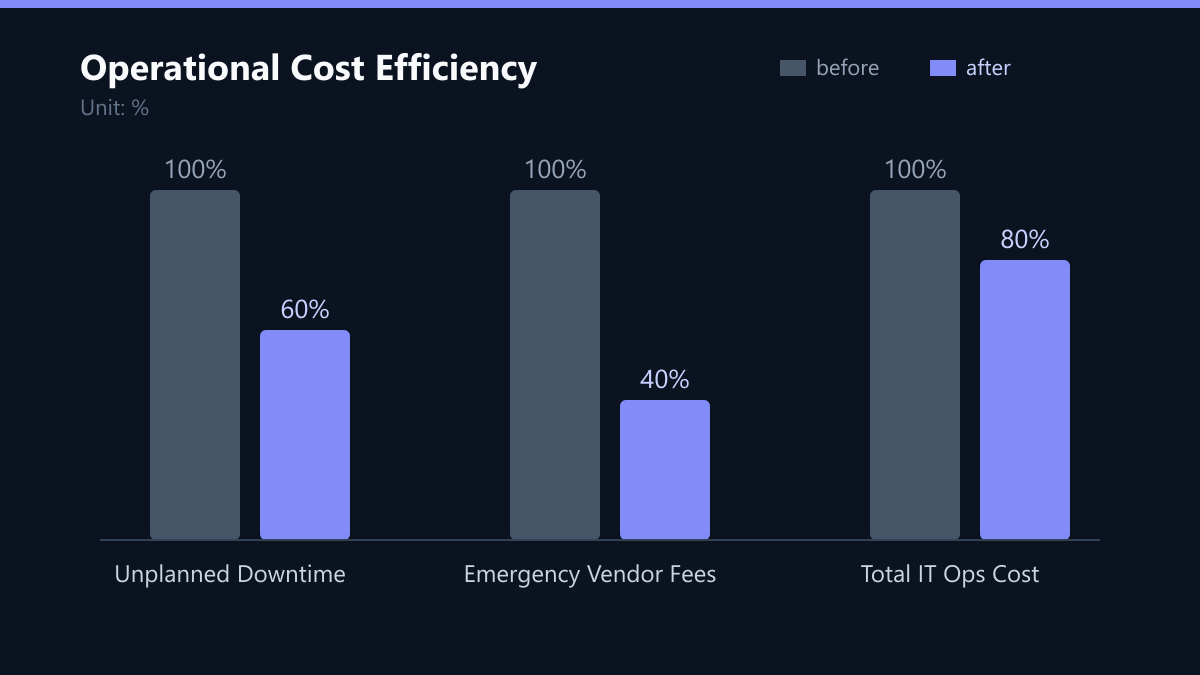
Waiting for systems to fail before acting is the most expensive strategy in IT. Preventive maintenance ensures that hardware and software remain stable under load. This approach reduces unplanned downtime by up to 40 percent. Without these measures, minor issues escalate into major outages. Each hour of downtime can cost a mid-sized company between $1,000 and $5,000, depending on the industry.
To shift from reactive to proactive, you must implement a structured maintenance cycle:
- Schedule regular patch management and updates.
- Conduct quarterly hardware health checks.
- Monitor server performance proactively using automated tools.
Error #2: The Generalist Trap
Small IT teams often lack specialized expertise in cloud security or complex network architectures. Relying solely on generalists leads to slower resolution times and suboptimal solutions. Specialized managed services provide access to certified experts without the overhead of full-time hires.
Outsourcing specific tasks to experts often costs less than hiring and training specialized staff internally. Key benefits include:
- Access to 24/7 monitoring and support.
- Reduced risk of security breaches due to specialized knowledge.
- Faster incident resolution through dedicated teams.
Error #3: Backup vs. Recovery
Data loss is a critical risk for any business. Many companies underestimate the complexity of disaster recovery. A simple backup file is not a recovery plan. Without tested restore procedures, data may be unrecoverable when needed most.
A robust DR strategy minimizes recovery time objectives. This protects your business from ransomware attacks and hardware failures, avoiding potential losses in the six figures. Essential steps include:
- Perform automated daily backups.
- Store copies off-site or in the cloud.
- Test recovery processes at least twice a year.
Error #4: Security as a Business Risk
Cybersecurity is not just an IT issue; it is a business risk. Non-compliance with regulations like GDPR or NIS2 can result in severe fines. Additionally, a single breach can damage your brand reputation for years.
Proactive security measures reduce the likelihood of incidents. They also ensure that your organization meets legal requirements, avoiding costly legal proceedings and regulatory penalties. Core actions include:
- Implement multi-factor authentication across all systems.
- Conduct regular security audits and penetration tests.
- Train employees on phishing and social engineering tactics.
Error #5: The Governance Gap
Without clear processes, IT teams spend valuable time searching for information. Poor documentation leads to errors, delays, and knowledge silos. When key employees leave, critical knowledge often leaves with them.
Effective governance ensures continuity and efficiency. It allows for faster onboarding of new staff and smoother handovers during incidents, reducing overall operational friction. You must:
- Maintain an up-to-date IT inventory.
- Document standard operating procedures for common tasks.
- Define clear roles and responsibilities within the IT department.
Typical Mistakes to Avoid
Even with a solid strategy, teams often fall into specific traps that negate their efforts.
- Treating Documentation as a One-Time Task: Many organizations create documentation during a project and never update it. As infrastructure changes, these documents become obsolete, leading to confusion and errors during incident response. Documentation must be a living process, updated with every significant change.
- Ignoring the Human Factor in Security: Installing firewalls and MFA is not enough. If employees are not trained to recognize phishing attempts, they remain the weakest link. A technical control without human awareness is a gap in the security chain.
- Assuming Backups Are Automatic: Some teams assume that because a backup job ran, the data is safe. They fail to verify the integrity of the backup or test the restore process. A backup that cannot be restored is not a backup; it is a false sense of security.
- Over-Consolidating Roles: Assigning too many disparate responsibilities to a single IT generalist creates a bottleneck. When that person is on leave, critical tasks stall. Clear role definition and cross-training are essential for resilience.
How You Measure Success
To ensure your IT support strategy is actually reducing costs and improving efficiency, you must track specific KPIs. These metrics provide a clear picture of your operational health.
- Mean Time to Resolve (MTTR): This measures the average time it takes to resolve an incident. A decreasing MTTR indicates that your team is more efficient and that preventive measures are reducing the complexity of issues.
- First Contact Resolution (FCR): The percentage of tickets resolved on the first interaction. High FCR rates reduce the workload on senior staff and improve user satisfaction.
- Unplanned Downtime Hours: Track the total hours of unexpected system outages. This directly correlates to revenue loss and should trend downward as you implement preventive maintenance.
- Cost per Ticket: Calculate the total IT support cost divided by the number of tickets resolved. This helps you understand the efficiency of your support model and identify areas where automation could reduce costs.
Measure these KPIs monthly and review them quarterly. Compare your current values against your baseline to quantify the impact of your improvements.
Checklist for Implementation
Use this checklist to guide your transition from reactive to proactive IT support:
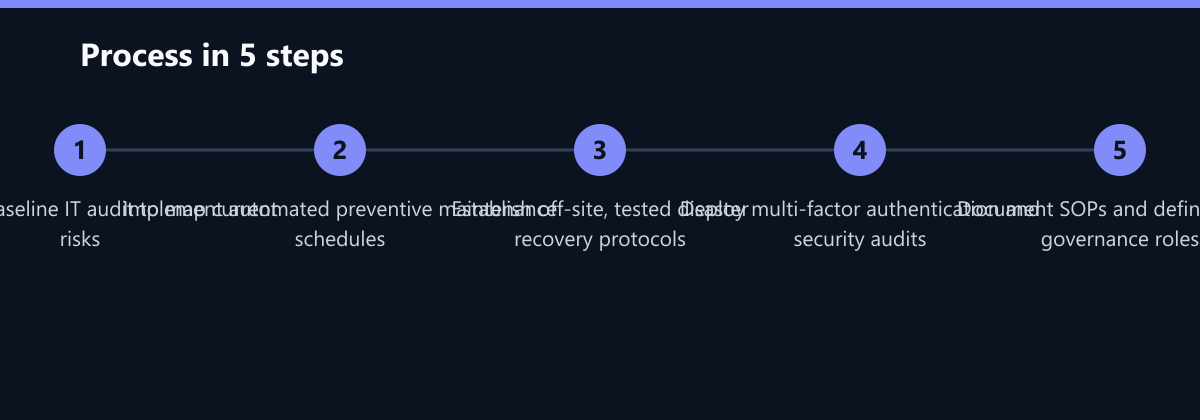
- Conduct a comprehensive IT audit to identify current weaknesses.
- Define clear roles and responsibilities within the IT department.
- Implement automated patch management and monitoring tools.
- Establish and test a disaster recovery plan at least twice a year.
- Deploy multi-factor authentication and conduct regular security audits.
- Document standard operating procedures and maintain an up-to-date IT inventory.
Strategies to Reduce IT Operational Costs
Addressing these five mistakes requires a structured approach. Start with a comprehensive IT audit to identify current weaknesses. Then, implement targeted solutions based on your business needs.
- Adopt a proactive mindset: Shift from fixing problems to preventing them.
- Leverage automation: Use tools to handle repetitive tasks like patching and monitoring.
- Partner with experts: Collaborate with managed service providers for specialized support.
By optimizing your IT infrastructure, you can free up resources for strategic initiatives. This leads to improved productivity and a stronger competitive position in the market. Remember that IT is not just a support function; it is a strategic asset that drives business value.
Passend dazu
- Reducing Azure Costs by 42% for a DACH SaaS Provider via CloudWatch Integration
- IT Consulting & IT Strategy
- B2B Portal Reduces Support Effort by 30% for UK Manufacturer
- AI Demand Forecasting Cuts Inventory Costs by 18 Percent in Machinery Manufacturing
- IT Support & Helpdesk
- Cloud Services & Cloud Migration
- IT Compliance & Data Protection
- Cloud Security Basics: 5 Common Mistakes in M365 and Azure Migrations
- 5 Common Errors in Legacy Software Cloud Migration and How to Avoid Them
- Adobe Commerce Licensing Costs: The Real Financial Impact
- AI vs. Human Support: When to Automate Tier-1 Tickets and When to Escalate to Experts
- Balancing Backup Retention, Compliance, and Storage Costs
- The Complete Guide to Setting Up a Tiered IT Support Structure in 5 Steps
- The True Cost of Poor IT Support: Calculating Hidden Business Impact
- Reducing Onboarding Friction for 500 New Employees in a UK Fintech via Centralized IT Support
- Remote IT Support Security: Best Practices for Protecting Sensitive Data
- 5 Common Process Bottlenecks: How to Identify Automation Candidates in Finance and Operations
- Mitigating AI Hallucinations in Customer Support
- How to Reduce WooCommerce Checkout Abandonment: 7 Technical Fixes That Improve Conversion Rates by Up to 20%
- Selecting a Hosting Provider: 10 Technical Questions That Separate MSPs from Resellers
- Avoiding Common Pitfalls in Magento 2 to 2.4 Upgrade
- 5 Signs Your In-House IT Support Is Slowing Down Business Growth
- Optimizing IT Budgets: How MSPs Help Companies Control Costs and Improve ROI
- Top 5 IT Support Tools for Growing Businesses: A Comparative Analysis
- How to Negotiate an MSSP Contract: 7 Clauses That Protect Your Data and Limit Liability
- Cutting Security Costs by 30% Through MSP Consolidation
- Hot Desking vs. Fixed Seats: Impact on Wi-Fi Density and IT Costs
- Negotiating MSP Contracts: Lower Costs Without Compromising SLAs
- SLA vs. OLA: The Difference in IT Support Contracts
- Measuring IT Support ROI: 5 KPIs That Prove Value to the Board
- The 5 Most Common Ransomware Attack Vectors and How MSSP Services Block Them
- 5 Common AI Pilot Failures and How to Build a Scalable Production Roadmap