The Hidden Cost of Reactive IT Support
Many mid-sized companies operate IT departments that are purely reactive. Technicians spend their day fixing issues after they occur rather than preventing them. This model creates a bottleneck that directly impacts revenue and employee productivity. When IT becomes a source of friction instead of a driver of efficiency, growth stalls.
The transition from reactive to proactive support is not just a technical upgrade; it is a strategic shift. By identifying the specific signs that your current setup is limiting your potential, you can unlock significant operational gains. Here are the five critical indicators that your in-house support is holding back your business.
1. Recurring Outages and Slow Resolution Times
Frequent downtime is the most visible symptom of an under-resourced or inefficient IT team. If servers crash, networks drop, or applications freeze regularly, your business is losing money every minute. High resolution times signal that your team is firefighting rather than maintaining. This consumes valuable engineering hours that should be spent on strategic projects.
Key indicators include:
- Average Resolution Time (ART): If it takes more than 4 hours to resolve a standard ticket, your SLA is too loose. A target of under 1 hour for critical issues is a better benchmark for modern operations.
- Repeat Incidents: The same issue occurring multiple times in a month suggests a lack of root-cause analysis. This indicates a systemic failure in documentation or system design.
- Emergency Calls: Staff calling technicians for non-critical issues because they lack documentation or self-service tools. This erodes trust and consumes Tier 1 bandwidth unnecessarily.
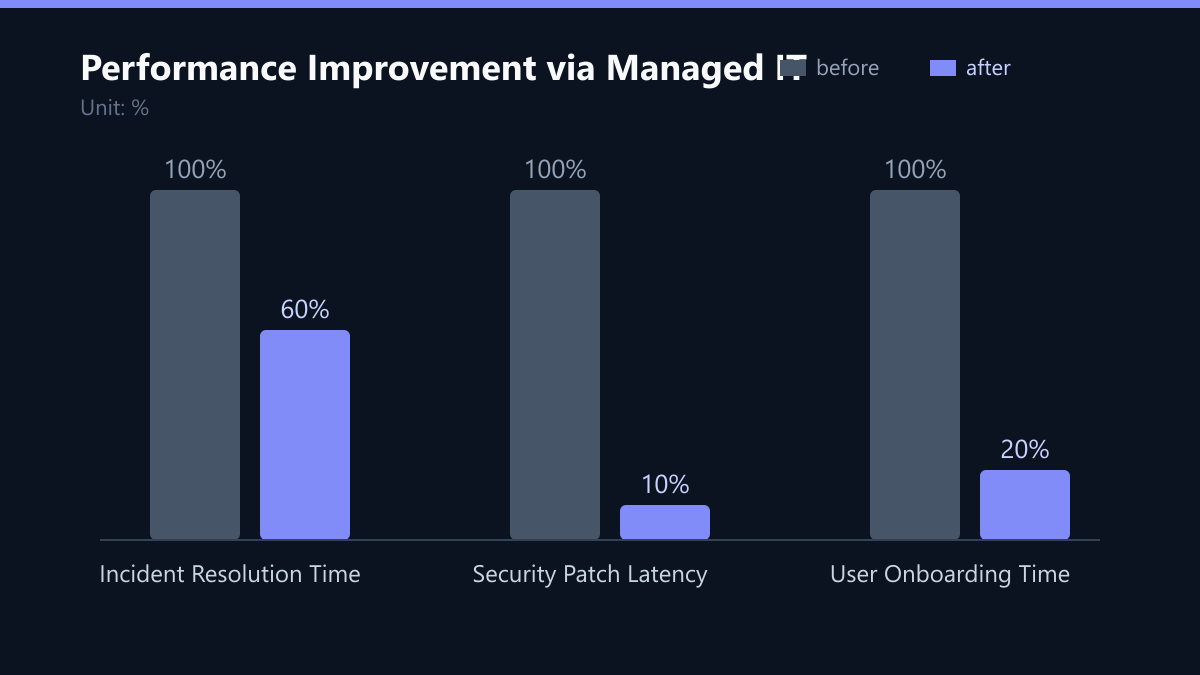
To improve this, you must move from ticket-based resolution to root-cause elimination. Implementing automated monitoring tools can reduce the mean time to detect (MTTD) issues before they impact users, effectively cutting resolution times by up to 40%.
2. Lack of Proactive Security and Compliance
Cybersecurity is not a one-time setup; it is a continuous process. In-house teams often lack the bandwidth to monitor threats 24/7. This leaves your company vulnerable to ransomware, data breaches, and compliance failures. A single security incident can cost a mid-sized company six figures in recovery and legal fees.
Proactive security requires specialized tools and expertise that small internal teams rarely possess. Common gaps include:
- Patch Management: Critical updates are applied late or missed entirely. Automated patching can reduce latency from weeks to days.
- Monitoring: No real-time visibility into network traffic or user behavior. Without this, threats go undetected until they become incidents.
- Compliance Risks: Difficulty proving adherence to DSGVO, NIS2, or ISO 27001 standards during audits. Manual compliance checks are error-prone and time-consuming.
Shifting to a proactive model involves continuous monitoring and automated response. This not only reduces risk but also simplifies audit preparation, turning compliance from a burden into a verifiable asset.
3. Siloed Systems and Data Fragmentation
As businesses grow, they often accumulate disparate tools that do not communicate with each other. Your ERP, CRM, email, and cloud infrastructure may operate in isolation. This fragmentation slows down decision-making and increases operational overhead.
Modern business growth relies on seamless data flow. When IT cannot integrate systems, you lose agility. Competitors with unified digital ecosystems can launch products and respond to market changes faster. Signs of siloed IT include:
- Manual Data Entry: Employees copying data between systems, leading to errors and wasted hours.
- Version Control Issues: Multiple teams working on different file versions, causing confusion and rework.
- Integration Failures: New software cannot easily connect to existing legacy systems, creating technical debt.
Breaking down these silos requires an integration-first approach. By centralizing data and using APIs to connect disparate systems, you enable real-time insights and automate workflows that previously required manual intervention.
4. High Employee Friction and Low Adoption
IT should empower employees, not hinder them. If your staff complain about slow software, difficult logins, or lack of access to necessary tools, your IT infrastructure is holding them back. Low adoption rates for new technologies are a direct result of poor user experience.
A user-centric IT strategy ensures that technology serves the business goals. If your team struggles to use the tools provided, you are not getting a return on your IT investment. Impact on productivity includes:
- Workarounds: Employees using unapproved apps (Shadow IT) to bypass restrictions, creating security risks.
- Training Burden: Significant time spent training staff on complex, unintuitive interfaces.
- Disengagement: Frustration with IT leads to lower job satisfaction and higher turnover.
Improving user experience involves simplifying access, providing self-service portals, and ensuring that IT tools align with actual user workflows. When employees can resolve common issues themselves, IT is freed to focus on higher-value tasks.
5. Scalability Bottlenecks During Growth Phases
The true test of IT infrastructure is its ability to scale. When you hire new staff, open new locations, or launch new products, your IT systems must adapt instantly. If scaling requires months of planning and implementation, your IT is a bottleneck.
Businesses that grow quickly need IT that can keep pace. Managed IT services provide elastic resources that scale with demand, ensuring that your infrastructure never lags behind your business strategy. Scalability red flags include:
- Onboarding Delays: It takes weeks to set up a new user account and provide hardware. A streamlined process should take days, not weeks.
- Infrastructure Rigidity: Moving to the cloud or expanding data centers is overly complex and costly.
- Cost Predictability: IT costs spike unpredictably during growth phases, making budgeting difficult.
To overcome these bottlenecks, you must adopt a cloud-native, modular architecture. This allows you to scale resources up or down based on demand, ensuring cost efficiency and operational resilience.
Typical Mistakes to Avoid
- Ignoring Root Cause Analysis: Fixing symptoms without addressing the underlying system issue leads to repeat incidents and wasted resources.
- Undervaluing Documentation: Poor documentation forces technicians to rely on tribal knowledge, slowing down resolution times and increasing error rates.
- Neglecting User Feedback: Failing to gather and act on employee feedback results in low adoption rates and the proliferation of Shadow IT.
- Static Infrastructure Planning: Designing IT systems for current needs rather than future growth leads to costly and disruptive upgrades later.
How You Measure Success
To ensure your IT support model is driving business growth, you must track specific KPIs. Here is how to measure success:
- Mean Time to Resolve (MTTR): Track the average time it takes to resolve incidents. A decreasing MTTR indicates improved efficiency and team capability.
- System Uptime: Monitor the percentage of time your critical systems are available. Aim for 99.9% uptime to minimize business disruption.
- First Contact Resolution (FCR): Measure the percentage of tickets resolved on the first interaction. High FCR rates indicate effective self-service tools and well-trained support staff.
- User Satisfaction Score (CSAT): Regularly survey employees to gauge their satisfaction with IT support. High CSAT scores correlate with higher productivity and lower turnover.
By tracking these metrics, you can quantify the impact of your IT improvements and demonstrate value to stakeholders.
Checklist for IT Optimization
- Conduct a comprehensive audit of current SLA metrics and downtime logs.
- Map security gaps against NIS2, DSGVO, and ISO 27001 standards.
- Identify siloed systems and data friction points in your workflow.
- Implement proactive monitoring and automation tools.
- Define KPIs for continuous performance tracking and review.
- Establish a feedback loop with employees to improve user experience.
By addressing these five signs and implementing the strategies outlined above, you can transform your IT department from a cost center into a strategic driver of business growth. The result is a more resilient, efficient, and scalable organization ready to meet the challenges of tomorrow.
Passend dazu
- IT Consulting & IT Strategy
- B2B Portal Reduces Support Effort by 30% for UK Manufacturer
- Reducing Onboarding Friction for 500 New Employees in a UK Fintech via Centralized IT Support
- IT Support & Helpdesk
- Cloud Services & Cloud Migration
- IT Compliance & Data Protection
- IT Architecture for Scaling: Preparing Your System for 10x Growth
- The True Cost of Poor IT Support: Calculating Hidden Business Impact
- 5 Common IT Support Mistakes That Increase Operational Costs
- 5 Critical Security Measures for Your Managed Server Infrastructure
- Managed IT vs. In-House Teams: A Financial Breakdown
- ROI Calculator for IT Automation: Proving the Business Case to Your CFO in 3 Steps
- The Cost of Inaction: Quantifying the Business Risk of Ignoring AI
- The Business Case for Observability: Quantifying ROI Beyond Technical Stability
- Aligning Your 3-Year IT Roadmap with Business Growth Targets
- Social Engineering Defense: 5 Practical Drills to Test Your Team’s Resilience
- The 5-Step IT Audit: Identifying Gaps Before Scaling Your Business
- How to Calculate the True ROI of AI Chatbots for Your IT Helpdesk
- IT Roadmap: 5 Strategic Steps to Align Technology with Business Growth
- 5 Signs Your Helpdesk Is Bottlenecking Your Business Growth and How to Fix It
- Helpdesk vs. IT Support: Defining the Right Scope for Your Budget and Team
- 5 Signs Your Current IT Support Model Is Costing You More Than You Think
- Headless Shopify for UK Fashion Retailer: Sub-2s Mobile Load and 25% Revenue Growth
- E-Commerce: Migrating Magento to Cloud-Native Architecture to Support 10x Growth in Singapore
- SLA vs. OLA: The Difference in IT Support Contracts
- Measuring IT Support ROI: 5 KPIs That Prove Value to the Board
- IT Governance vs. IT Operations: Structuring Teams for Scalable Growth
- Why Your IT Team Is Overwhelmed: Automating Tier 1 Support with AI Chatbots